

Active-Active Clustering with ThingWorx
- 0 replies
- 1358 views
- Translate All
- Guide Concept
- Step 1: Clustering Overview
- Step 2: ThingWorx Active-Active Architecture
- Step 3: Next Steps
Learn how ThingWorx can be deployed in a clustered environment
Guide Concept
Web applications have increased reliability and performance by using a "pool" of independent servers called a cluster. It is important to understand what benefits the different methods of clustering provide, and what the different methods can mean for your system.
ThingWorx Foundation can be deployed in either an Active-Active clustered architecture or a standard single-server deployment. This guide describes the benefits of an Active-Active clustered architecture over other clustering methods and provides a system administrator with resources to navigate the different architecture options.
You'll learn how to
- Overview of different server clustering techniques
- Pros and cons of the different clustering configurations that can be used with ThingWorx
- Where to find detailed information about ThingWorx server clustering
NOTE: This guide's content aligns with ThingWorx 9.3. The estimated time to complete this guide is 30 minutes
Step 1: Clustering Overview
Clustering is the most common technique used by web applications to achieve high availability. By provisioning redundant software and hardware, clustering software can automatically handle failures and immediately make the application available on the standby system without requiring administrative intervention.
Depending on the business requirements for High Availability, clusters can be configured in any of the following configurations:
Cluster Configuration Description Recovery Time
| Cold Standby | Software is installed and configured on a back-up server when the primary system fails. | Hours |
| Active-Passive | A second server is provisioned with a duplicate of all software components and is started in case of failure of the primary server. | Minutes |
| Hot Standby | Duplicate software is installed and running on both primary and secondary servers. The secondary server does not process any data when the primary server is functional. | Seconds |
| Active-Active | Both the primary and one or more secondary servers are active and processing data in parallel. Data is continuously replicated across all running servers. | Instantaneous |
Cold Standby
ThingWorx installed in a default single-server configuration is not inherently a cold standby system. Periodic system backups can be used to bring the system back online in the event of system failure.
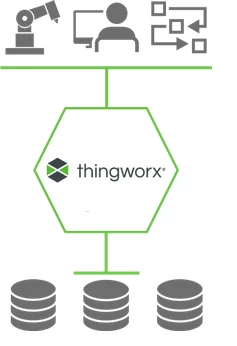
Note: A cold standby configuration does not constitute high availability
Active-Passive
High availability can be achieved with an Active-Passive configuration.
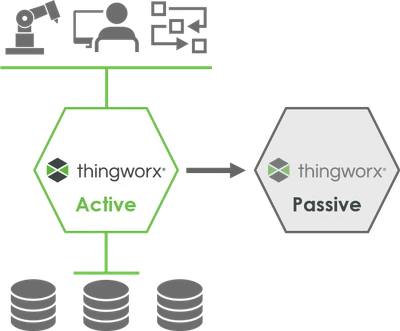
One “active” ThingWorx server performs all processing and maintains the live connections to other systems such as databases and connected assets. Meanwhile, in parallel, there is a second “passive” ThingWorx server that is a mirror image and regularly updated with data but does not maintain active connections to any of the other systems.
If the “active” ThingWorx server fails, the “passive” ThingWorx server is made the primary server, but this can take a few minutes to establish connections to the other systems.
Active-Active
ThingWorx uses Active-Active architecture for achieving high availability.
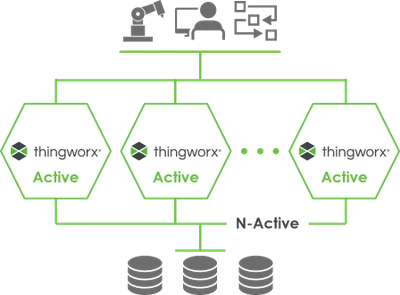
Active-Active configuration differs from Active-Passive in that all the ThingWorx servers in the cluster are “active.” Not only is data mirrored across all ThingWorx servers, but also all servers maintain live connections with the other systems. This way, if any of the ThingWorx servers fail, the other ThingWorx servers take over instantaneously with no recovery time.
Because all ThingWorx servers are active and processing data in parallel, the cluster can handle higher loads than the single running server in an Active-Passive configuration. An Active-Active deployment leverages the investment made in multiple servers by providing not only greater reliabilility, but also giving the ability to handle demand spikes. When server utilizations exceed 50%, customers can easily scale their deployment by adding more ThingWorx servers to the cluster - horizontally scaling. This also avoids the limitations of vertically scaling - provisioning a single server with more and more CPU cores and RAM.
Benefits of Active-Active Clustering
- Higher Availability You can avoid single points of failure and configure the ThingWorx Foundation platform in an Active-Active cluster mode to achieve the highest availability for your IIoT systems and applications.
- Increased Scalability You can horizontally scale from one to many ThingWorx servers to easily manage large amounts of your IIoT data at scale more smoothly than ever before.
Step 2: ThingWorx Active-Active Architecture
An Active-Active Cluster configuration introduce two software components and two components that are optional in a standard ThingWorx architecture are now required.
The reference architecture diagram below shows ThingWorx deployed with multiple ThingWorx Foundation servers configured in an Active-Active Cluster deployment.
Note: This is an example of a possible ThingWorx deployment. The business requirements of an application will determine the specific configuration in an Active-Active clustered environment.
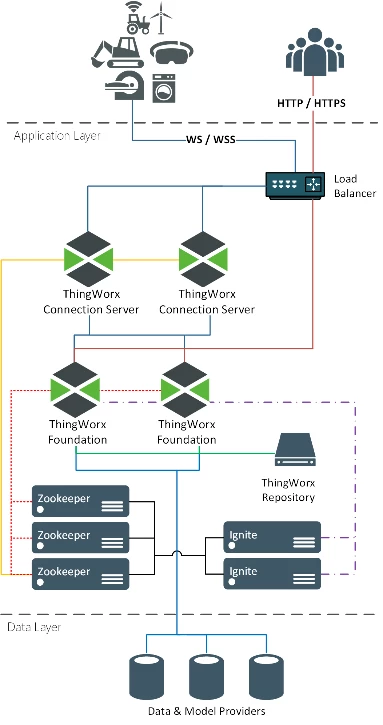
- Load balancer was optional in a single-server deployment, is now a requirement.
- ThingWorx Connection Server is also now required.
- Apache ZooKeeper is used to coordinate multiple running servers.
- Apache Ignite is used to share current state between servers.
| Load Balancer | Distributes network traffic to servers ready to accept it. In Active-Active Cluster configuration, the load balancer is used to direct WebSocket based traffic to the ThingWorx Connection Services while user requests (http/https) traffic is directly distributed to the ThingWorx Foundation servers. | Example load balancers:
|
| ThingWorx Connection Server | Handles AlwaysOn connections with devices and multiplexes all messages over one connection to ThingWorx Foundation Servers. In an Active-Active configuration, it handles all WebSocket based traffic to and from the ThingWorx Foundation Server. | PTC |
| Apache ZooKeeper | A centralized service for maintaining configuration information, naming, providing distributed synchronization, and providing group services. It is a coordination service for distributed application that enables synchronization across a cluster. | Apache Software Foundation |
| Apache Ignite | Used by ThingWorx Foundation Servers to share state. It may be embedded with each ThingWorx instance or can be run as a standalone cluster for larger scale. | Apache Software Foundation |
| Data and Model Provider | Provides persistent storage of application data. | All ThingWorx 9 supported database options:
|
Step 3: Next Steps
Congratulations! You've successfully completed the Active-Active Clustering with ThingWorx guide.
At this point, you can make an educated decision regarding which clustering architecture is best suited for your ThingWorx application. Whether you already use ThingWorx or pursuing ThingWorx, its important to understand how Active-Active clustering is achieved and whether it is right for your system.
Learn More
We recommend the following resources to continue your learning experience:
| Capability | Guide |
| Manage | ThingWorx Application Development Reference |
| Build | Get Started with ThingWorx for IoT |
| Experience | Create Your Application UI |
Additional Resources
To learn more about Active-Active Clustering and general ThingWorx deployment guidelines, there are ample resources available through our Help Center and PTC Community:
| Resource | Link |
| Community | Developer Community Forum |
| Support | ThingWorx Platform Sizing Guide |
| Support | ThingWorx Deployment Architecture Guide |
| Support | ThingWorx High Availability Documentation |