
1-Visitor
July 19, 2019
Solved

How to create multiple shapes with relation for a burning cylinder , save S. Area for each step?

  • July 19, 2019
  • 2 replies
  • 12217 views

Hi friends,


I'm trying to simulate the geometry change for the burning of a perforated cylindrical shape (solid fuel inside a rocket motor) that burns from inside and both sides. I want to recede the thickness with 1 mm until the cylinder completely burned. How can I change the dimensions automatically and obtain the surface area of the new geometry at each burn step, then how to plot these areas with the new thicknesses of the cylinder, or export the results to Excel? I know there is a way by using relation (make the dimension function of the thickness), creating a family table for that automatically generate the new model shapes, saving the surface areas for each new shape, and plotting the areas as a function of each thickness. I tried to do that by myself but I failed.


I really appreciate any kind of help as I have to complete a Ph.D. paper according to this geometrical analysis and the submission date is on the 31st of July. I attached here (as a hint) some relevant work using NX software.  whoever interested, I can add his name as a co-author of the paper as well.
Best answer by tbraxton

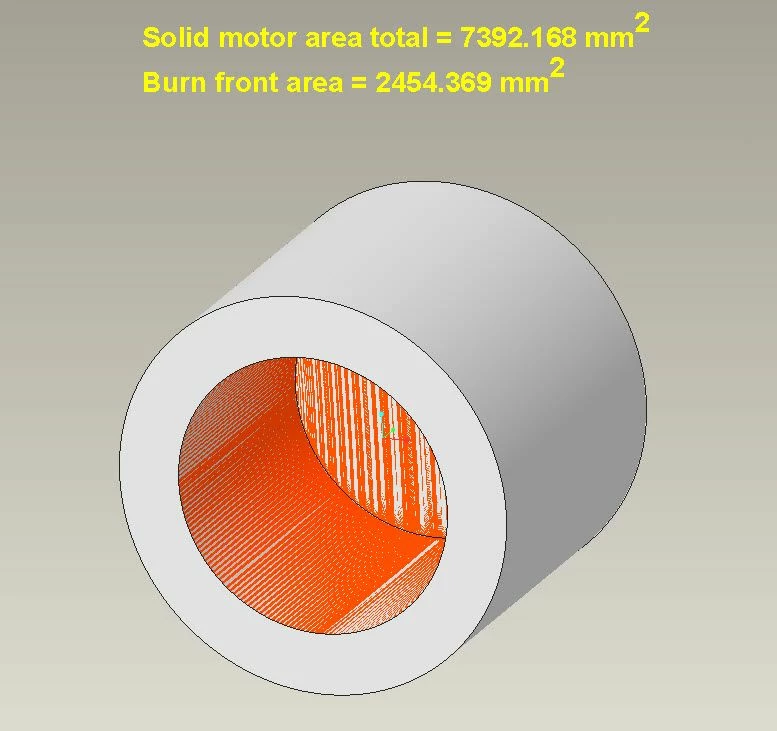
This is a simplified model (Creo 4) demonstrating how to incrementally burn fuel in a semi-automated fashion using relations and regeneration of the model. The model is surfaces only as that is all that is needed for the measurements (areas). BMX will give you access to more analysis features and graphing of parameters and allow you to bound the solution space explicitly based on geoemtry limits. The iteration in BMX is fully automated once you get it set up.


The step size (a constant) used to grow the dimensions of the burn front is arbitrary and used for depth and diameter. The model will always indicate that it is need of regeneration because of the relations not being satisfied. This is by design to enable incremental burn with each regeneration until the OD of the motor is consumed. Once the motor is consumed the next regen will reset the burn front dia and depth to 25 mm.


Open the model and turn on annotation display and set the view to DEF_1. For each regen the burn front will expand by the step size in depth and dia and the area calculations are displayed on the screen.


burn front ex.jpg


2 replies

tbraxton
22-Sapphire II
22-Sapphire II
July 19, 2019

Create analysis features for each measure of area, volume etc., these will update as the geometry changes and you can export the results out of Creo. Pay attention to regen status of the model to makes sure all features are updated before reporting results from analysis features.


Build the model representing the unburnt geometry and include design intent that supports the step change for geometry, this will require relations. Flex the model to insure it performs as intended when a step is applied.


Pro/Program would support automatic increment of the parameters to alter the geometry for each step. Input to this would include the step "size" You can insert a logical test to stop the increment and exit for the last step. The program can save a copy of the model for each step giving you access to a model for each step at any time in the future. You could of course increment the model manually with a streamlined Pro/Program algorithm which may be the quickest way to get your data.


If you are targeting a design goal(s) driven by geometry then the behavioral modeling extension (BMX) may be of use if you have access to it. BMX has tools to iterate within a bounded solution space for multivariate optimization problems within Creo and has rudimentary graphing capabilities available within Creo.

1-Visitor
July 19, 2019
Thanks tbraxton,

I will try these solutions and feed u back..
tbraxton
22-Sapphire II
tbraxton22-Sapphire IIAnswer
22-Sapphire II
July 21, 2019

This is a simplified model (Creo 4) demonstrating how to incrementally burn fuel in a semi-automated fashion using relations and regeneration of the model. The model is surfaces only as that is all that is needed for the measurements (areas). BMX will give you access to more analysis features and graphing of parameters and allow you to bound the solution space explicitly based on geoemtry limits. The iteration in BMX is fully automated once you get it set up.


The step size (a constant) used to grow the dimensions of the burn front is arbitrary and used for depth and diameter. The model will always indicate that it is need of regeneration because of the relations not being satisfied. This is by design to enable incremental burn with each regeneration until the OD of the motor is consumed. Once the motor is consumed the next regen will reset the burn front dia and depth to 25 mm.


Open the model and turn on annotation display and set the view to DEF_1. For each regen the burn front will expand by the step size in depth and dia and the area calculations are displayed on the screen.


burn front ex.jpg