

Mechanism analysis fails – cam pushing spring-loaded sliding pin
Hello everyone,
I am having problems with a mechanism analysis in Creo.
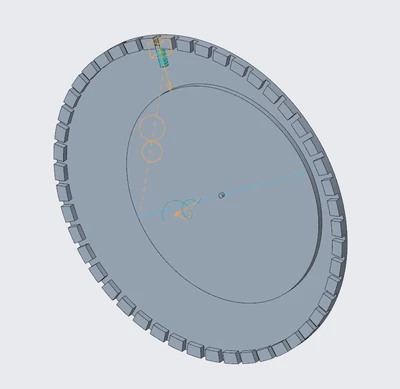
I have a square sliding pin that moves along an axis using a prismatic joint.
The pin is preloaded by a spring.
An eccentric rotating disk (cam) pushes the pin upward, and the spring pushes it back when the cam rotates away.
The disk does not rotate around its geometric center (offset axis).
What I am trying to achieve
I need to evaluate the required driving torque of the rotating disk during the mechanism analysis.
What I have already tried
3D surface-to-surface contact between cam and pin
Cam / curve follower definition instead of contact
Unfortunately, both approaches fail during the mechanism analysis with a “simulation failed / analysis failed” error.
Additional question (modeling):
I also need to place 48 identical sliding pins into corresponding grooves/slots around the disk.
Is there a way to automatically insert or pattern these pins without defining each pin manually in the mechanism?
Creo version: 12.4.0.0
Any help or best practices would be greatly appreciated.