12-Amethyst
April 29, 2016
Solved

Pause for keyboard input in mapkeys

  • April 29, 2016
  • 3 replies
  • 9009 views

Hello,

I didn't understand, and didn't find some good explanation about it (not in the Creo Help, nor on the internet), what "pause for keyboard input" means exactly in the Mapkey definition window.

In particular, for giving inputs during execution, what's the difference between it and simply keeping the default "record keyboard input" + pausing with dialog box?

Could someone possibly make a screen video recording with an example?

thanks

Bye

Tommaso

    Best answer by tleati

    Hi Jitu,

    Thanks for your reply. Sorry for the delay but I have seen your message just now that I discovered the function of pause by chance by myself and I want to post the answer.

    In my case, I recorded a mapkey for changing the format of a drw, and I saw that there is a difference when the mapkey, once selected the format, encounters the input bar that appears on the top (in my case for surface_treatment parameter to put in the .drw title block):
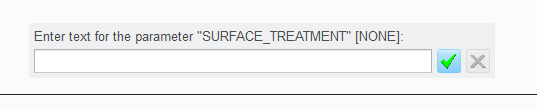
    2.PNG

    Pause for keyboard input --> the mapkey pauses in order to allow the user to write in the bar everytime the mapkey is executed. After having clicked on the green mark, the mapkey goes on with its recorded script.

    Accept system defaults --> the mapkey at each execution accepts whatever is already written in the bar (in my case it is empty, if there is something already written it is highlighted in black), and clicks the green mark by itself. Then goes on with its recorded script.

    Record keyboard input --> the mapkey records and will use forever what the user writes in the bar at the moment of mapkey recording: so I write "quenching" during mapkey recording, the mapkey will always write "quenching" when it encounters that field.

    Hope to have been quite clear for others who might read,

    and would be interested to know if anyone has found this difference in other contexts other than Jitu's too.

    bye

    3 replies

    1-Visitor
    April 29, 2016

    The pause functionality gives a person options on what to do.  Instructions should be listed in this dialog box.  For example I have created a mapkey to utilize a template drawing (size a-e).   The pause function for this examples states to pick the drawing template size to utilize.

    tleati12-AmethystAuthor
    12-Amethyst
    May 2, 2016

    Hi Todd,

    thanks for your reply. Indeed you made exactly the right example, relating to what I wrote in the topic: I also have your same mapkey for format selection, and for it I used the "record keyboard input" option plus the pausing with the dialog box...simply the dialog box appears, I choose the format, click "resume" and it goes on with the follwing steps...

    (that's why I am not catching the real difference yet...)

    thanks

    bye

    2-Explorer
    April 30, 2016

    Hello Tommaso Leati

    in generall PAUSE function give you possibility to make some "variables" input in your mapkey. l will describe it on example.

    Requirement:

        - need a mapkey to create printscreen macro - JPEG A4; 300dpi

        - need possibility to change JPEG file name and export location

    Video Link : 6841

    Test description:

    As en example l created 3 files in DESKTOP/mapkey_variable_location

         - test_01 - origin folder from macro creation

         - test_02 - macro first run (folder created during macro pause)

         - test_users_file_location - whichever folder from your HDD

    Config with macro is attached.

    Hope it helps...

    Regards Milan

    tleati12-AmethystAuthor
    12-Amethyst
    May 2, 2016

    Hi Milan,

    thanks for your reply and detailed description. Could you please re-upload (or send in zip file) the enclosed video? Because in the video square I see the error message "this video is not available".

    thanks

    bye

    1-Visitor
    May 16, 2016

    Pause is basically user input for map key Run.

    For an example, you are using electrical drawing installation and want to designate connector details. If you simply make map key for one connector in drawing & want to repeat operation for other connector, it is not going to work as you have to select other connector edge/surface. So to select other surface/edge, you require user input.

    So pause allows to select geometry and resume again will work your map key.

    I hope it answer your question. I do not have video in my system else create it for better understanding.

    Thanks,

    Jitu Thakor

    tleati12-AmethystAuthorAnswer
    12-Amethyst
    May 25, 2016

    Hi Jitu,

    Thanks for your reply. Sorry for the delay but I have seen your message just now that I discovered the function of pause by chance by myself and I want to post the answer.

    In my case, I recorded a mapkey for changing the format of a drw, and I saw that there is a difference when the mapkey, once selected the format, encounters the input bar that appears on the top (in my case for surface_treatment parameter to put in the .drw title block):

    2.PNG

    Pause for keyboard input --> the mapkey pauses in order to allow the user to write in the bar everytime the mapkey is executed. After having clicked on the green mark, the mapkey goes on with its recorded script.

    Accept system defaults --> the mapkey at each execution accepts whatever is already written in the bar (in my case it is empty, if there is something already written it is highlighted in black), and clicks the green mark by itself. Then goes on with its recorded script.

    Record keyboard input --> the mapkey records and will use forever what the user writes in the bar at the moment of mapkey recording: so I write "quenching" during mapkey recording, the mapkey will always write "quenching" when it encounters that field.

    Hope to have been quite clear for others who might read,

    and would be interested to know if anyone has found this difference in other contexts other than Jitu's too.

    bye