1-Visitor
November 6, 2019
Solved

Chart with mathcad same in mathcad

  • November 6, 2019
  • 2 replies
  • 1733 views

Hi all,

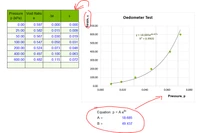
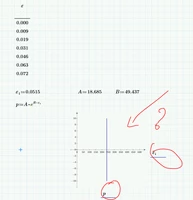
I have new using Mathcad and then I have a chart in excel. How I can do that in Mathcad? thanks so much.
Capture.PNGCapture1.PNG

Best answer by Werner_E

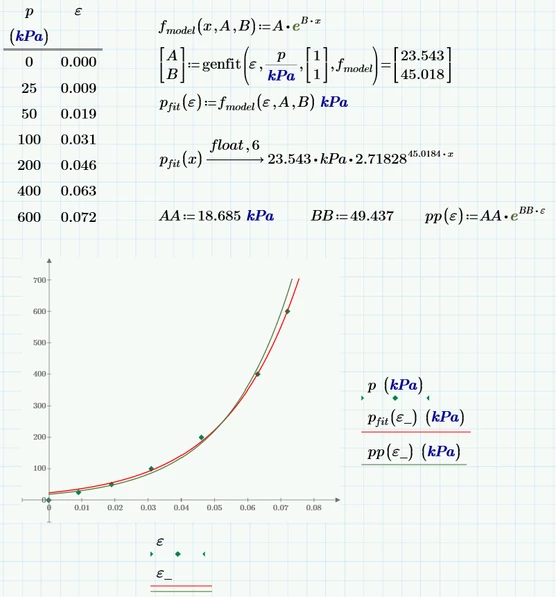
Obviously the labels in the Excel chart are wrong and should be exchanged.

Prime can also find a regression fit (a different one than shown in the Excel plot) for you.
B.png

Worksheet in format P6 attached

2 replies

23-Emerald IV
November 6, 2019

Like this.

LM_20191106_Chart.png

(See attached Prime 4 file)

Explanation:

Mathcad is NOT a spreadsheet program. It's more like mathematics. In your case p is/should be a function. I defined it a function of parameter epsilon.1 (because you had used that in the exponent). Note that this epsilon.1 is now unrelated to the epsilon.1 you defined to be 0.0515 just above p.

Now I assumed that you wanted to plot epsilon (from the table in the upper left) versus p (as a function of this epsilon) so I changed the expressions along the axes of the chart accordingly.


Success!
Luc

Werner_E25-Diamond IAnswer
25-Diamond I
November 6, 2019

Obviously the labels in the Excel chart are wrong and should be exchanged.

Prime can also find a regression fit (a different one than shown in the Excel plot) for you.

B.png

Worksheet in format P6 attached

25-Diamond I
November 6, 2019

Just a remark:

If we omit the first data line (with epsilon and p zero) we get similar results as shown in the Excel image if apply a linear regression on the logarithmized data.

B.png
