1-Visitor
February 7, 2023
Solved

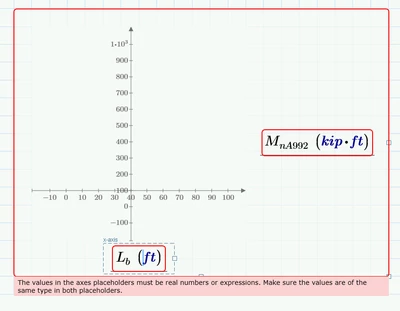
How do I get my if/else function to graph properly
  • February 7, 2023
  • 2 replies
  • 1108 views

GG_10575687_0-1675743063229.png

GG_10575687_1-1675743084089.png

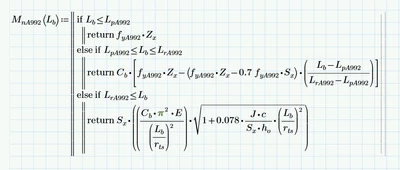
I have defined every variable except for Lb. I thought with it being defined as an independent variable in the function, Mathcad would understand to vary it from 0 to basically infinity. If not, how do I define Lb to work like that. Thanks.


Best answer by Werner_E

Primes so called "quickplot" (where you do not define the independent abscissa argument) only works for unit-less variables.
Once you use units you also have to provide your own range for this variable. To define a range with units, you must provide its first, second and last value as ttokoro had shown.

Furthermore on the ordinate you do not just place the function name but you have to write MnA992(Lb). You have to type the parentheses yourself as the parentheses in the plot are for the desired units only.


P.S.: In future questions remember to attach your worksheet whenever possible!

2 replies

ttokoro
21-Topaz I
21-Topaz I
February 7, 2023

Before your plot you should do, 


image.png

image.png

t.t.
Werner_E25-Diamond IAnswer
25-Diamond I
February 7, 2023

Primes so called "quickplot" (where you do not define the independent abscissa argument) only works for unit-less variables.
Once you use units you also have to provide your own range for this variable. To define a range with units, you must provide its first, second and last value as ttokoro had shown.

Furthermore on the ordinate you do not just place the function name but you have to write MnA992(Lb). You have to type the parentheses yourself as the parentheses in the plot are for the desired units only.


P.S.: In future questions remember to attach your worksheet whenever possible!