6-Contributor
February 19, 2021
Solved

How to solve an equation with constant represented by letter

  • February 19, 2021
  • 2 replies
  • 4865 views

i dont't know how to solve an equation with constant like 'A' or 'B'


for example:

x+B=A

solve, x


it is available in MATHCAD 15, but not in Prime

how can i realize this function?

Best answer by Werner_E

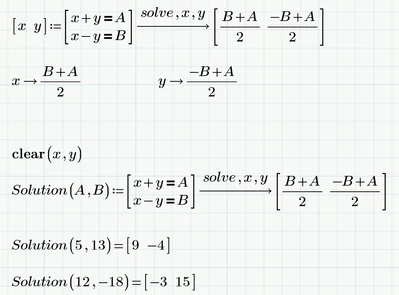
How can you input the "(x  y)" ?


Its a matrix (1 row, 2 columns)


Keystrokes:


Ctrl-M (or simply type [)

x

Shift-Space

y

:

....


In Prime you get square brackets to indicate a matrix and you also may simply type square brackets to create a matrix.
 

Werner_E_0-1613731444251.png


2 replies

14-Alexandrite
February 19, 2021

Prime can solve this, especially since it's pretty trivial.

Type the following

A:=5

B:=7

A=x+B  (the equals sign here is CTRL-=)

Then, go to the Symbolics menu and click on the right arrow operator (→), which will place it after A=x+B (ignore the answer for now)

Go back to the Symbolics menu and click on the operator solve, which will place it above the right arrow operator, then type ,x

Hit the Enter key to get the answer of -2.

25-Diamond I
February 19, 2021

@Ethan.Z wrote:

i dont't know how to solve an equation with constant like 'A' or 'B'


for example:

x+B=A

solve, x


it is available in MATHCAD 15, but not in Prime

how can i realize this function?


Its the same in Prime as in MC15

Just use the symbolics if you are looking for a symbolic solution

Werner_E_0-1613698925038.png

Or use the root-function or a solve block for a numeric solution (you'll have to provide values for A and B in that case)

Werner_E_1-1613699193670.png


Ethan.Z6-ContributorAuthor
6-Contributor
February 19, 2021

Thanks, it works!

But how about the equation set like this?

YZ_9729930_0-1613705855873.png


23-Emerald IV
February 19, 2021

The solve block in Prime only works with numeric items, that is, it doesn't work with symbols alone.

If you provide numerical values for A and B, the solve block will give the numeric answers for x and y.

If you want to solve it purely symbolic (with no numeric values for A and B), use the symbolic solver:

LucMeekes_0-1613720013077.png

You can even assign the results to the variables you solve for:

LucMeekes_0-1613720156821.png

Note that the expression involving solve turns red. That is because the numeric processor complains that A and B are (numerically) unknown. But the symbolic processor doesn't mind, and symbolically evaluates x and y without problems.


Success!
Luc