Best answer by Fred_Kohlhepp

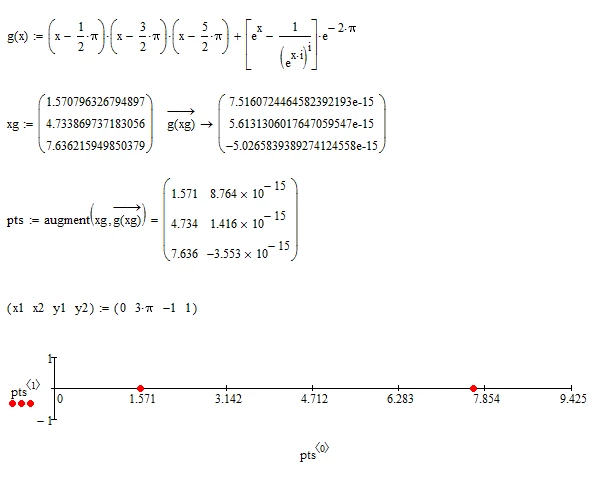
As Werner shows, there is an imaginary component to the second point (that is small enough that it apparently doesn't show in your version.)  The solution would be to specify only the real portions {Re(g(x))}. 

2 replies

25-Diamond I
November 4, 2018

Sorry, but I give up - explaining the very same over an over again!

Maybe someone else has more luck

B.png

--------------------------------------------------------------------------------------

B2.png

lvl10720-TurquoiseAuthor
20-Turquoise
November 4, 2018

Werner, I very sorry about my questionSmiley Sad. My question would be : "Is there a way to plot the third root-point  ?"

2.PNGBest Regards.

25-Diamond I
November 4, 2018

@lvl107 wrote:

Werner, I very sorry about my questionSmiley Sad. My question would be : "Is there a way to plot the third root-point  ?"


Sure!

B.png

Or you may consider Freds suggestion.

23-Emerald I
November 4, 2018

As Werner shows, there is an imaginary component to the second point (that is small enough that it apparently doesn't show in your version.)  The solution would be to specify only the real portions {Re(g(x))}. 

lvl10720-TurquoiseAuthor
20-Turquoise
November 4, 2018

Yes, yes... I guess so. Many many thanks, Fred.Smiley HappySmiley HappySmiley Happy. The point doesn't show in my Mathcad15 (version).

Many thanks again, Fred.

Best Regards.

Loi.

25-Diamond I
November 4, 2018

@lvl107 wrote:

The point doesn't show in my Mathcad15 (version).


I bet it does if you do the same as I did. Look at how I modified the definition of pts.


Some day even you will realize that Mathcad simply can't handle a family of functions defined like g(x) as we would like it to do and you can't expect that just one single k in f(k,x) can equal what Mathcad does with g(x).

You have a different k for every interval of length 2 pi!

One last try:

B3.png