1-Visitor
November 16, 2019
Solved

Pulse function

  • November 16, 2019
  • 3 replies
  • 13926 views

I need a "forcing function" that will be continuous (not piece wise). It needs to be a rectangular function with amplitude "A", Period "P", and duty cycle "D" (40%) that is a function of y(t) for some time period "t".


Can anyone help me out with this? 


Thanks,

Mike


Best answer by Werner_E

@LucMeekes wrote:

Worksheet(s) please...!


Luc


Here you are

I did no exact timing but it looks to me like calculations need much more time in Prime than in MC15


BTW, omitting the vertical line segments in a step function would be perfectly correct from a mathematical point of view but I understand that its undesirable for an engineer.

There is a simple cure, though.

My suggestion of a step width of 0,01 ms in the range was far too low. It should read 0.01 s which is good enough for the plots.

The range 0s, 0.01ms .. 4.2s forces the plot to be evaluated at 4.2 * 10^5 positions. Mathcad could handle that many points (nearly half a million) but Prime seems to have different limits and it falls back to this strange looking plot where you could not change anything (line style, thickness, .. ) other than the colour.
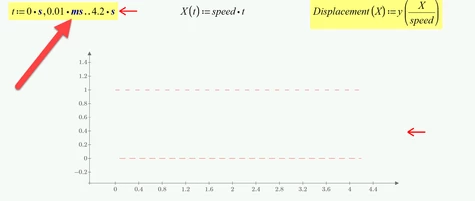
B1.png

Changing the range to read 0s,0.01 s .. 4.2 s gives us 421 points which is more than enough for this simple rectangular function. Changing the step width to 1 ms for 4201 points should be OK, too, of course.
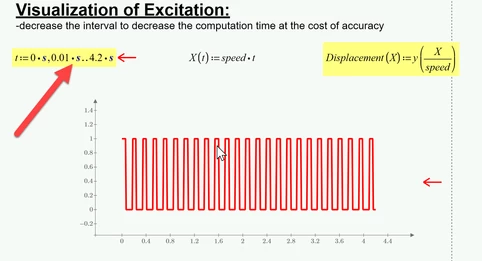
B2.png


Even simple 2D plots always were one of the many drawbacks in Prime and PTC was not able or willing to improve it. You may have noticed that there are not axis labels, no grid lines, the possibilities to customize the plot are much more limited and simple things like changing the axis limits are much more cumbersome.

In Prime 5 PTC has introduced a third party diagram component (look at the "calculate" ribbon for it). I don't like this add-on as its very slow and laborious to handle, does not scale correctly when used with a high resolution 4K display (making it nearly unusable) and does not support units (a no-go in a program like Mathcad/Prime).

Nonetheless, if you decide that you like Prime despite its drawbacks, you may give this plot component a try, too.



3 replies

23-Emerald IV
November 16, 2019

How about:

LM_20191116_Pulse.png

Success!
Luc

mlernst1-VisitorAuthor
1-Visitor
November 17, 2019

Luc,


Thank you for the solution. I see it works. I need it to be in the form of y(t)=. I tired to set y(t):= Pulse(t,A,T,d)


But that did not work. How can I accomplish this?


Thanks,

Mike

23-Emerald IV
November 17, 2019

You need to fill in values for A, T and d.

Like

y(t):=Pulse(t,1.5,2,0.4)

if your amplitude is 1.5, your pulse duration is 2 and the duty cycle is 40 %.

There are several alternatives to the definition above. You could also define A, T and d with these or other values and - subsequently - define:

y(t):=Pulse(t,A,T,d)

You could define:

Grootte:=1.5

Pulsduur:=2

Werkingsfractie:=40*%

and then define:

y(t):=Pulse(Grootte,Pulsduur,Werkingsfractie)


I hope you get the point now. If you're still unsuccessful: post your worksheet.


Success!

Luc

21-Topaz II
November 17, 2019

Hi,

elliptic pulse train.jpg

mlernst1-VisitorAuthor
1-Visitor
November 17, 2019

Thank you for this interesting idea. However, I need it to be rectangular (as proposed by Luc), not elliptical.

21-Topaz II
November 17, 2019

Ok!

that's better?

Square pulse train.jpg

mlernst1-VisitorAuthor
1-Visitor
November 17, 2019

That is definitely better. Now my next question - how do I turn that into an equation of the form y(t)? 


I have a lot of other equations on down the Mathcad program that are using y(t) in their evaluation. This program is using this pulse as a "description" of a road surface that is then being used to evaluate the suspension on a vehicle that is driving over it.

21-Topaz II
November 17, 2019

it is very simple:

Square pulse train1.jpg