
1-Visitor
January 6, 2021
Solved

SORT TABLE

  • January 6, 2021
  • 5 replies
  • 7796 views

Hello everyone.
I have extensive tables with data with which I must do repetitive operations, I have managed to make the calculations automatically in mathcad and obtain a table with the results. What I can't do is sort the final table to sum one of the result columns.
I attach the file in Mathcad Prime with the table of results that I obtained and with the ordered table that I need to obtain.

I hope you can help me, in advance thank you very much for the help.
Best answer by Werner_E

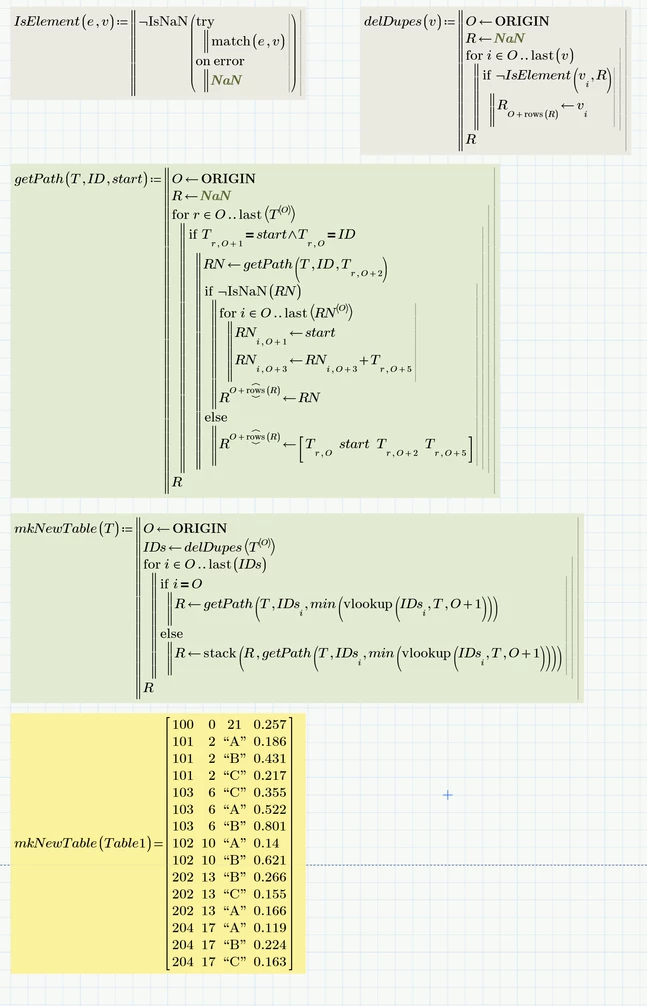
Here is a function which, as I believe, does what you are looking for:

Werner_E_0-1610067723372.png

Prime 6 worksheet attached


5 replies

15-Moonstone
January 6, 2021

Try using the sort functions.

25-Diamond I
January 6, 2021

I don't think that Mathcads sort functions will suffice to do the task, some programming will be required.


23-Emerald I
January 6, 2021

All I can see are two EXCEL tables.  How did you get the second (right) table?  Was that order generated in Mathcad?  Where are those calculations?

23-Emerald IV
January 6, 2021

The second table is a picture, looks like a screenshot from Excel.


Luc

25-Diamond I
January 6, 2021

@LucMeekes wrote:

The second table is a picture, looks like a screenshot from Excel.


Luc


No, its an Excel component, too. But without any in/output from/to Mathcad

23-Emerald IV
January 6, 2021

Use the csort() function (look it up in the help):

LucMeekes_0-1609959211756.png

Repetitively using the csort on different columns  - may - get what you need.


Success!

Luc

25-Diamond I
January 6, 2021

Note, that the result table uses some rows multiple time.

That result table is kind of connecting different paths which may contain partially equal subpaths

25-Diamond I
January 6, 2021

I wonder why you don't do the necessary calcilations and table build-up in Excel with a bit of scripting.

As I understand you provide an Excel table, want Mathcad do the build-up of a new table and write it back to another Excel sheet, right?


Du you really need the table as you had shown (I don't think that Mathcad can create an Excel sheet with combined cells as you use for your sums.

Would it suffice to create a table like

Design. 100; Start 0; End 21; SUM 0.257

Design. 101; Start 2; End A;  SUM 0.186

Design. 101; Start 2; End B; SUM 0.431

.....

Or do you need all the hops and values from COL-A and COL-B


COL-C seems unnecessary as its just the difference between COL-A and COL-B, so the values could be calculated rather than taken from a table.


Why does DESIGN. 204 not showing up in your second table?


A further question:

Can we assume that within every DESIGNATION every "path" starts with the same number? For example, both paths for 102 start with 10 and all three paths for 103 start with 6.


BPP1-VisitorAuthor
1-Visitor
January 7, 2021

First of all thank you all for your comments.


Regarding inquiries:


1. the data tables that I have are in excel and are like the ones shown in the table on the left of the attached file, with the difference that it contains more columns that I use to do other operations between them, which I did with mathcad and that is why I intend to do everything directly in that program. However, if ordering the table so that it looks like the table on the right of the attachment is more complicated than I thought using mathcad, I would have to choose to try to do it directly in excel using programming as stated.
2. The sums column does not need to be in a merged cell. It is enough to create a table with the designation, the starting and ending cells, and the sum of the COL-C column, ignoring the COL-A and COL-B columns.

        Design. 100; Start 0; End 21; SUM 0.257

        Design. 101; Start 2; End A;  SUM 0.186

        Design. 101; Start 2; End B; SUM 0.431

The colors used and the detail shown in the target table (right) is so that I can better understand what I want to achieve.
3. Designation 204 should be included in the target table (right), it is not included due to an error when copying it to the attached file.

4. Within each designation, each path begins with the same number in all cases. All paths in 102 start with 10 and all paths in 103 start with 6.


23-Emerald IV
January 7, 2021

You shouldn't need programming in Excel to get the sorting on multiple columns that you need. A single sort can involve multiple successive columns.


Success!

Luc

Werner_E25-Diamond IAnswer
25-Diamond I
January 8, 2021

Here is a function which, as I believe, does what you are looking for:

Werner_E_0-1610067723372.png

Prime 6 worksheet attached


BPP1-VisitorAuthor
1-Visitor
January 8, 2021
It works perfectly, thank you very much Werner.
BPP1-VisitorAuthor
1-Visitor
January 8, 2021

I incorporated the "sort()" function to sort the table in ascending order based on the first column as you suggest, again thanks for the help.