
Turn on suggestions
Auto-suggest helps you quickly narrow down your search results by suggesting possible matches as you type.
Showing results for
Please log in to access translation
Turn on suggestions
Auto-suggest helps you quickly narrow down your search results by suggesting possible matches as you type.
Showing results for
Community Tip - When posting, your subject should be specific and summarize your question. Here are some additional tips on asking a great question. X
Translate the entire conversation x
Please log in to access translation
Options
- Subscribe to RSS Feed
- Mark Topic as New
- Mark Topic as Read
- Float this Topic for Current User
- Bookmark
- Subscribe
- Mute
- Printer Friendly Page
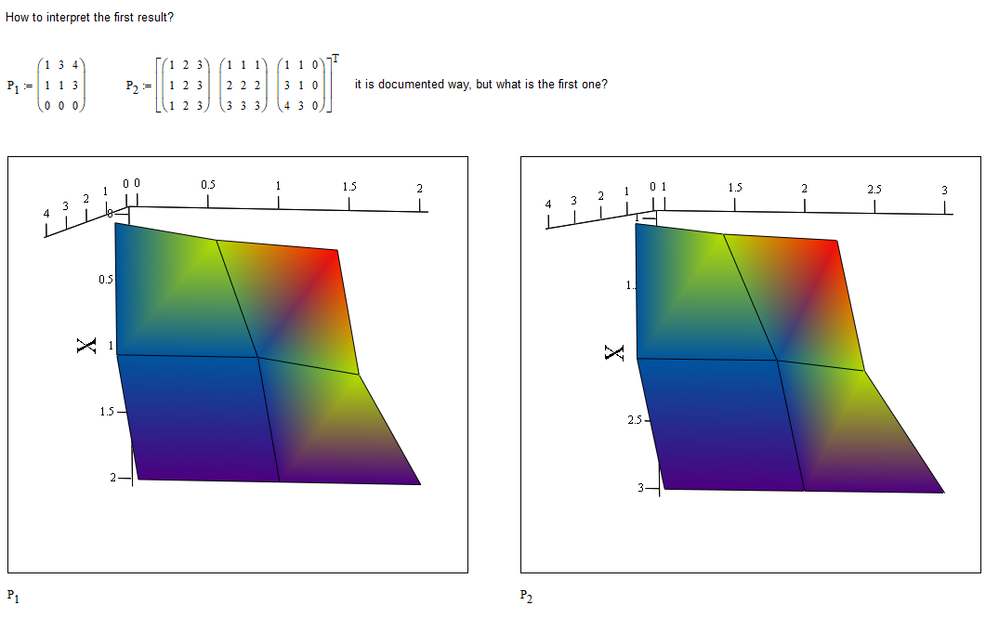
Unexpected 3D plot


Feb 15, 2020
06:44 AM
- Mark as New
- Bookmark
- Subscribe
- Mute
- Subscribe to RSS Feed
- Permalink
- Notify Moderator
Please log in to access translation
Feb 15, 2020
06:44 AM
Unexpected 3D plot
Labels:
- Labels:
-
Mathcad Usage
-
Other
ACCEPTED SOLUTION
Accepted Solutions


Feb 15, 2020
01:06 PM
- Mark as New
- Bookmark
- Subscribe
- Mute
- Subscribe to RSS Feed
- Permalink
- Notify Moderator
Please log in to access translation
Feb 15, 2020
01:06 PM
Don't worry, it is documented:
"Insert - Graph - Surface Plot
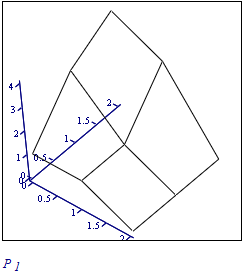
Inserts the 3D plot operator into your worksheet. Create a surface plot of the elements of a matrix by entering the matrix in the placeholder. The rows and columns of the matrix correspond to the x and y axes. The values of the matrix elements themselves represent the heights above the xy plane.
If you want to specify the appearance of the plot (such as its color and lines) as it is inserted, choose Insert - Graph - 3D Plot Wizard instead.
"

Success!
Luc
2 REPLIES 2
Feb 15, 2020
01:06 PM
- Mark as New
- Bookmark
- Subscribe
- Mute
- Subscribe to RSS Feed
- Permalink
- Notify Moderator
Please log in to access translation
Feb 15, 2020
01:06 PM
Don't worry, it is documented:
"Insert - Graph - Surface Plot
Inserts the 3D plot operator into your worksheet. Create a surface plot of the elements of a matrix by entering the matrix in the placeholder. The rows and columns of the matrix correspond to the x and y axes. The values of the matrix elements themselves represent the heights above the xy plane.
If you want to specify the appearance of the plot (such as its color and lines) as it is inserted, choose Insert - Graph - 3D Plot Wizard instead.
"
Success!
Luc
Feb 15, 2020
01:40 PM
- Mark as New
- Bookmark
- Subscribe
- Mute
- Subscribe to RSS Feed
- Permalink
- Notify Moderator
Please log in to access translation
Feb 15, 2020
01:40 PM
Many thanks, Luc, I remember this, I`ve never used this opportunity.


