
cancel
Showing results for 
Search instead for 
Did you mean: 
cancel
Showing results for 
Search instead for 
Did you mean: 

Community Tip - Need to share some code when posting a question or reply? Make sure to use the "Insert code sample" menu option. Learn more! X

Translate the entire conversation x

Variable undefined error when using a ranged variable in equation

DF_14482076
3-Newcomer

Variable undefined error when using a ranged variable in equation

Thanks in advance for any input.  I am somewhat new to Mathcad Prime.  I have generated a range variable sigma_t. when i use this in an equation H(sigma_t):= it does not compute and gives the "this variable is undefined" error.  I cannot for the life of me figure out what the issue is and what i can do to fix this.  assistance would be greatly appreciated!

ACCEPTED SOLUTION

Accepted Solutions
Werner_E
25-Diamond I
(To:DF_14482076)

You are defining a function H which is dependent on an independent variable sigma.t (which at the time of definition has nothing to do with the range variable of the same name!).

You cannot evaluate (the equal sign after the definition) a function definition.

So delete the = at the end and you have a valid function definition.

Werner_E_0-1769531888684.png

There is also no need to define sigma.t in front of that definition.


Now for the range variable and changing default unit to psi not working. This may called a bug in Prime.

You can define the range and evaluate it in a second region where you can change the unit:

Werner_E_1-1769532037095.png

Generally it has proven a good idea over the years of working with Mathcad and Prime to separate definition and evaluation in extra regions. While inline evaluations often work OK and as expected, now and then strange effects may occur (especially when working with matrices). That's why I've gotten into the habit of not writing

Werner_E_3-1769532740403.png

but rather

Werner_E_4-1769532760165.png


An important thing to remember is that you should be aware of the difference between a range variable and a vector! This is a constant stumbling block when working with Mathcad.
Unlike a vector, a range variable is not a collection of values, even though in Prime the representation of vectors and ranges unfortunately looks completely the same. A range can be seen as kind of an implicit loop, not a series of values.

Ranges should be used for

  • indexing vectors and matrices
  • plotting
  • a for-loop in a program

For anything else you should use vectors. Starting with Prime 11 a vector can easily be created using the new "vec" function.


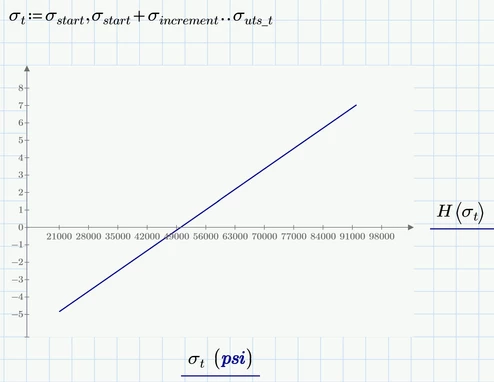
This said, you sure can use your range as the abscissa values when you plot the graph of your function H (which is a simple linear function):
Werner_E_2-1769532440387.png


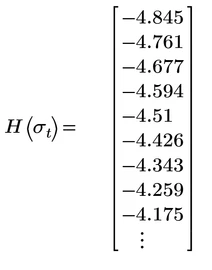
But don't use this range for creating a table of values. While this look good
Werner_E_5-1769532957233.png

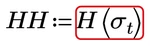
you already run into troubles if you try to assign this "vector" (its not a vector, nor is it a range!) a variable:
Werner_E_6-1769533055759.png

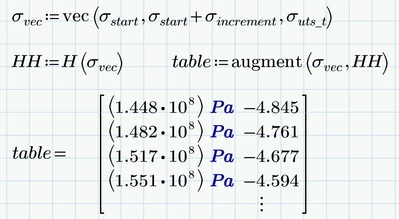
So to create a table of values you should use vectors:
Werner_E_7-1769533390818.png

Here you see a severe limitation of Prime - we cannot change the units inside of a matrix from Pa to psi.

One way around this may be to divide the vector by the desired unit, creating dimensionless values and maybe adding a header line which names the units we see:
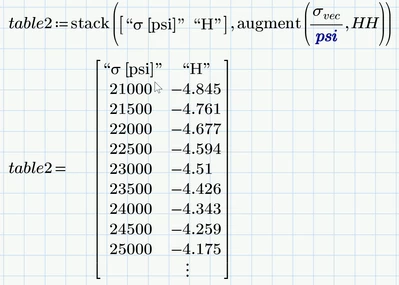
Werner_E_8-1769533548610.png


View solution in original post

4 REPLIES 4

Also if i change units "Pa" to "psi" for sigma_t it then says "this value must be a scalar or a matrix".  


i feel like it is related but cant figure out what i should do to resolve. thanks

DF_14482076_0-1769530969640.png


DF_14482076_2-1769531124668.png


Werner_E
25-Diamond I
(To:DF_14482076)

You are defining a function H which is dependent on an independent variable sigma.t (which at the time of definition has nothing to do with the range variable of the same name!).

You cannot evaluate (the equal sign after the definition) a function definition.

So delete the = at the end and you have a valid function definition.

Werner_E_0-1769531888684.png

There is also no need to define sigma.t in front of that definition.


Now for the range variable and changing default unit to psi not working. This may called a bug in Prime.

You can define the range and evaluate it in a second region where you can change the unit:

Werner_E_1-1769532037095.png

Generally it has proven a good idea over the years of working with Mathcad and Prime to separate definition and evaluation in extra regions. While inline evaluations often work OK and as expected, now and then strange effects may occur (especially when working with matrices). That's why I've gotten into the habit of not writing

Werner_E_3-1769532740403.png

but rather

Werner_E_4-1769532760165.png


An important thing to remember is that you should be aware of the difference between a range variable and a vector! This is a constant stumbling block when working with Mathcad.
Unlike a vector, a range variable is not a collection of values, even though in Prime the representation of vectors and ranges unfortunately looks completely the same. A range can be seen as kind of an implicit loop, not a series of values.

Ranges should be used for

  • indexing vectors and matrices
  • plotting
  • a for-loop in a program

For anything else you should use vectors. Starting with Prime 11 a vector can easily be created using the new "vec" function.


This said, you sure can use your range as the abscissa values when you plot the graph of your function H (which is a simple linear function):

Werner_E_2-1769532440387.png


But don't use this range for creating a table of values. While this look good

Werner_E_5-1769532957233.png

you already run into troubles if you try to assign this "vector" (its not a vector, nor is it a range!) a variable:

Werner_E_6-1769533055759.png

So to create a table of values you should use vectors:

Werner_E_7-1769533390818.png

Here you see a severe limitation of Prime - we cannot change the units inside of a matrix from Pa to psi.

One way around this may be to divide the vector by the desired unit, creating dimensionless values and maybe adding a header line which names the units we see:

Werner_E_8-1769533548610.png


Amazing! Everything worked!  THank you so much. You have saved me a lot of time. 


I will look into the vec function.  i do have mathcad prime 1.1.0.1.0.   

Werner_E
25-Diamond I
(To:DF_14482076)


@DF_14482076 wrote:

Amazing! Everything worked!  THank you so much. You have saved me a lot of time. 


I will look into the vec function.  i do have mathcad prime 1.1.0.1.0.   


You are welcome.

I just edited my answer above showing the use of the "vec" function and also attached the modified worksheet.

Announcements

Top Tags
