
16-Pearl
November 2, 2016
Solved

Vector input into solve block

  • November 2, 2016
  • 3 replies
  • 3251 views

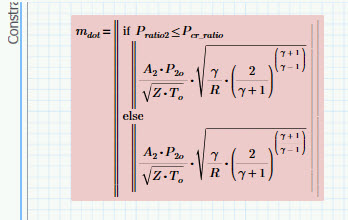
I have a model (compressible flow through o r i f i c e s in series) that utilizes a solve block to find the mass flow and pressures.  It works great for any single point analysis. I then tried to feed it multiple flow areas as a vector and haven't gotten it to work.  It's slightly unique in that I have an IF inside the solve block. I have tried to vectorize everything and rearrange the IF, all to no avail.

PDF and 3.1 file attached.

P.S.  I know that I can rework this to use the solve block as a function and call it that way to repeat calculations.  That's just not what I'm after today.

P.P.S This is a dumbed-down version just to demonstrate the problem.  No need to correct my physics as I know they're off.

Basically, I don't think Mathcad likes this IF inside solve block when trying to solve for a vector of inputs.
picv.jpg

Best answer by DJF

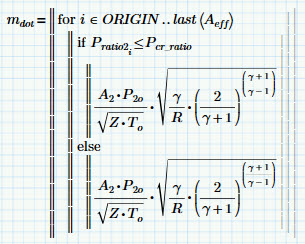
A-ha!  I believe I have it.  By telling mathcad which P_ratio2 to use (through a for loop) it can then figure out the rest.  It can't compare a vector to a scalar, so we have to feed it one value.  This is what solved it.

vec5.jpg

Note: Several variations on this do not work (e.g. storing the results into m_dot_i or using P_2o_i)

Thanks for the assistance.

3 replies

23-Emerald I
November 2, 2016

Does it work if you vectorize the whole constraint?

Make the arrow cover the m_dot too.

DJF16-PearlAuthor
16-Pearl
November 2, 2016

While it will solve, it does not solve correctly.  I believe that as soon as I do what you suggest the whole equation is no longer recognized.  I get the same incorrect answers if I just delete the offending equations. I also noted that if I vectorize the entirety of other constraints that the "constraints" bar no longer enveloped them.  They were in no mans land and don't seem to effect the output (or lead to an error).  

vec2.jpg

1-Visitor
November 2, 2016

I can't open your file to play with it.  Can you convert your if statement to Boolean algebra?

Instead of this:

If A <= B

  T

Else

  F

Write this:

(A<=B)*T+(A>B)*F

Possibly even just converting the programming if to an if function would work:

if(A<=B,T,F)

DJF16-PearlAuthor
16-Pearl
November 2, 2016

Your suggestions, unfortunately, didn't work.  But, they led me to a clue.  I replaced the current IF statement by something that was obviously true (e.g. if D_bore < 1000 in) and it works beautifully.  So, it seems to be balking at the IF.  I'm thinking it's confused because there would be multiple values of P_ratio2 and it doesn't know how to vectorize.  Adding vectorize to the IF doesn't seem to resolve it though.

1-Visitor
November 2, 2016

This might be your best option:

dferry wrote:

P.S.  I know that I can rework this to use the solve block as a function and call it that way to repeat calculations
19-Tanzanite
November 2, 2016

It's a little unconventional, but you can use the heavyside step function to create an "if" statement:

The solve block understands this.

As an aside, this is also a useful trick for the symbolic processor, which also does not understand if statement, but does understand the heavyside step function.