
16-Pearl
June 28, 2023
Solved

Tab Widget - CSS for Tab selected

  • June 28, 2023
  • 1 reply
  • 1384 views

Hi Team,


Following on the Tab CSS - Blog Link. I also needed to change the ptcs-tab selected header color and styling  based on the customer UI requirement. I used the below given CSS, Its working properly in TWX 8.5.

But in TWX 9.4.0 its not working as expected.


.TabsArrow .widget-ptcstabset::part(tabs-tab)[selected] 
{ 
 background: #0094C8 !important; 
 border-bottom-color: #EEEEEE !important;
}
.TabsArrow .widget-ptcstabset::part(tabs-tab)[selected]:before 
{ 
 content: ''; 
 width: 0; 
 height: 0; 
 border-top: 17px solid transparent; 
 border-bottom: 17px solid transparent;
 border-left: 15px solid #EEEEEE;
 position: absolute; 
 display: block; 
 top: 0; 
 left: 0;
}
 .TabsArrow .widget-ptcstabset::part(tabs-tab)[selected]:after 
 { content: ''; 
 width: 0; 
 height: 0; 
 border-top: 17px solid #EEEEEE; 
 border-bottom: 17px solid #EEEEEE; 
 border-left: 15px solid #0094C8; 
 position: absolute; 
 display: block; 
 top: 0; 
 right:0;
}
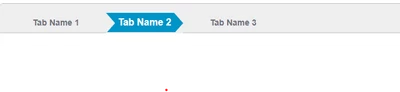


Arun_C_1-1687934805888.png

Kindly provide some workaround for this case to fix in TWX 9.4 Versions.


Thanks & Regards,

Arun C


Best answer by Velkumar

Hi @Arun_C 


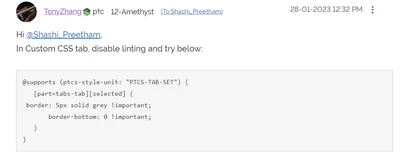
CSS Syntax got changed from TWX 9.3.4


Please follow the new syntax - 


Velkumar_0-1687936593504.png


Related Article 

https://www.ptc.com/en/support/article/cs377455

Tabset CSS on Tab Selected - PTC Community


/VR


1 reply

Velkumar19-TanzaniteAnswer
19-Tanzanite
June 28, 2023

Hi @Arun_C 


CSS Syntax got changed from TWX 9.3.4


Please follow the new syntax - 


Velkumar_0-1687936593504.png


Related Article 

https://www.ptc.com/en/support/article/cs377455

Tabset CSS on Tab Selected - PTC Community


/VR


Arun_C16-PearlAuthor
16-Pearl
June 28, 2023

Thank You @Velkumar . After updating with syntax , now its working properly.


@supports (ptcs-style-unit: "PTCS-TAB-SET") {
 [part=tabs-tab][selected] {
 <<CSS>>
 } 
}
@supports (ptcs-style-unit: "PTCS-TAB-SET") {
 [part=tabs-tab][selected]:before {
 <<CSS>>
 }
}
@supports (ptcs-style-unit: "PTCS-TAB-SET") {
 [part=tabs-tab][selected]:after {
 <<CSS>>
 }
}