Hi @jsj ,
I think here is not quite clear what is the goal at the end - so means to get the third column and third row this is Ok. But what is not clear -when you want to get this in which contex?. This is important question because there could be different approaches . So, you can get data and could count the number column and number row simple form to repeat data property:
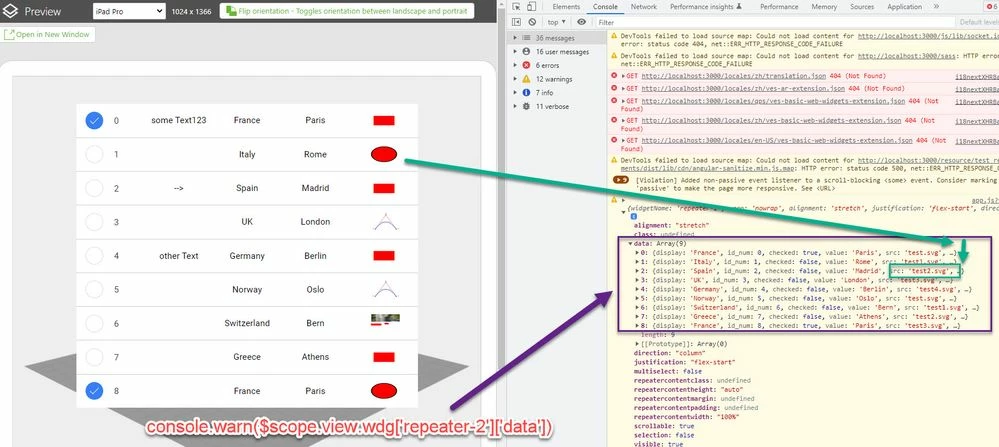
So you can retrieve simple the data
let my_data =$scope.view.wdg['repeater-2']['data']
console.log(my_data[2].src)
//this will print here "test2.svg"
and here (example ) the print of 3 row 6 column is "test2.svg"
But I think possibly your goal is to click on element and to try to find the value , respectively to change the value in cell . So possibly the following behavior as shown on the picture below:
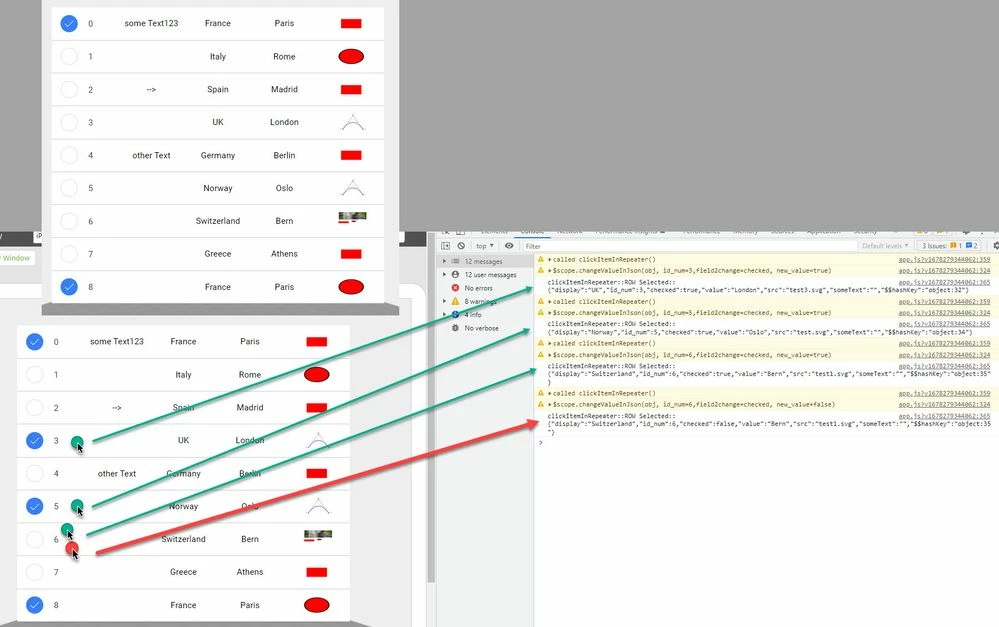
So in this case you can use the callback for the clickItemInRepeater event:
twx.app.fn.clickItemInRepeater = function(item,list,isMultiSelect){
//... your definition
}
there in the call the list contains the list - means that what is the data in the repeat widget
I hope this will make it more clear- and the item is the clicked row.
Also you can find the demo project (I mentioned int he picture above) in the post https://community.ptc.com/t5/Vuforia-Studio/list-widget-js-api/m-p/803441
here the project to download