

Reverse Engineering / Restyle (REX) Leaves Holes In Surface
Creo 2, M230
We're evaluating teh restyle / reverse engineering extension (REX) using scan data from a car hood and I'm having trouble getting good surfaces.
I'm also struggling to find tutorials and help info on this so I can understand the functions and commands. I'm sure I'm probably not using great technique, but there just doesn't seem to be much info out there on how to use it. If anyone has any good links, I'd appreciate them. There were some links here on the community, but they are broken since the move to Lithium.
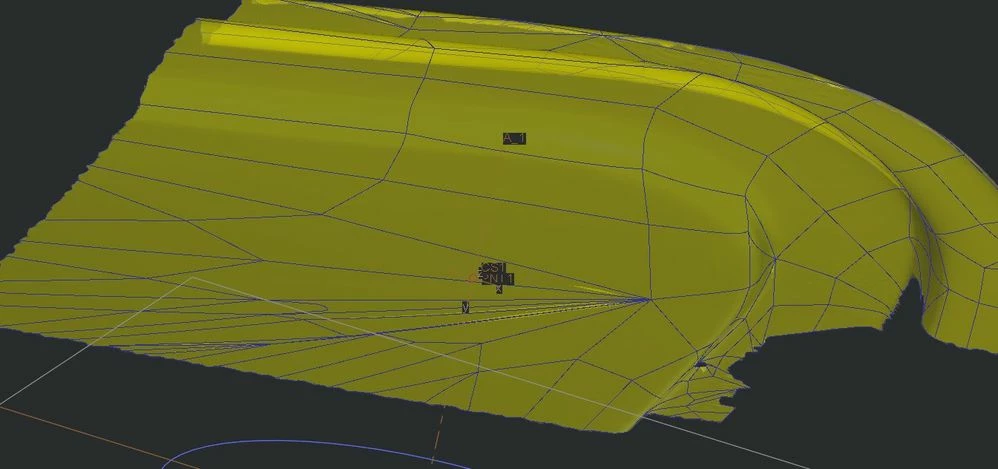
I'm trying to use the auto surface function over an STL file that I've trimmed to just the corner I need. I'm able to generate a quilt, but it contains pinched areas and 1 sided edges that make it impossible to use for later features.
You might be able to see here that the center is relatively flat but Creo insists on bringing all these lines together creating a wrinkled mess with open edges:
I thought perhaps it was because of the jagged edges of the STL import, so I created a curves and confined the auto surface to inside them. Better, no pinch point, but I still have open internal edges:
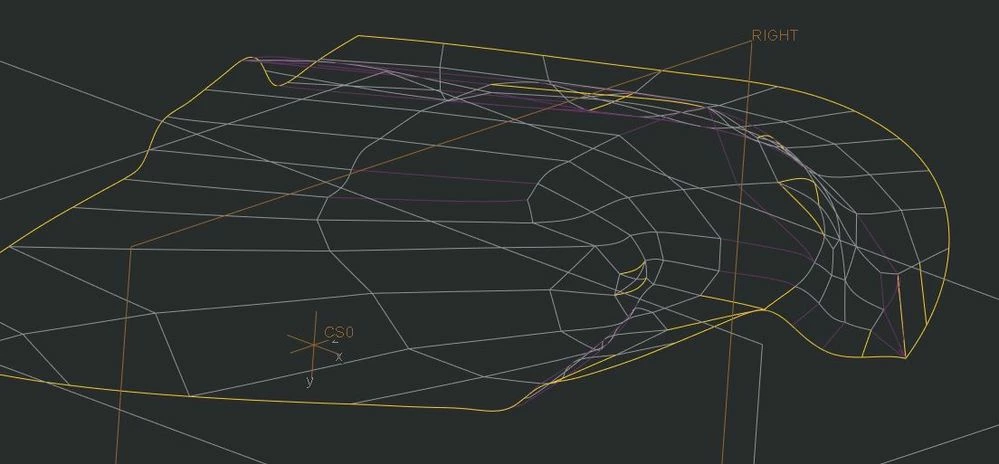
I'm at a loss as to how to get a good surface out of this STL file. I could probably patch it after the fat using traditional surfacing techniques, but I'm hoping that by using REX we can get good surfaces right from the scan data without a lot of secondary manipulation.
Any tips?