
Turn on suggestions
Auto-suggest helps you quickly narrow down your search results by suggesting possible matches as you type.
Showing results for
Please log in to access translation
Turn on suggestions
Auto-suggest helps you quickly narrow down your search results by suggesting possible matches as you type.
Showing results for
Community Tip - Did you get an answer that solved your problem? Please mark it as an Accepted Solution so others with the same problem can find the answer easily. X
- Community
- Creo+ and Creo Parametric
- Customization
- Macro i want select the FEATURE ID and not the nod...
Translate the entire conversation x
Please log in to access translation
Options
- Subscribe to RSS Feed
- Mark Topic as New
- Mark Topic as Read
- Float this Topic for Current User
- Bookmark
- Subscribe
- Mute
- Printer Friendly Page
Macro i want select the FEATURE ID and not the node


Nov 28, 2022
04:26 AM
- Mark as New
- Bookmark
- Subscribe
- Mute
- Subscribe to RSS Feed
- Permalink
- Notify Moderator
Please log in to access translation
Nov 28, 2022
04:26 AM
Macro i want select the FEATURE ID and not the node
Hi,
I want to select a feature using a macro, but instead of writing ID FEATURE, Creo use the NODES.
Example:
mapkey(continued) ~ Select `main_dlg_cur` `PHTLeft.AssyTree` 1 `node3238`;\
Is it possible to write:
mapkey(continued) ~ Select `main_dlg_cur` `PHTLeft.AssyTree` 1 `feature ID 235`;\
Thanks
Solved! Go to Solution.
Labels:
- Labels:
-
General
ACCEPTED SOLUTION
Accepted Solutions


Nov 28, 2022
09:10 AM
- Mark as New
- Bookmark
- Subscribe
- Mute
- Subscribe to RSS Feed
- Permalink
- Notify Moderator
Please log in to access translation
Nov 28, 2022
09:10 AM
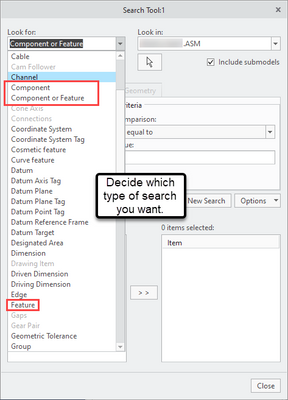
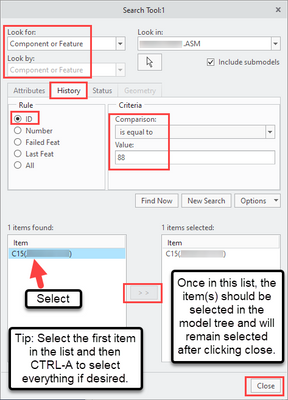
I do not know of a way to do it in one line, but it is possible to use the Search Tool (CTRL-F keyboard shortcut). It's a very useful way to select 1 or many items in the model tree via mapkey. You can uncheck the Include Submodels option if you don't wish to select subcomponents in the search results.
- Tags:
- select all
3 REPLIES 3

Nov 28, 2022
08:39 AM
- Mark as New
- Bookmark
- Subscribe
- Mute
- Subscribe to RSS Feed
- Permalink
- Notify Moderator
Please log in to access translation
Nov 28, 2022
08:39 AM
Try to use "Find" tool by ID.
Nov 28, 2022
09:10 AM
- Mark as New
- Bookmark
- Subscribe
- Mute
- Subscribe to RSS Feed
- Permalink
- Notify Moderator
Please log in to access translation
Nov 28, 2022
09:10 AM
I do not know of a way to do it in one line, but it is possible to use the Search Tool (CTRL-F keyboard shortcut). It's a very useful way to select 1 or many items in the model tree via mapkey. You can uncheck the Include Submodels option if you don't wish to select subcomponents in the search results.
- Tags:
- select all
Nov 28, 2022
10:16 AM
- Mark as New
- Bookmark
- Subscribe
- Mute
- Subscribe to RSS Feed
- Permalink
- Notify Moderator
Please log in to access translation
Nov 28, 2022
10:16 AM
Ok I'll do some tests.
Thanks

Announcements


Top Tags
