
14-Alexandrite
January 27, 2024
Question

Workspace options settings

  • January 27, 2024
  • 2 replies
  • 2185 views

Hi,


We use Windchill and Creo 9 (will soon be upgrading to Creo 10. We also use Windchill for document management.


In Windchill, each product has three main folders CAD, Promotion requests and Documents.

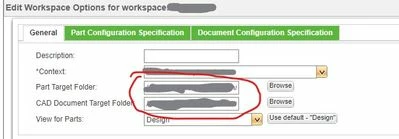
When creating a Workspace the Context is set to the product root in Windchill and so is the Part Target Foler and CAD Document Target Folder. I know that I can manually go in and change the Part and CAD document target folder to the Windchill CAD folder. However, is there a way to, in the config.pro for example, to set the CAD folder by default, so that all are not directed to the root by default? Also that it will use the current context, since the context will change depending on the product/workspace.
Screenshot1.jpg

2 replies

17-Peridot
January 30, 2024

I'm sure this is not a Creo side feature.

Dig into the Windchill preferences or maybe the OIR (Object Initialization Rules) rules.

12-Amethyst
February 1, 2024

I was recently looking into the same thing, did not find anything at the Preference level to set it for all of the user's workspaces.


The OIR can set it to a specific folder but that is every object created for that type.

However, our company has several groups creating EPMDocuments but are required (and only have access) to store them in different subfolders under the product root.


Let us know if you discover something.

14-Alexandrite
February 1, 2024

Ok. Thanks. I guess we'll just have to live with it for now.

17-Peridot
February 2, 2024

https://community.ptc.com/t5/Windchill/OIR-Configuration-to-have-multiple-Life-cycle-templates/m-p/857482#M70377%3Fsource=search

In the article some one mention PTC case document. Looks like it is possible to create a parameter in CAD model and map this parameter to EPMDocument attribute. Then using OIR will be possible to change target folder making selection based on attribute value.