cancel
Showing results for 
Search instead for 
Did you mean: 
cancel
Showing results for 
Search instead for 
Did you mean: 

Community Tip - Your Friends List is a way to easily have access to the community members that you interact with the most! X

Translate the entire conversation x

CLT Gamma calculation

JD_10468629
3-Newcomer

CLT Gamma calculation

Hi guys

new here

I have worked with mathcad a few times, but never with very complex sheets

I'm trying to do a calculation sheet for the Cross laminated timber (CLT) gamma values, which are used to accound for weak layers in a laminate.

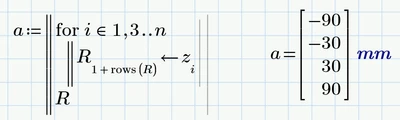
I have been able to create the matrices, but in a non automatic way. I'd like to be able to make the sheet build them automatically, with the correct size for the given niumber of layers.

The PDF from ProHolz provides the calculation on page 5-7, and the indices are already given for placement in the matrix.

But I cant get it to work, I always have an issue with the indices i-1 when its the first line, cause the indices simply don't exist for 0...

Basically I want to just write down the number of layers, and the dimension, but then it should be automatic

the Matrix V and vector S always vary in size depending on the number of layers
JD_10468629_0-1765647431212.png

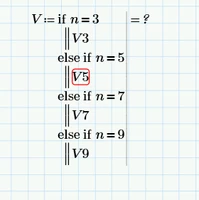
or use a trick like this, because once the matrices are build, I could just use the right one, but for a 3 layer -composition, the matrices V5-7-9 are not defined, therefore blocking the calculation...


Any help would be appreciated!

Thanks a lot!
Jezza
3 REPLIES 3
Werner_E
25-Diamond I
(To:JD_10468629)

Next time you ask here you should clearly say which version of Prime you are using. This is especially important if you don't use the latest version as otherwise you may get a solution file you can't open.


I strongly would advise to avoid using a myriad of range variables to do the various calculations. In my opinion they are failure prone and much less clear as programs using for-loops. Especially the quite creative way to separate vector values with odd and even indices.


The attached sheet should help and should work with any (odd) number of layers, not limited to 9.
(Due to a current bug in the forum software I had to zip the file before being allowed to attach it here)


Hey man!

thanks a lot, your solution is sick, way shorter than anything I hoped for!

i changed it slightly to correct some point that you implimented juste based on my sheet, but they were unsuccesfull tris to fix issues that I had.

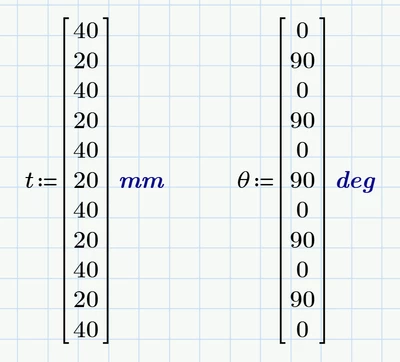
I changed again to have the possibility to input any value for the layers, as it need to work with any buildup, not always 40-20 layers.


You're a legend mate, thanks!
I can enjoy my christmas semester break without worrying about this anymore🤣

Werner_E
25-Diamond I
(To:JD_10468629)

Some remarks:


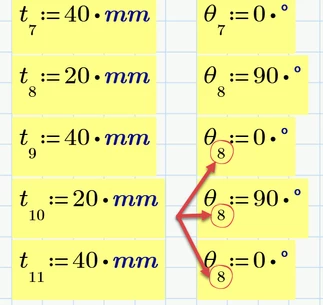
1) It might be easier to input the values for the thickness vector "t" and the vector theta (which is not used so far in your sheet) not singly but as  vectors (start with Ctrl+M an then; Shift+Enter inserts a new row).

Werner_E_0-1765720571589.png

This also avoids errors like this in your sheet 😉

Werner_E_1-1765720806719.png

You may also consider to limit the value of "n" to the number of rows in "t"  to avoid any errors if someone inputs a value of "n" larger than the number of values inputted in "t"

Werner_E_3-1765721385632.png


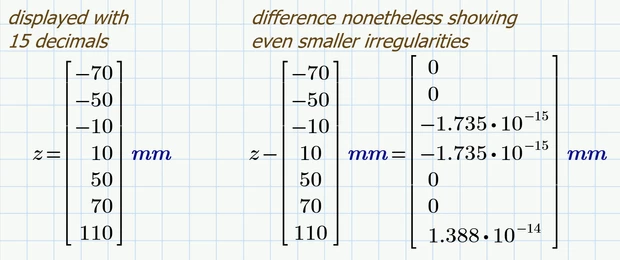
2) To check for exact values it often does not suffice to display the values with the maximum of 15 decimals. You may display the difference of the calculated vector and the vector of exact values (you can use copy and paste) to see even smaller round off errors:

Werner_E_2-1765721163266.png


3)  You still have a range "k" defined just for the calculation - probably because the calculation I suggested would not work with the vector "t" being larger than the vector z, which depends on "n".

After vector t is defined and after the number "n" of used layers id defined (and probably corrected to be an odd number larger than 1 and not larger than the number of rows in "t") you could trim the vector "t" according to "n":

Werner_E_4-1765721760690.png

So you can get rid of the last range variable "k" and use the trimmed t-vector for the calculation of the new vector "z".

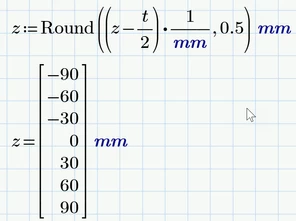
Subtraction of t/2 and rounding could be done in one go:

Werner_E_5-1765721837488.png


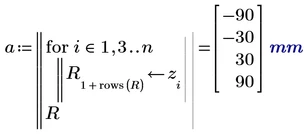
4) Calculation of values and displaying the results in one single region often works OK.

Werner_E_6-1765722120444.png

However, Prime can sometimes produce strange effects and even errors—especially in combination with matrices.

For this reason, I have gotten into the habit of separating the calculation and display of values - just to be on the safe side.

Werner_E_7-1765722288464.png


If you don't have any follow up questions, you may consider closing the thread.

Wish you a nice Christmas semester break!

Announcements

Top Tags