6-Contributor
October 29, 2021
Solved

Mathcad Prime - Breaks in Integral Graph Causing Problems

  • October 29, 2021
  • 3 replies
  • 3876 views

Hello everyone. 


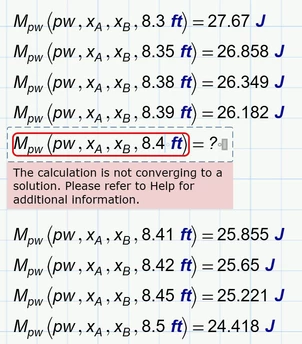
I'm trying to make a spreadsheet that graphs partial uniform loads and seem to have run into an issue. It all works for the most part. However, when trying to graph, the graph typically "fails" in certain places. See my attached file and notice the missing portion of the graph at x=8.4ft. 


Is there any way to fix this?


Note that I've already tried messing with the TOL global variable to no avail. It usually causes the break to move to a different place in the graph and doesn't actually fix anything. If it does fix it then it is usually just for that one case and if you put in different loads/locations it'll break again. What should I do?

Best answer by Werner_E

I opened your sheet with Prime 6 and can confirm that the function returns an error for x=8.4 ft and that changing the TOL value does not solve the problem.

Werner_E_0-1635596671172.png

Slightly changing the value of x.A (to 2.0001 ft) "solved" the problem.

If its just a cosmetic problem and you  are only concerned because of the gap in the plot, you may simply use a slightly different range for x when you plot, something like x:=0 ft, 0,11 ft .. L or x:=0 ft, 0,099 ft .. L works pretty well but the last value for x will be smaller than L (10 ft) and so you may want to let the range run up to L+0.1ft.


Your function M uses an integral which in turn calls another function also using an integral. So quite a lot of integrals have to be calculated for the plot and you can see that creating the plot quite takes some time.

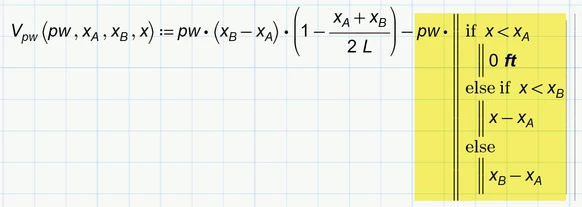
Here is a more efficient way by defining function V without an integral:

Werner_E_1-1635597106556.png

Calculation now is lightning fast, the results are more precise even without using a smaller TOL value and the problem with x=8.4 ft is also gone away -> win-win-win ๐Ÿ™‚

Of course you could also use the if-function

Werner_E_3-1635597560294.png

or the program if

Werner_E_4-1635597605921.png

if you feel thats better readable. All three version are fast, provide better precision and do not suffer from the 8,4 ft problem.


3 replies

24-Ruby III
October 29, 2021

In version 7.0, everything is displayed normally on the plot:


Pic-1.png


What version of Mathcad Prime are you using?

ttokoro
21-Topaz I
21-Topaz I
October 29, 2021

Prime7 TOL=10^-3

image.png

TOL=10^-1

image.png

t.t.
6-Contributor
October 30, 2021

Iโ€™m on version 3. I guess thatโ€™s why. Itโ€™s just weird that the whole graph would work fine except one number. 

24-Ruby III
October 30, 2021

Tested in Mathcad Prime 3, result (in both cases, I did not change the calculation tolerance, just recalculated the entire worksheet):


Pic-2.png


By the way, if you want to try the Mathcad Prime 7 version, here are the links:

https://www.mathcad.com/en/try-and-buy/mathcad-express-free-download/install

https://free-dl.ptc.com/install/pim_installmgr_mathcad.exe

Werner_E25-Diamond IAnswer
25-Diamond I
October 30, 2021

I opened your sheet with Prime 6 and can confirm that the function returns an error for x=8.4 ft and that changing the TOL value does not solve the problem.

Werner_E_0-1635596671172.png

Slightly changing the value of x.A (to 2.0001 ft) "solved" the problem.

If its just a cosmetic problem and you  are only concerned because of the gap in the plot, you may simply use a slightly different range for x when you plot, something like x:=0 ft, 0,11 ft .. L or x:=0 ft, 0,099 ft .. L works pretty well but the last value for x will be smaller than L (10 ft) and so you may want to let the range run up to L+0.1ft.


Your function M uses an integral which in turn calls another function also using an integral. So quite a lot of integrals have to be calculated for the plot and you can see that creating the plot quite takes some time.

Here is a more efficient way by defining function V without an integral:

Werner_E_1-1635597106556.png

Calculation now is lightning fast, the results are more precise even without using a smaller TOL value and the problem with x=8.4 ft is also gone away -> win-win-win ๐Ÿ™‚

Of course you could also use the if-function

Werner_E_3-1635597560294.png

or the program if

Werner_E_4-1635597605921.png

if you feel thats better readable. All three version are fast, provide better precision and do not suffer from the 8,4 ft problem.


21-Topaz II
October 31, 2021

Hi,


To finish with the superposition of the vectors pw, xA, and xB.

Cheers

Terry