
16-Pearl
December 10, 2020
Solved

Transmit text from label with js

  • December 10, 2020
  • 1 reply
  • 3731 views

Hi,


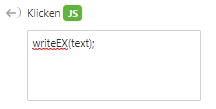
I want to transmit the text, that a label currently has to the java script function that is called at a click event. I tested writeEX(text); but receive "undefined". Maybe using property values could be a workaround, but I have five different labels, that shall transfer different values to one function. 


Regards

Whity
 

whity_0-1607590061468.png


Best answer by sebben

Hi,


the function you call on Click should be like this:


identAssembly(view.wdg["partNr"].text);


I hope that helps.


1 reply

21-Topaz I
December 10, 2020

Hi @whity ,

I am not quite sure if I correctly understood what is here the goal

Let say that we have some simple definitions like the code below:


//========================================
$scope.testLabel= function(my_arg){
console.log("testLabel my_arg="+my_arg);}
//========================================


So then use the function  in the js box of the 3D label widgets:  e.g. testLabel("bla bla text");

2020-12-10_18-55-28.jpg

So when we test it to the console we will have the following printing:

 2020-12-10_18-58-24.jpg


So my question:  is that what was wanted here or  the goal is different?

OK we can use also the  userpick event to handle a generally the click event on a 3dWidget  and then to check if this is 3DLabel / here very simple check if the name contains "3DLabel" substring:


//============ after Enter start Def
$scope.$on("$ionicView.afterEnter",function() {
 $scope.userpickDef();
});
//============ after Enter finish def
//=========================================
//=========================================
$scope.userpickDef= function() {
// define the button action
 console.log("$scope.userpickDef");
document.addEventListener('userpick', function (ev) { 
 var widget = ev.target.closest('twx-widget');
 if (widget) {
 console.log('*->the widget clicked is ', widget.getAttribute('widget-id'));
 $scope.app.clickMyWidget(widget.getAttribute('widget-id').toString())
 }
}); 
 
};
//========================================================
//========================================================
$scope.app.clickMyWidget = function(target) //handel the widgets
{
 //check if the cllicked widget contains the substring "3DLabel" 
if(!target.toString().startsWith("3DLabel")) 
{console.log("not 3DLabel");return;}
console.log($scope.view.wdg[target.toString()].text)

}


so when we test this code - click on the 3DLabel widget -> we can see the following print into the console:


2020-12-10_19-12-04.jpg

whity16-PearlAuthor
16-Pearl
December 11, 2020

Hello @RolandRaytchev 


this is almost correct. Sorry, it is hard to explain. What I want to achive is the following:

I click on a model part and recieve the part name, the name of the next bigger assembly group and the one on that comes after that. The names are written via JS in the labels (in the 2nd screenshot they are filled with "n.a."). Now the tricky part: When I click on one of the text labels, the text (marked in yellow) that is written on the label shall be given to a java script function.

whity_1-1607668269279.png

The JS then highlights all parts, that contain this number. Of course, if the user clicks on the label "selected Part" only parts are highlighted. If he clicks on "1 assembly level up" all groups that contain the name of the group are highlighted.


whity_0-1607667908656.png


sebben14-AlexandriteAnswer
14-Alexandrite
December 11, 2020

Hi,


the function you call on Click should be like this:


identAssembly(view.wdg["partNr"].text);


I hope that helps.