1-Visitor
March 31, 2016
Question

Change revision via SQL

  • March 31, 2016
  • 2 replies
  • 3949 views

Hello,

I am working to fix some data integrity issues we have after migrating from Agile to Windchill.

I need to change the Revisions for some iterations, but I cannot use the ChangeRevisionLabelUtility.

I was able to update on the "WTPart" table the "versionIdA2versionInfo", "versionSortIdA2versionInfo", "iterationIdA2iterationInfo" columns, on the "ControlBranch" table the

"versionId" column.

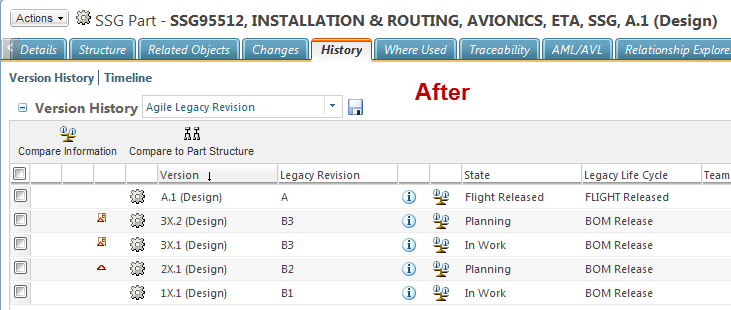
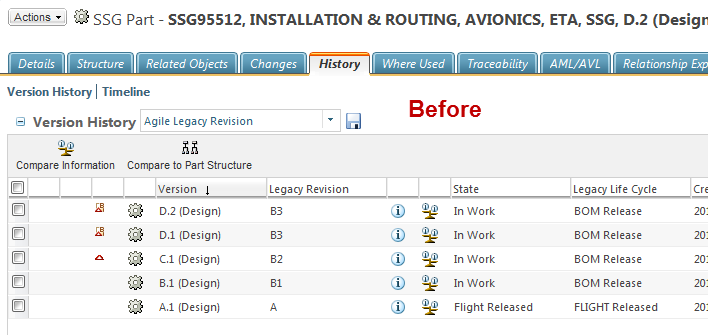
This works fine, the RevisionLabelCleanser shows no issues, however I have the "Revise" action available only on the version 3X.2 (was D.2 before the SQL change).

This means that something is wrong on my query.

This is what I know so far.

ControlBranch CB, WTPart P, WTPartMaster M:

CB.idA3B5=M.idA2A2

CB.idA3C5='0'

P.idA3masterReference=M.idA2A2

For example, this is what I used to change the version from D.2 to 3X.2:

update ControlBranch set versionId='A', idA3C5='720510629' where idA2A2 in (select CB.idA2A2 from WTPart P, WTPartMaster M, ControlBranch CB where CB.idA3B5=M.idA2A2 and CB.idA3C5='0' and P.idA3masterReference=M.idA2A2 and P.versionIdA2versionInfo='D' and P.iterationIdA2iterationInfo='2' and M.WTPartNumber='SSG95512')

update WTPart set versionIdA2versionInfo='3X', versionSortIdA2versionInfo='0000023', iterationIdA2iterationInfo='2' where idA2A2 in (select P.idA2A2 from WTPart P, WTPartMaster M where P.idA3masterReference=M.idA2A2 and P.versionIdA2versionInfo='D' and P.iterationIdA2iterationInfo='2' and M.WTPartNumber='SSG95512');

What am I missing here?

Thanks
2 replies

23-Emerald IV
March 31, 2016

Have you added the new revisions to your versioning series?  Have you updated the version sort order table?  Does your OIR specify the correct series?

Versioning scheme update

Re: Creo/Windchill revisions

1-Visitor
March 31, 2016

Hi Tom,

Thank you for the answer.

The "1X, 2X, 3X" series is an existing series and it is order before the "A, B, C,..." series.

I have attached a screen capture of the revision report and an output from SQL.

The only thing I can think about is the WTPart idA2A2 of the 3X.2 is higher then A.1.

Can this be the reason to have the "Revise" action showing up only on the 3X.2 iteration?

23-Emerald IV
March 31, 2016

Adding these extra revisions to the series does not automatically update the sort order in the database.  Run this query to view the current database sort order:

select * from SeriesSortValue order by sortId

You may need to rebuild this table.  Take a look at these related articles:

1-Visitor
March 31, 2016

Tom,

Thank you for the query.

Actually the extra revisions were already existing in the SeriesSortValue table, I am basically reusing already existing values in the series.

I figure out the issue though.

It was due to the a Partial update of the ControlBranch table. There are other columns that needs to be updated other than the VersionId.

I will post a document when I have a moment, so everybody can understand and perform the changes.

Thank you a lot for your replies

Antonio

10-Marble
April 22, 2016

Hello Antonio,

We have a similar requirement like this. Can you please let us know what are the columns should be updated in ControlBranch table. Do you see any issues after updating it?

Thanks in advance,

Saravanan

6-Contributor
August 2, 2019

hi Saravana,


can you please post your scripts.