
Turn on suggestions
Auto-suggest helps you quickly narrow down your search results by suggesting possible matches as you type.
Showing results for
Please log in to access translation
Turn on suggestions
Auto-suggest helps you quickly narrow down your search results by suggesting possible matches as you type.
Showing results for
- Community
- ThingWorx
- ThingWorx Developers
- Re: Thingworx 10 foundation installation failed !
Translate the entire conversation x
Please log in to access translation
Options
- Subscribe to RSS Feed
- Mark Topic as New
- Mark Topic as Read
- Float this Topic for Current User
- Bookmark
- Subscribe
- Mute
- Printer Friendly Page
Thingworx 10 foundation installation failed !


Oct 27, 2025
02:47 AM
- Mark as New
- Bookmark
- Subscribe
- Mute
- Subscribe to RSS Feed
- Permalink
- Notify Moderator
Please log in to access translation
Oct 27, 2025
02:47 AM
Thingworx 10 foundation installation failed !
I am trying to install Thingworx 10 using foundation installer for postgresql.
I have met all the prerequisite to install thingworx and also checked all the required configuration for postgresql required for thingworx. while installing thingworx using installer its failing in the end saying installation failed exiting now. There is not additional message provided so its kind of unknown to me why it is failing.
Key points: -
- I am not using any ssl while going through setup process.
- created required db and all the configuration is done for connection.
- all the paths are inplace
- phb_conf file is updated as per requirement.
- after exit from installation there are no residue of process so can't track the root cause.
Need help on this issue unable to install thingworx 10.
Solved! Go to Solution.
Labels:
- Labels:
-
Install-Upgrade
ACCEPTED SOLUTION
Accepted Solutions
Nov 10, 2025
06:58 AM
- Mark as New
- Bookmark
- Subscribe
- Mute
- Subscribe to RSS Feed
- Permalink
- Notify Moderator
Please log in to access translation
Nov 10, 2025
06:58 AM
Thanks @slangley for you response.
residue of previous installation gets wiped out automatically whenever installation gets failed due to unknown error and also i have set required env. variables too. but it was still happening but later even before you posted this response i was trying out different things with it and I'm thinking one of the things which worked for my installation got successful its passing the full path of variable in path instead using variables (it should work with variables too but that is what i tried) along with adding postgres path with and without bin earlier it was without bin along with some other minor things i tried which help me complete the installation successful.
10 REPLIES 10


Oct 27, 2025
03:58 AM
- Mark as New
- Bookmark
- Subscribe
- Mute
- Subscribe to RSS Feed
- Permalink
- Notify Moderator
Please log in to access translation
Oct 27, 2025
03:58 AM
Same issue:
- "Error installation Thingworx Foundation 9.1": https://community.ptc.com/t5/ThingWorx-Developers/Error-installation-Thingworx-Foundation-9-1/td-p/724053
- "Thingworx Foundation with PostgreSQL 9.1 fails on Windows Server 2019 deleting all folders": https://community.ptc.com/t5/ThingWorx-Developers/Thingworx-Foundation-with-PostgreSQL-9-1-fails-on-Windows-Server/td-p/761531
- "ThingWorx Installer fails": https://community.ptc.com/t5/ThingWorx-Developers/ThingWorx-Installer-fails/td-p/800868


Oct 27, 2025
05:54 AM
- Mark as New
- Bookmark
- Subscribe
- Mute
- Subscribe to RSS Feed
- Permalink
- Notify Moderator
Please log in to access translation
Oct 27, 2025
05:54 AM
By chance was this article of any help : https://www.ptc.com/en/support/article/CS329897?source=search
Oct 27, 2025
06:39 AM
- Mark as New
- Bookmark
- Subscribe
- Mute
- Subscribe to RSS Feed
- Permalink
- Notify Moderator
Please log in to access translation
Oct 27, 2025
06:39 AM
Thanks @remy for the article as per article i have those things in place already but still issue is there.
Oct 27, 2025
06:37 AM
- Mark as New
- Bookmark
- Subscribe
- Mute
- Subscribe to RSS Feed
- Permalink
- Notify Moderator
Please log in to access translation
Oct 27, 2025
06:37 AM
Thanks for these articles out of them one article is something has similar problem mentioned but, in my case, resolution is already the same having right language set. I'm still looking into it this time im trying to see if i can capture some logs to share it here.
Oct 27, 2025
08:43 AM
- Mark as New
- Bookmark
- Subscribe
- Mute
- Subscribe to RSS Feed
- Permalink
- Notify Moderator
Please log in to access translation
Oct 27, 2025
08:43 AM
These are the saved logs before installation got failed.
Wanted to also highlight I'm not continuing with ssl fields so i uncheck the box and also jdk21 path have been given till bin in the system variable instead of %Java_Home%. im also having JavaHome system variable.

Nov 07, 2025
08:47 AM
- Mark as New
- Bookmark
- Subscribe
- Mute
- Subscribe to RSS Feed
- Permalink
- Notify Moderator
Please log in to access translation
Nov 07, 2025
08:47 AM
Hi @Mayur_B
We would need to take a look at the installation logs. Refer to section H on this page for log locations.
If you're installing on Windows, be sure to run the installer as Administrator. Since you're having issues, it's best to open a command prompt Window (as Administrator) and run the executable with the --debuglevel 4 switch. For example:
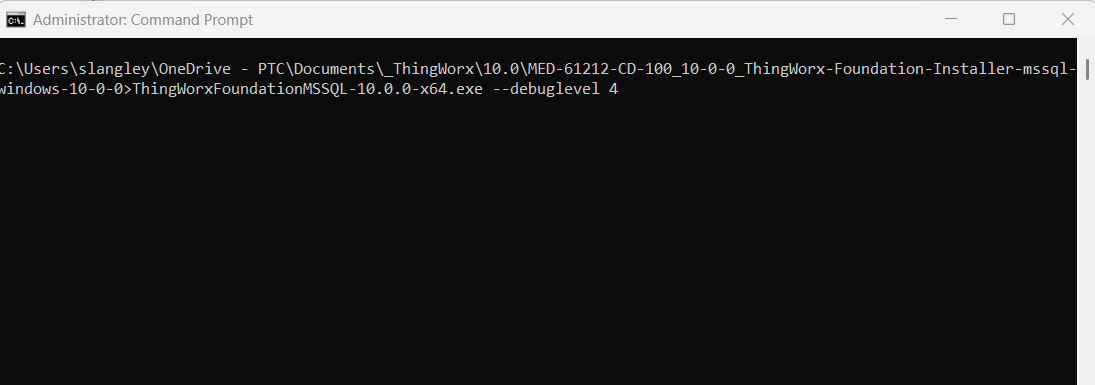
Some things to check:
- The database and database user have to be created before running the installer. While the installer is running, validate that tables are getting created. If not, the issue may be in the PostgreSQL config.
- Is the Tomcat service getting created? In some environments, restrictions can prevent service creation.
Just as a sanity check, what versions are you running of the following:
- Operating system
- Java JDK
- PostgreSQL
Regards.
--Sharon
Nov 07, 2025
10:06 AM
- Mark as New
- Bookmark
- Subscribe
- Mute
- Subscribe to RSS Feed
- Permalink
- Notify Moderator
Please log in to access translation
Nov 07, 2025
10:06 AM
Hi @Mayur_B
Apologies that I failed to see that you had provided logs in your last post. It would still be best to run the installer again with the --debuglevel 4 option as it will capture more logging that will aid in our investigation.
Also, if you are installing on a system that previously had a ThingWorx install, you may need to clean up old artifacts, such as the THINGWORX_PLATFORM_SETTINGS in the system environment variable, and any old folders. Make sure Java home is set correctly. I wasn't clear on what you were saying in this regard in your last post. If you provide a screenshot, we can validate. You also need to add the <jdk_home>/bin directory to the path.
Regards.
--Sharon
Nov 10, 2025
06:58 AM
- Mark as New
- Bookmark
- Subscribe
- Mute
- Subscribe to RSS Feed
- Permalink
- Notify Moderator
Please log in to access translation
Nov 10, 2025
06:58 AM
Thanks @slangley for you response.
residue of previous installation gets wiped out automatically whenever installation gets failed due to unknown error and also i have set required env. variables too. but it was still happening but later even before you posted this response i was trying out different things with it and I'm thinking one of the things which worked for my installation got successful its passing the full path of variable in path instead using variables (it should work with variables too but that is what i tried) along with adding postgres path with and without bin earlier it was without bin along with some other minor things i tried which help me complete the installation successful.
Nov 10, 2025
09:20 AM
- Mark as New
- Bookmark
- Subscribe
- Mute
- Subscribe to RSS Feed
- Permalink
- Notify Moderator
Please log in to access translation
Nov 10, 2025
09:20 AM
Hi @Mayur_B
Glad you got it to work.
One note.....On Windows, the logs for a failed installation are saved under the profile that ran the install. For example:
C:\Users\<userID>\AppData\Local\Temp\ThingWorxFoundation_Failed_installs\
Section H of the Help Center documents the location of all logs.
Regards.
--Sharon
Nov 10, 2025
10:59 PM
- Mark as New
- Bookmark
- Subscribe
- Mute
- Subscribe to RSS Feed
- Permalink
- Notify Moderator
Please log in to access translation
Nov 10, 2025
10:59 PM
yeah @slangley I did check that and also uploaded them in above reply.
In those logs I couldn't find main issue, but it was mainly showing errors for chef knife installation even after installing it separately it was keep failing and those logs get disappear once installation fails so it's difficult to retrieve all the logs before they get disappear but yeah it is a very helpful way to track the issue.


