Hi @HectorAtLmco ,
how did you try to copy the Vuforia Studio Project to the local machine? I believe you simple try to copy the directory form the Experience Service as project? Or did you try some other methods?
But I believe to copy project directory form the ES folder is the only one available option . We could find the folder as specified in the project section if the configuration json on the ES installation e.g.
 "projects": {
 "storePath": "D:/Vuforia-Studio-ES/studio-es-store/projects",
 "staticOps": {
 "maxAge": "1 second"
 }
So when we check the experience servrer folder it seem not to be the same - compared to the i project folder in the Studio local installation - sample project: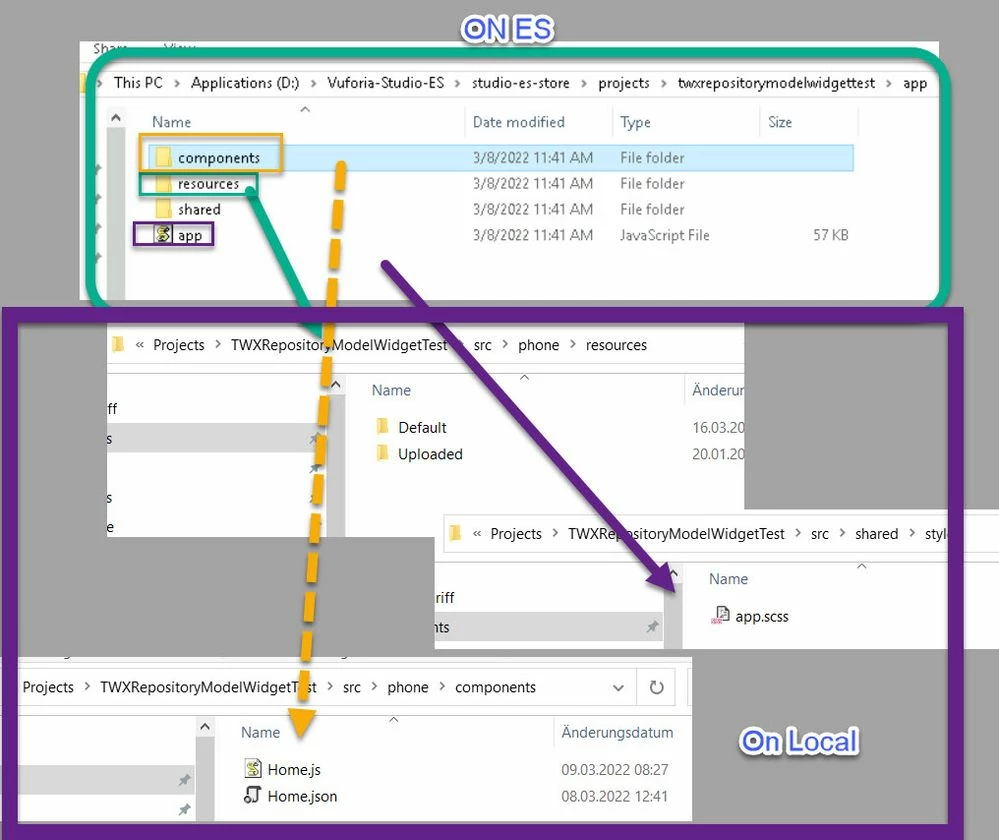
So if you do not use External data - I think the best option will be to create a new project and to replace the files /data form the mentioned folders
View.js and View.json e.g. Home.js and Home.json and all resources but also app.css file for the styles
If you have a Thingworx data then you need also Data.json, metadata.json and Device.json here in the example form the folder
Local
\Projects\TWXRepositoryModelWidgetTest\src\shared\components
ES Server
D:\Vuforia-Studio-ES\studio-es-store\projects\twxrepositorymodelwidgettest\app\shared\components
Possibly this is not the only opton available -and somebody could share it but , I used this workaround sometimes and it was working for me.


