
16-Pearl
March 28, 2019
Question

TML widget X-ray shader

  • March 28, 2019
  • 1 reply
  • 4648 views

hi there,


I tried to apply x-ray shader on model Item with TML widget

<script name="xray_green" type="x-shader/x-fragment">
 precision mediump float;
 
 varying vec3 I;
 varying vec3 N;
 
 const float edgeFalloff = 1.0;
 const float intensity = 1.0;
 const float ambient = 0.2;
 
 void main() {
 vec4 color = vec4(0.1,0.9,0.3,1.0);
 float opacity = abs(dot(normalize(-N), normalize(-I)));
 opacity = ambient + intensity*(1.0-pow(opacity,edgeFalloff));
 gl_FragColor = opacity * color;
 gl_FragColor.a = opacity;
 }
</script>
 
<script name="xray_green" type="x-shader/x-vertex">
 attribute vec3 vertexPosition;
 attribute vec3 vertexNormal;
 
 varying vec3 I;
 varying vec3 N;
 
 uniform mat4 modelViewProjectionMatrix;
 uniform mat4 modelViewMatrix;
 uniform mat4 normalMatrix;
 
 void main() {
 vec4 vp4 = vec4(vertexPosition,1.0);
 vec4 P = modelViewMatrix * vp4;
 I = P.xyz - vec3(0);
 N = vec3(normalMatrix * vec4(vertexNormal,0.0));
 gl_Position = modelViewProjectionMatrix * vp4;
 }
</script>

and the result looks like

x-ray shader result.png

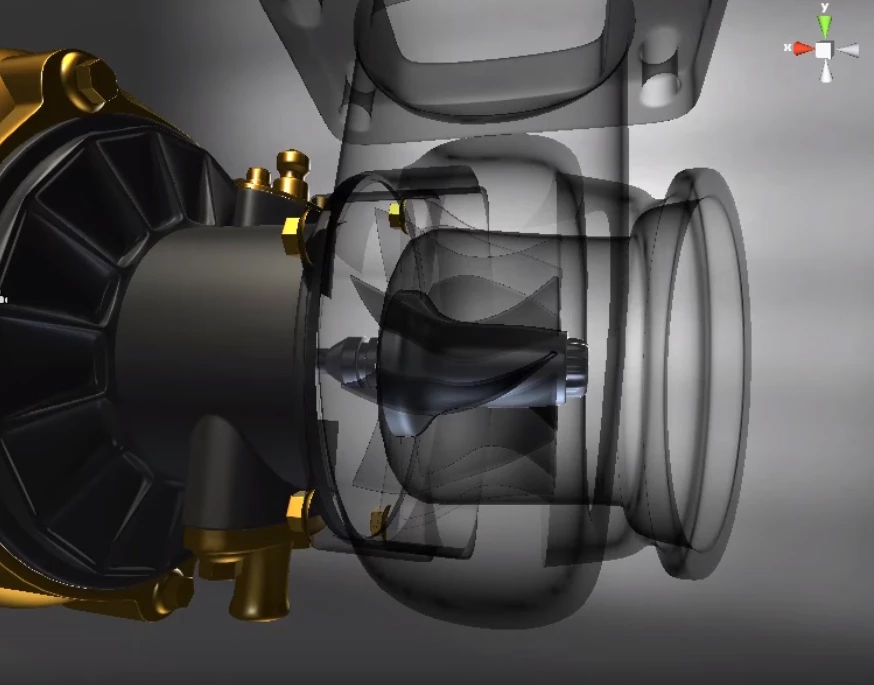
How do I get the details like this? https://www.youtube.com/watch?v=0UJt9mYSSis
x-ray shader.png

Especially the surfaces inside the structure.

Any feedback would be appreciated. Smiley Happy


ClarK

1 reply

17-Peridot
March 28, 2019

Hello Clark,


I saw that the video in YouTube is done in Unity 3D.


  • Is it the same Shader used in your example and in the demo in Unity ?

I suppose that the answer is no because in the comments in YouTube, it is explained that :

  1. It needs 2 pass to have a such result
  2. We have a combination of source and destination colors
  3. Variables in Unity to control shader and the ones in you fragment shader are not the same

If I understand well your fragment shader, we have only one pass.

More details about the graphical result with 1 pass and 2 pass (In Unity 3D but it is common to all x-ray shaders)

https://lindenreid.wordpress.com/2018/03/17/x-ray-shader-tutorial-in-unity/


In OpenGL or WebGL, multipass shader doesn't exist.

It is 2 shaders to use. The second one is using the result of the first one. 


I have this example about 2 shaders applied on 1 object in WebGL :

https://gist.github.com/philogb/3731312


But to be honest, I don't know how to port that into Vuforia Studio.

I don't think we have an access to WebGL API in javascript to control rendering pipeline.


I am asking to R&D to have more details.


Best regards,

Samuel

16-Pearl
March 28, 2019

Hi Samuel,


Thank you for the reply.

And you are right about it, the answer to your question is "no".
I got the TML content form KTMBike_v2 project files.(https://share.ptc.com/sites/sales/ic/tdd/ves/content/ktm_cad/download.html)


Looking forward to the amswer.


ClarK

21-Topaz I
March 28, 2019

OK this info is here only as summary for people who are looking for the solution of this topic

To generate x-ray like in unity the following steps:

Create a TML Text  widget:


2019-03-28_17-37-40.gif

Edit the Text property and add the following  code:

<script name="xray_green" type="x-shader/x-fragment">
 precision mediump float;
 
 varying vec3 I;
 varying vec3 N;
 
 const float edgeFalloff = 1.0;
 const float intensity = 1.0;
 const float ambient = 0.2;
 
 void main() {
 vec4 color = vec4(1.0,0,0,1.0);
 float opacity = abs(dot(normalize(-N), normalize(-I)));
 opacity = ambient + intensity*(1.0-pow(opacity,edgeFalloff));
 gl_FragColor = opacity * color;
 gl_FragColor.a = opacity;
 }
</script>
 
<script name="xray_green" type="x-shader/x-vertex">
 attribute vec3 vertexPosition;
 attribute vec3 vertexNormal;
 
 varying vec3 I;
 varying vec3 N;
 
 uniform mat4 modelViewProjectionMatrix;
 uniform mat4 modelViewMatrix;
 uniform mat4 normalMatrix;
 
 void main() {
 vec4 vp4 = vec4(vertexPosition,1.0);
 vec4 P = modelViewMatrix * vp4;
 I = P.xyz - vec3(0);
 N = vec3(normalMatrix * vec4(vertexNormal,0.0));
 gl_Position = modelViewProjectionMatrix * vp4;
 }
</script>

Important is here in the code  e.g. the line for the color definition:

vec4 color = vec4(0,1.0,0,1.0);

Here means this for a green corlor.

If you want red color you can use

 vec4 color = vec4(1.0,0,0,1.0);

for blue color  :

vec4 color = vec4(0,0,1.0,1.0)

To use the shader  definition for a  modelitem -> define a modelitem and set in javaScript the shader property:

$rootScope.$on('modelLoaded', function() { 
//....
 $scope.view.wdg['modelItem-2']['shader'] = 'xray_green_ktm';
//....
});

 2019-03-28_17-51-27.gif