
Solved
Variable not defined. Mathcad 3.0
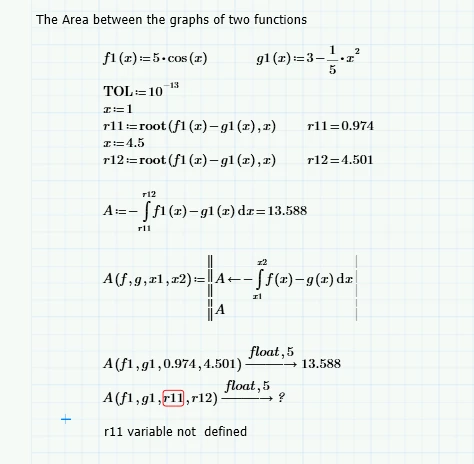
Somebody Knows why I can not give r11 to the function A?

Somebody Knows why I can not give r11 to the function A?
The reason is, as Fred already said, the (unneccessary) use of the symbolics.
The symbolics always traces back to the root of the definition of a variable and uses this for its calculations.
In your example the root is the "root" command (pun intended) and unfortunately "root" is only for numeric evaluation and can't be evaluated symbolically. So when the symbolics tries to go back to the definition of r11 it also tries to evaluate the root command, fails and that way r11 remains undefined for the symbolics.
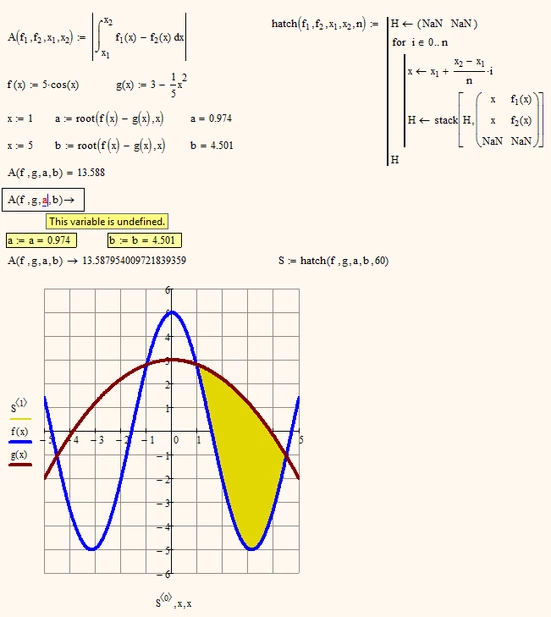
What Valery found is not a bug but just a way to break that tracing back of the symbolics. Its called numeric inline evaluation. When you write r11:=root(f,g,x)=0.974 this is treated as a simple value assignment. The symbolics does not see the root command anymore and takes the numeric value at the end as value of r11.
You can achieve the very same effect if you use the (on first sight meaningless) assignment r11:=r11=...
BTW, are you aware that there is a second way to use the root command? You can use it without having to define a guess value first but simply provide limits for the looked for value -> r11:=root(f,g,x,0,2)=0.974
Interestingly the symbolics behaves a bit different (but still not as expected) if the values are calculated that way.
Enter your E-mail address. We'll send you an e-mail with instructions to reset your password.