13-Aquamarine
February 19, 2024
Solved

Solving for a variable in MathCAD

  • February 19, 2024
  • 1 reply
  • 2373 views

Hi, 


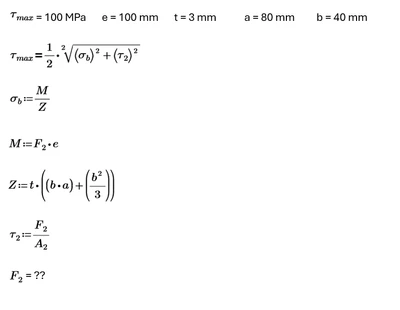
I am looking to solve for F2 in the below image, Can anyone help on how to get this working in MathCad please? 
Deepakjohsh_0-1708354235075.png


Best answer by Werner_E

@Deepakjohsh wrote:

Hi, 


I am looking to solve for F2 in the below image, Can anyone help on how to get this working in MathCad please? 



Sure! Attach your worksheet and if you are not using Mathcad but rather Prime you should also state which version you are using.

You seem to have five equations and five unknowns.

Have not checked if the equations are independent, but if they are you may either use a solve block with "find" or put the five equations in a 5x1 matrix and use the symbolic "solve" command.


EDIT: Just noticed that you have SIX unknowns but only FIVE equations! So you can expect an infinite number of possible solutions!!
Maybe you'd like to recheck!

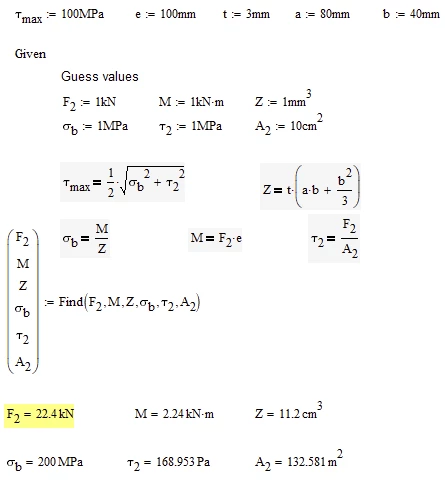
Here an approach done with Mathcad and a numeric solve block. Different guess values may yield different results, though.
Werner_E_0-1708382195393.png


1 reply

Werner_E25-Diamond IAnswer
25-Diamond I
February 19, 2024

@Deepakjohsh wrote:

Hi, 


I am looking to solve for F2 in the below image, Can anyone help on how to get this working in MathCad please? 


Sure! Attach your worksheet and if you are not using Mathcad but rather Prime you should also state which version you are using.

You seem to have five equations and five unknowns.

Have not checked if the equations are independent, but if they are you may either use a solve block with "find" or put the five equations in a 5x1 matrix and use the symbolic "solve" command.


EDIT: Just noticed that you have SIX unknowns but only FIVE equations! So you can expect an infinite number of possible solutions!!
Maybe you'd like to recheck!

Here an approach done with Mathcad and a numeric solve block. Different guess values may yield different results, though.

Werner_E_0-1708382195393.png


13-Aquamarine
February 20, 2024

Thanks a ton Werner! I have understood what went wrong in my approach.

Below is the screenshot of the mistake I had done.

Deepakjohsh_0-1708403392389.png


25-Diamond I
February 20, 2024

Yes, you have to use "Find" to solve for all of the unknowns, even though you might not be interested in them.

And you have to use the boolean equal for all the equations, not the assignment equal (:=).

But there still are too few equations (just five) for all the unknowns (six).

You can calculate Z in front of the solve block as it depends on known variables only. That way you still have four equations for five unknowns in the solve block.

Finally you may be able to let Prime find a formula for F2 which only uses the known variables plus one of the unknowns, maybe A2. So you would get a different value for F2 for different values of A2...