
1-Visitor
November 27, 2011
Question

Conch shell in Creo Parametric

  • November 27, 2011
  • 28 replies
  • 9057 views

Hi all

how about this one for a problem to solve.   I am trying to create a conch shell using the helical sweep tool, I can do it so far and then I hit a brick wall namely my mathematical ability, or should I say lack of mathematical ability.  The conch shell is creted in nature obeying rules that can best be described by the using Fibonacci principles.  That is the bit that beats me.  Using the Vary Section option I can create a pseudo conch shell. See below
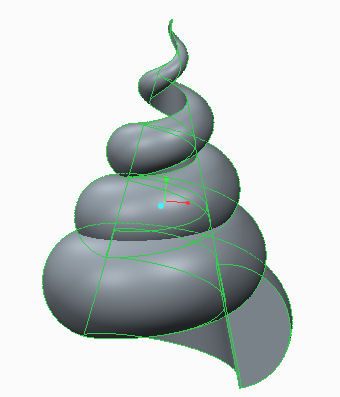
conch1.jpg

What I would like to do is now vary the pitch so that it changes related to the fibonacci series.  Has anyone any clues to how I might do this.  The Hel;ical sweep has a variable pitch function in Creo Parametric by setting a series of points along the profile curve axis.  If I can set the points in the ratio of 1.618 , the golden section I think I can do it.  Am I on the right track?  I attach my Schools Edition file just in case anyone else would like to play.

    28 replies

    12-Amethyst
    November 29, 2011

    JohnF,

    I think we have some helical sweep experts (@VladimirPalffy, @GregFrankland, @ChristianSmith, @DavidButz) that may have an answer.

    -Dan

    JohnF1-VisitorAuthor
    1-Visitor
    November 29, 2011

    Hi Dan

    Can I contact these gods of trajpar direct?

    12-Amethyst
    November 29, 2011

    You can most certainly network with them by sending a PM (Private Message) or Adding them as a friend. I sent them all a personal note asking if they could help you out when they have a free moment, also by referencing their names within a post, it sends a "Mention" notification alerting them that they may want to be part of the conversation. It's kind of like the Bat Signal

    JohnF1-VisitorAuthor
    1-Visitor
    November 29, 2011

    How do get my Bat signal to work?

    12-Amethyst
    November 29, 2011

    Here's a little trick.

    I'll reference you in this post, JohnF

    Now, when you look at your Homepage Community Activity feed, you should see the Mention which looks something like the below. Click on the Mention tab and you'll see everything in context.

    Mention.png

    1-Visitor
    November 30, 2011

    Interesting situation! Unfortunately I cannot read the student version to see what you have tried thus far. Can you explain a little more what you have done in the file attached? Are both the pitch and the section diameter affected by the same 1.618 ratio?

    JohnF1-VisitorAuthor
    1-Visitor
    November 30, 2011

    Hi Gregory

    The spiral was created using the Helical Sweep tool in Creo Parameteric with a constant pitch but using a surface cone to which the section was locked by a tangent using tehVary Section option in the Helcal Sweep tool.  As you can see from the image this creates what looks like a conch but because I cannot vary the pitch geometrically/parametrically it does not create a proper conch spiral or equiangle spiral. The pitch needs to change by 20% per revolution roughly however the math is somewhat complex.  I think I willhave to use a Sweep and create the path via trajpar function and vary the section somehow using a relation.  So far all I am managing to do is confuse myself!!  Hope you can help.

    Regards   John E Forth 

    18-Opal
    November 30, 2011

    Hi all,

    I have converted the data from educational to commercial.

    http://apps.ptc.com/schools/conche.prt.1

    The file is Creo 1.0 Parametric.

    Thanks,

    Mark

    1-Visitor
    November 30, 2011

    We (Roger, John, Lino, and I) played around with the idea using Mathcad Prime and Creo. A Mathcad function is used to generate the Fibonacci Sequence and the (x,y,z) coordinates for a spline curve based on Fibonacci. These coordinates can then be used to generate conche geometry in Creo Parametric.

    Mathcad Creo Conch.png

    24-Ruby III
    December 1, 2011

    This is interesting.