
1-Visitor
February 18, 2020
Question

Cabling Parametric Example?

  • February 18, 2020
  • 4 replies
  • 23561 views

I used Pro-Cabling/Pro-Diagram for many years (10-12) with both Wildfire and the initial releases of CREO.  I am with a new company and trying to sell them on parametric harnessing (for many years they have used line entity drawings in Autocad and manually filled tables).  

I have been running a trial of Schematics/Cabling and have eaten up much of the trial simply getting things functional.  I have zero references to use to prove this out, as my previous employers files were proprietary.   

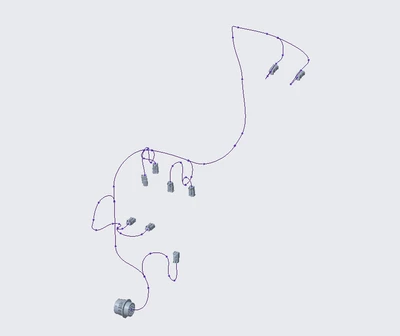
I have my connectors placed and bundles routed and split as necessary (pic below), but the out of box library is missing so many spools I cannot make the proper schematic. The schematic I want to do would be pretty basic.  I have placed my connectors using the connector groups but cannot find any reference for 2 node splices and cannot figure out how to change connector node from numeric to alpha (for 23 pin Deutsch HD).    If I had something to go from, I am confident I could stumble through it, but I'm a bit overwhelmed with the changes to the Cabling and schematic modules made since I used it about 5 years ago.

I've done some digging here and really am not finding much (surprisingly) and what I am finding, the uploaded files have expired and are not acquirable.  Does someone have a schematic, model, flattened mfg file, and parametric drawing with connector tables/BOM/CDT/etcetera that they can share? or can someone point me to where to find this?

Thanks in advance,
Kevin
harness.png


4 replies

15-Moonstone
February 18, 2020

I am not a Pro-Cabling person and am only tangentially connected with Pro-Diagram.  Pro-Diagram has been considered obsolete for a long time, having been replaces with Creo Schematics.  What I do know of Pro-Diagram is that you need to create your own Spool files and Terminator files.  The terminator files match up the terminals with the connector and wire sizes.  

I have good knowledge of Creo Schematics and both of those functions are handled internally to Schematics and made part of the XML transfer file so that the Spool and Terminator files are not needed for Pro-Cabling.

The spool files are easy, with just the basic information for the wire.

The terminator files contain logic in them and I hope that the ones we have are not typical.  The person who set it up couldn't find a way to match both the amount of copper and the insulation diameter so everything is based on insulation diameter +/-0.001.  


1-Visitor
February 18, 2020

is there an easy way to create spools based off of the existing spools in the trial library?  I've heard of being able to modify the CSV file in excel and being able to copy and change the appropriate values, but I cannot find where that CSV file is...even with a *.csv search of my directories.

15-Moonstone
February 18, 2020
You probably won't find any CSV files. CSV is frequently just a commonly used "format" for editing text files with fields delimited by commas (The C in CSV).
The spool (SPL) files are just text. Looking at one, it uses tabs as delimiters rather than commas.
You can open them in any software that can handle plain text. I opened the following one in Notepad. Copy the file to the new name, open it, and edit whatever you need.
If you are doing a lot of these, it could be easier to create tables of data in Word or Excel and paste the resulting text into blank SPL files.
Note: "spaces" between fields (all caps items) are actually tab characters.
File name is txl16r.spl

! Enter or modify parameters for the spool.
! You may use the help functionality of Pro/TABLE
! to enter pre-defined parameters.
! Spool Name
NAME TXL16R
! Spool Type
TYPE WIRE
! Color
COLOR RED
! Insulation Type
INSUL_TYPE TXL
! Minimal Bend Radius
MIN_BEND_RADIUS 0.03
! Wire Thickness
THICKNESS 0.085
! Units
UNITS INCH
! Wire Gauge
WIRE_GAUGE 16
! Color Code (for reports only, does not affect display)
COLOR_CODE R
AREA .0016

17-Peridot
February 18, 2020
1-Visitor
February 18, 2020

The attached image is with this method, which I was able to carry over from my experience.  The bigger part of my question is that I need parametric tables to be able to crate and link my flat to the model and was hoping someone had an example, so I could just copy and paste the tables over and then use the appropriate parameters in my own model to populate them on the drawing.  (The schematic portion can wait for purposes of selling this to my management)

14-Alexandrite
February 21, 2020

Hi,


I had also lots of problems when we had to start doing cabling with Creo. First thing was that we have the cabling module but it only includes the lite version of the Schematic. Trying to use the Schematic was a pain. There were only few example components. Next problem was making the cable drawings. Tutorials suggest to use the HMX-module for making drawings... Yet another separate license that we don't have. So manual layout it is... Which is not too bad for simple cables.


Anyway, since my backgound is in electronics design, I decided to use Kicad for the schematics to generate the logic xml files. I am more familiar with using a PCB design software for drawing schematic diagrams. Attached are the design files for a demo cable, schematic and drawing. Hopefully they can be opened... Creo files are for version 4.0. Kicad files are for the latest version of Kicad. The kicad scripts, component library  and a short description can be found at https://github.com/lassefyr/kicadToCreo


One idea of this post is of course to promote a free alternative to making schematics for creo. Hopefully someone with more resources would branch a better Kicad scipts and components library (read "less bugs and more features") someday.

15-Moonstone
February 21, 2020
Creo Parametric lite is limited. Looks like they want people to try it out but not use it regularly.
https://support.ptc.com/help/creo/creo_schem/usascii/index.html#page/Schematics_hc/Limitations_of_Creo_Schematics_Lite.html

The big item is not being able to use a Central Catalog (library of parts that can be shared).

The library is huge for having consistent designs. Without it, you cannot (in theory) use a part in more than one design.
You can fake it by creating a "library" design. You create all your parts in it and then create copies of it to make new designs.

We have the full package and don't know how some of the other limitations affect things. Here are my quick notes on some of the limitations that I understand.

We don't use more than 10 sheets.
I find draft groups mostly useless.
Reordering two groups simultaneously is nice but you can do then sequentially.
Never wanted to import or export a CGM file.

Design properties files are useful for setting up properties. Big but not as big as central catalog.
Export to PDF is important to pass the design on to other people
Java can be very useful for more advanced things but takes some work to learn
13-Aquamarine
February 29, 2020

Hi Kevin...


It sounds like you're significantly in the weeds - especially with configuration of Creo Schematics. I can help with this. Typically, I do this work as a consultant but I can probably help point you in the right direction. One large example with all the moving parts is only going to take you so far. There's a good bit of specialized knowledge you'll need to really get Creo Cabling and Creo Schematics working properly together.


You've asked quite a few questions - do you have a place to start? What's your biggest hurdle right now. Let's clear that one - and then we'll start clearing the others. There is plenty to learn, that's for sure.


Thanks!

-Brian


PS: Someone said they had too much trouble with Schematics so they started using another CAD system. Noooooo... don't do that. If you really can't decipher Creo Schematics, there are much, much easier ways to route wires and harnesses all using Creo. If that's required, I'm happy to dig into that, too.


14-Alexandrite
February 29, 2020

Hi,


I must disagree a little with the previous post.


In my opinion... Please always use any schematic tool to create the harness diagrams. With visual tools it is much easier to read and to maintain your design.


There are many schematic programs that also generate Creo compatible logical wire lists (e.g. Zuken, Mentor etc). We decided to use Kicad. An added bonus with another CAD system is that you can usually export the netlists to competing CAD systems too (e.g. Solidworks). There is no need to recreate component libraries and spools.


Actually, since Creo Schematic is just a stand alone schematic program, you can also convert Creo Schematic data to Solidworks on any other 3D cad that has well-defined logical wire list format.


Br,
Lars

15-Moonstone
March 2, 2020

Lars (trainee) is making a big point.


Every time you need to manually translate the connections, it will be a source of errors.
If you are coming from or to a system that does not show the circuits, it is harder to see them.

There is a reason harness design packages are moving to hybrid schematics.  A hybrid breaks away from the true schematic that lines do not represent signal groups.  They represent the actual signal connection.  The documents for Creo Schematic still lean heavily towards true schematics (CID in PTC speak) being converted to Wiring Diagrams (WID) with software help to do the conversion.  Schematics can do a hybrid by making the wiring diagram symbols be the schematic symbols.  You place the symbols and attach wires directly to them.   No conversion to accidentally change a connection.  I have converted harness designs that were done from separate schematics and found significant differences in the circuits.  
According to the former (now retired) product manager for Schematics, almost all the U.S. users of Schematics use it to do hybrid designs.