
1-Visitor
August 3, 2021
Question

Cannot solidify (remove material) with copied surface

  • August 3, 2021
  • 4 replies
  • 9006 views

Hi,

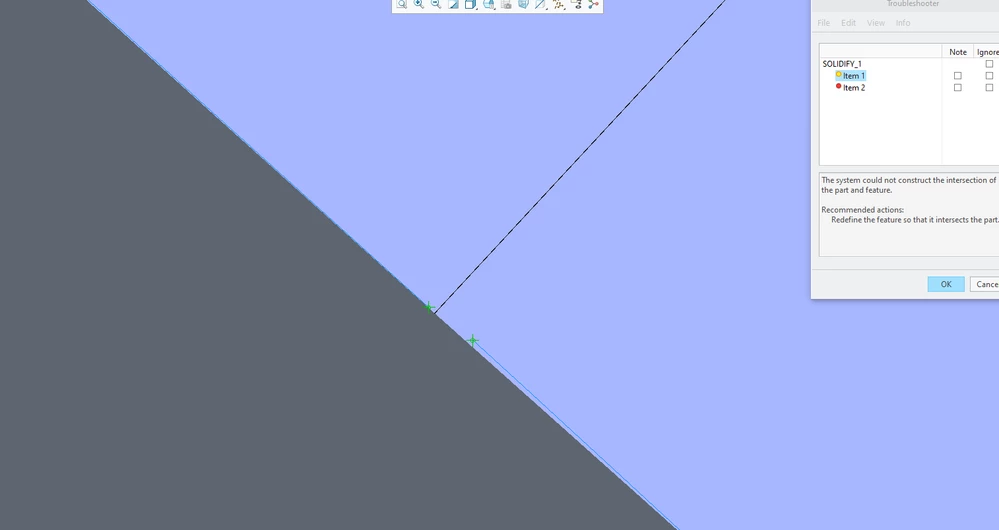
I've got a huge problem with solidify operation in Creo Parametric 7.0. In general I have the solid body (usual rectangle made by Extrude) on which there's a varius-shaped surface that was created by copying geometry from the STEP file. When I'm trying to trim protruding parts of extrude by solidifying (with remove material option enabled) I've got the following error
2021-08-03_20h21_35.png

Please note that the green vertexes are not joined and there's a little bit place between them (the picture above has been zommed in much enough inside Creo in order to show this situation). These vertexes make my part unable to solidify which is visible in the picture. I tried to fix the STEP in Data Doctor. The Geometry Check option (in import DataDoctor tab) doesn't show any bad stuff on and in proximity of my copied surface. Therefore I've no idea why cannot perform the operation. Do you have any suggestions? Of course I'll provide more information about this problem if necessary.

Thanks in advance for all replies! 

4 replies

Patriot_1776
22-Sapphire II
August 3, 2021

Can't see well enough to tell what's going on.  BUT, you might need to tweak your Absolute Accuracy (don't use Relative Accuracy).  Also, try extending the edges of the surface to make sure they protrude out from the solid.  maybe even as little as .010 will do.


Best of luck!

cadbart1-VisitorAuthor
1-Visitor
August 3, 2021

Thank you for your reply! Yes, i forgot to write that all edges protude from the solid out. Please look at the picture below 
2021-08-03_21h48_44.png
Now you can see that the surface is bigger than the solid and the egdes are actually out. You can also see the vertexes on the front and left side of the solid rectangle (in the picture I'm still inside Solidify). I tried to find some gaps inside the STEP by using Find (Tools > Find) option but even in 0.0001 scale there's no gaps. This purple surface which you can see in the picture above is a little part copied from the STEP. A I mentioned earlier - IDD wasn't show any imperfections on this part. This looks like an internal error of Solidify operation. 

Patriot_1776
22-Sapphire II
August 3, 2021

Something's wrong with the surface then.  I'd delete it, change the part absolute accuracy to .0001", then if I remember there is an option for importing where you can use the accuracy of the the part you're importing into, and try that.  If that doesn't work, you may have to recreate that surface internally with a boundary blend.

tbraxton
22-Sapphire II
22-Sapphire II
August 4, 2021

Post the STEP file so that it can be queried in detail inside Creo. I suspect that the purple surface is not a closed quilt but I can not tell without looking at the data set in Creo.

Patriot_1776
22-Sapphire II
August 4, 2021

Well, it looks like an open quilt, but that doesn't appear to be the issue since quilts don't need to be close to use to cut solids.  It looks like either the quilt has a tiny sliver opening in it or actually collapses onto itself and that's the problem.

cadbart1-VisitorAuthor
1-Visitor
August 4, 2021

Thank you both for reply! The problem is the STEP geometry is hugely complicated and it's hard to see any imperfections. But what about fixing copied surface not the STEP geometry? Is there a way to repair copied surface's vertices which Solidify showing as an error instead of fixing STEP geom?

15-Moonstone
August 9, 2021

In our Engineering group we just updated to version 7.  We have been observing some issues with Solidify using a quilt which integrates into a customer STEP model.  The geometry was very complicated but it did Solidify in previous versions.

Patriot_1776
22-Sapphire II
August 9, 2021

If you can show using the exact same geometry that there is an issue using quilts to cut solids in Creo 7 vs Creo 6, please forward that to PTC ASAP, as then it IS a software issue.


Now, here's something:  If there is a dramatic change to Creo from one version to another, say, Creo 6 to Creo 7, then you should make ALL NEW start parts.  I did when going from Creo 3 to 4.  I've read that using old start parts can cause issues.  It SHOULDN'T, but then there's a LOT of things Creo "shouldn't" do in general...  😉

Patriot_1776
22-Sapphire II
August 18, 2021

Any resolution on this?  Did you find a solution?

15-Moonstone
August 18, 2021

Myself personally I have not run into this really frequently.  The one case that I ran into I was able to resolve by tweaking the geometry.  My co-worker ran into this once as well, but it hasn't been obvious.  The part that it's failed with is such where there was construction was a dirty quilt work around which eventually was subtracted from the solid.


If I find a really obvious example of failure with version 7 I will certainly push this issue further.