

1-Visitor
September 16, 2015
Solved

converting negative space to positive and positive space to negative

  • September 16, 2015
  • 3 replies
  • 7274 views

Hello everyone, I have modeled a solid block and extruded several holes (think swiss cheese) and now I'd like to reverse the fill volumes and make the negative volumes (the holes) filled and the positive volume (the block) negative space or unfilled. Is there a way to do this? I'm using Creo Parametric 2.0. Thank you!
Best answer by MartinHanak

Kyle,

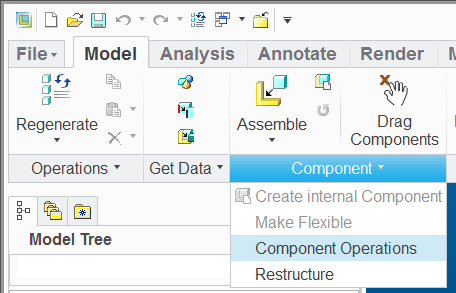
you can use Cut Out command available in Assembly mode (under Component operations). See uploaded data created in CR2 M070.

cutout.png

MH

3 replies

1-Visitor
September 17, 2015

You could do it using surface copy, merge, and solidify to create the geometry inside of the holes and remove everything else. I'm curious as to what you are trying to achieve?

1-Visitor
September 17, 2015

if you just need to calculate volume....extrude a surface with caped ends using the edges of the holes. to keep your model clean you can hide the surface in the model tree (remember to save status), push to a layer or suppress it, you might want to name it if you go the suppress route.

24-Ruby III
September 18, 2015

Kyle,

you can use Cut Out command available in Assembly mode (under Component operations). See uploaded data created in CR2 M070.

cutout.png

MH

1-Visitor
October 2, 2015

Thank you, that worked well. I was trying to create the negative in order to 3D print and use it as the die to create a mold. I appreciate your assistance as well as that of everyone else.