5-Regular Member
July 29, 2022
Solved

creating 3d curves for sweeps to create pipes, tubes, round forms from a Top Assembly

  • July 29, 2022
  • 3 replies
  • 15894 views

Spending way too much time creating multiple sketches in order to make a compound curve that will get extruded/swept to make a shaped tube, round, wire, etc. Ultimately a drawing is needed to manufacture such "Tube/Round" so geometry has to be clean. I use points to generate curves but that is time consuming just trying to figure out how to make the curve since they never are on a single 2D plane.

 Creo 8 & 9 basic is being used, no access to advanced surfacing or Rex tools. I am curious how many would approach this and not use external modules like Piping.

 Example: You have an assembly with various components that need tubing connecting them or round bar. 

You generate simple sketches within assembly in order to make this path/shape. Ultimately you get mismatched curves and many sketches on various planes only to find out the sweep tool will not generate the form because of various alignments, gaps (some extremely small) and you chase yourself around to fixing them. The entire assembly did not take long to design (Top-Down) but i find myself spending 10X that time just to make a tube that follows specific paths and assembles into tube fittings?


Any help here?

Thank You

Best answer by tbraxton

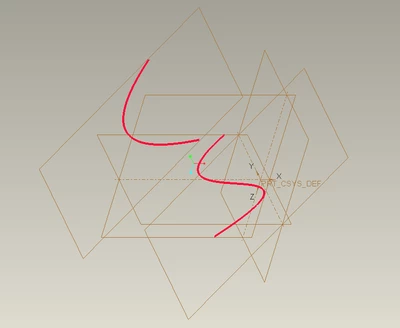
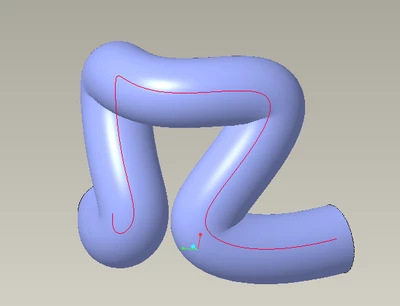
Here is a quick sample model (Creo 7) of how to use two planar curves to generate a 3D curve. If you can sketch on two planes to create the route this will work and is quite robust. You do need to insure that the curves actually intersect when you do this. If you need a visual cue when working then just extrude a surface from one or both curves.


Create two planar curves that represent the routing path projected onto a plane. I used splines for each planar sketch in this example. They do not have to be splines but the intersection of the curves should maintain G1 (tangency) or higher continuity to be a robust sweep trajectory.


tbraxton_1-1659211006671.png


Intersect the curves to generate the sweep trajectory 3D curve


tbraxton_2-1659211070513.png


3 replies

23-Emerald III
July 29, 2022

Piping/tubing/hose routings have always been pretty tedious. I haven't done much recently but in my past I used the piping module, which has become routed systems. But I have done some with intersecting curves and points from a coordinate system and it is extra painful. I really don't believe there is a cure for it. If I remember correctly, I decided that a curve thru points was my preferred method. That was likely due to when I did the drawings for the tubing, I had to have all that data anyway.

I would typically try to keep my external references to a minimum and mostly within my pipe or hose assy component and then in the long run I would break all the external references once I finalized my routings. Wish I had better advice for you.


For some reason, I thought that basic piping module was part of the foundation package or maybe advanced assembly, but I don't ever have to deal with licensing so I am possibly mistaken. Even with the piping module, its doesn't make the modeling much faster. But it does make the overall experience more pleasant and a little less tedious. It's much more like sketching a curve in 3D and does eliminate the hassles of intersecting curve issues.

kdirth
21-Topaz I
21-Topaz I
July 29, 2022

For "soft" routings I generally use a spline through points.  That would be for hose, wire, cable, etc.


For more controlled "hard" routings I use one of two methods.  That would be for rod, pipe, metal tubing, etc.

  1. Intersecting 2 sketches
  2. Curve through points with straight lines and added fillets.
  3. I have also seen sketching sections with end curves on planes as needed.

kdirth_0-1659124396493.png


There is always more to learn.
tbraxton
22-Sapphire II
22-Sapphire II
July 29, 2022

This illustrates 3D tube routing using the method (intersection of curves) mentioned by @kdirth above. All of these tubes are CNC bent and laser cut to join the cylindrical connectors. It works quite well for 3D routing problems but can be tedious. All of the 3D routes seen here were created by intersecting two planar curves to create a 3D curve. A skeleton model is used to manage constraints such as min bend radius on the tubing so the sweep trajectories are on the center line of the tubing which makes programming the CNC bender faster. It looks quite rudimentary but is not trivial to model with all of  the constraints.


tbraxton_0-1659125814593.png


5-Regular Member
July 29, 2022

Thank you to all that have replied. I really do appreciate the efforts!


I have been using the curve thru points and adding fillets when possible or needed.

Again, thank you. I am familiar with this technique but find it very similar to generating sketched curves. (tedious)

That seems the easiest but also has the same problem of generating points in 3D model space.

In the diagram shown I see 4 sketches but do not see how that generated your complex curve and or points?

Perhaps I am not so fluent in the curve intersecting routine. I do like the points for drawing dimensioning aspects.

Those can be generated easily from a completed tube-form.

Is there any chance a file could be shared for the illustrations sent above (kdirth)? Or a good You Tube link.

trail file/video or something. That is a pretty good example.

I do not see anything well guided in the E-learning library sadly.

Thank You,

Eric.


tbraxton
22-Sapphire II
22-Sapphire II
July 29, 2022

I am not able to post that model. If you have a representative test case for your routing that you can provide (Creo 7 or earlier for me) then I could use that as an example for curve intersection if it is applicable. It can be as simple as the start and end of the route and any geometry to navigate around. I may have an example I can post, I will have to dig through some legacy data to check.