10-Marble
January 28, 2026
Question

Help with Tolerance Tables

  • January 28, 2026
  • 3 replies
  • 524 views

Hola -

Longtime Creo/WF/ProE user (2000i2). Having an issue with fit tolerances using the tables. I've configured both the part and drawing to use the tables.


Problem example:

I have a 20mm shaft for a bearing; recommended shaft fit is h6. For a 20mm dia, h6 is:

+0

-13.


In inches, that is + 0, -0.0005". So the drawing should show 0.7874/0.7869 if I show limits.


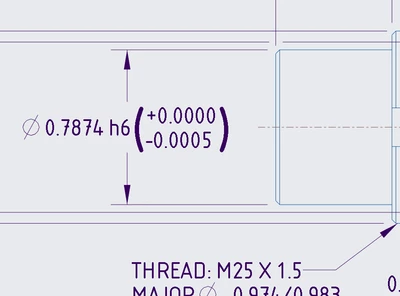
I set the diameter to nominal, 0.7874. I apply an h6 tolerance.

If is specify plus/minus, the dimension appears at 0.7874 + 0.0000 / -0.0005 (perfect!)

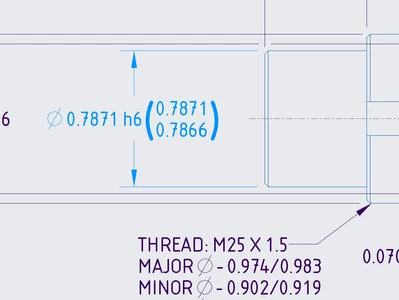
If I show 'limits', it changes to the nominal 0.7871 and then applies the -.0005 to that, so 0.7866. This is wrong.


What am I doing wrong?
peterbrown772_0-1769631316771.png

peterbrown772_1-1769631357660.png


TIA

3 replies

22-Sapphire II
January 29, 2026

I was able to replicate the issue in Creo 7 in both SI and imperial units models. Creo is shifting the nominal value of the dimension but the limits from the shaft table are calculated accurately, they are just not displayed/stored with the dimension in the model. The limits shown in yellow are accurate from the table but the nominal in red is shifted from the staring value. If no one provides a resolution here in the near future, you should open a tech support case.


tbraxton_0-1769650988151.png


10-Marble
January 29, 2026

I have opened a support ticket - 

15-Moonstone
January 29, 2026

I confirm the same behaviour in Creo 8.
To fix the issue, add one step: set tol tables to 'no' and only then switch to 'limits'


Snap-2026-01-29-001.jpg


Snap-2026-01-29-002.jpg


Snap-2026-01-29-003.jpg


The following dimension format does not comply with any standards, afaik.

And the program should not and is not required to support the automatic generation of such a dimension format

Snap-2026-01-29-004.jpg


10-Marble
January 29, 2026

I'm not quite understanding your solution nor the statement "


The following dimension format does not comply with any standards, afaik.

And the program should not and is not required to support the automatic generation of such a dimension format"

15-Moonstone
January 29, 2026
I meant that ISO tolerances for dimensions specify how much the measurements of a part can deviate from the nominal value. In other words, by specifying the tolerance class, you indicate the deviation from the nominal value, not the limit values.
Why specify the nominal value + tolerance class + limits instead of deviations from its nominal value, as required by the ISO ?
19-Tanzanite
February 2, 2026

Hi, I think you can get the dimension to behave the way you want if you set the config.pro option maintain_limit_tol_nominal to yes:

pausob_1-1770013546053.png


pausob_0-1770013462054.png

(seems the same outcome if you set maintain_limit_tol_nominal option to the value "tol_tables") 

10-Marble
February 2, 2026

Agreed, that does maintain the nominal when showing LIMITS.


However, I need the geometry to move to the median yet keep the tolerance range accurate. e.g., 0.7874 h6 move the geometry to 0.7871 and show the limits as 0.7874/0.7869. It is completely wrong for Creo to move the geometry to median and THEN apply +0/-0.0005.


Regards

19-Tanzanite
February 2, 2026

I see.  So sounds like you need to use the Analysis/dimension boundaries function to "force" this dimension to be at the middle value between its limits:

pausob_3-1770058542736.png

Then you end up with the standard looking shaft fit dimension and also the geometry you want:

pausob_1-1770058342617.png

Note in my color scheme, dimensions are typically green, but you can see above it is in the cyan color because I forced its value to be in the middle:

pausob_2-1770058442455.png