

1-Visitor
August 4, 2012
Solved

How do you extrude a surface with draft from an edge?

  • August 4, 2012
  • 2 replies
  • 12429 views

This one has me a bit concerned. I'm not seeing how it is possible to extrude a surface at an angle base off an edge.

When I try to do this as an extrude operation I see that there is only the option to extrude from a sketch.

Many times it is necessary to extrude non-planar surfaces either based off of an edge or a curve.

Perhaps this can be done through a surfacing tool but I haven't found it yet.

I'm certain that this has to be possible. I'm hoping someone with experience can lend a hand.
Best answer by Bari

What about a sweep or variable section sweep? It will allow you to define the profile with the required angle and the edge is your trajectory (trajectory has to be tangent for variable section sweep).

qw.jpg

Hope it helps.

2 replies

1-Visitor
August 4, 2012

A picture would help. However, from what I understood. The following video would help.

Video Link : 3196

dellens1-VisitorAuthor
1-Visitor
August 4, 2012

Thank you for your demonstration. Unfortunately this isn't the type of application I'm looking for.

I will attach an example of the issue I'm trying to resolve.

In the attached you will see 3 different labels.

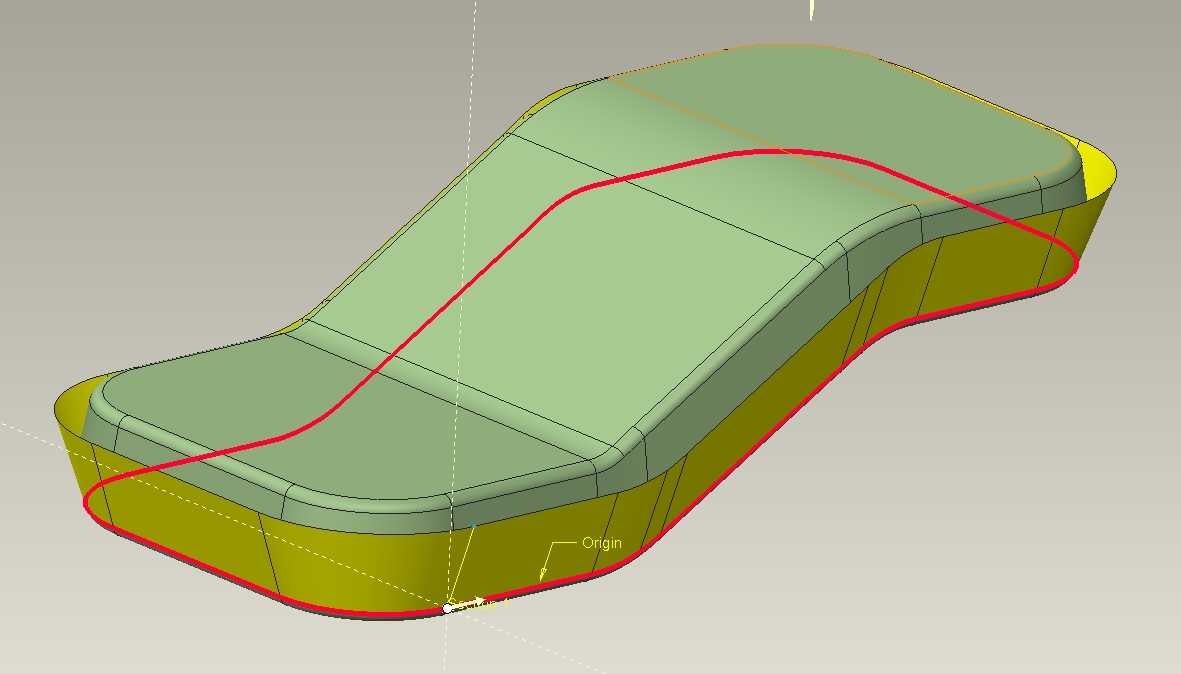
SKETCH: I wish to develope a parting line with this sketch but there is a negative draft in the twisted parting line of the customer model (in the area where the sketch intersects into the model).

PARTING LINE: In the area with the label this would be negative draft if viewed from the bottom view. This needs to be pulled out a specific distance.

EDGE: This is the edge in which I'd like to extrude draft out to intersect with the depth of the parting line. I would transfer this new location into my sketch to obtain a parting line split that will be drafted both ways in the Z direction. The resulting drafted extrude will not remove material in the area of the EDGE. The draft will not be negative in either direction of the split.

The obvious way to move out my parting line sketch in the area shown would be by developing a drafted extrude off the specified EDGE area which would be intersected out on a parting line surface and be referenced into the sketch.

Is there any way I can get the needed drafted extrude?

NEED EDGE EXTRUDE.jpg

17-Peridot
August 4, 2012

Do you have the advanced surface extention?

Regardless, I would considere a Blend making sections in both (multiple) planes required to account for the draft. The sweep sections could be driven from a "draft" sketch in a plane normal to the sweep sections. For a more complex solution, a Swept-Blend might be more appropriate.

Can the feature be created easier without draft and drafted in a separate step?

I am not seeing exactly what you are doing.

dellens1-VisitorAuthor
1-Visitor
August 6, 2012

I appreciate everyone's help in this thread. There are some useful ideas for other applications. After a lot of thinking I did discover a solution even though it did require extra steps. There certainly is a price to pay in learning the software. We are banking that with Creo's top rate tangency controls and parametrics that we will eventually end out much ahead.

My need was to extrude with a draft on a specified locked edge. This is what I needed to do to accomplish this:

1) Build sketch using profile of the needed edge.

2) Extrude this sketch in the Z direction

3) Draft this extrusion using the imported models edge as the hinge.

I still am crossing my fingers that eventually Creo will be able to extrude directly from an edge.

Solution.jpg

1-Visitor
August 6, 2012

hello

why don´t you create a plan with the angle you need, then you create another plan 90º from the first.

if you creat a sketch from the second plan, (using the project tool,and select the edge), when you extrude it will be with the correct angle...

2.jpg

you can also create a skirt surface (only on .MFG) and give the direction you want

You could also creat a flat surface, than you could add a draf split the draft from the

1.jpg

Hope it helps...

Pedro Neves