1-Visitor
June 11, 2014
Solved

How to proceed from here,having trouble with surfacing.

  • June 11, 2014
  • 4 replies
  • 4941 views

Practising surfaces,can't seem to find solution from here,did i paint myself into a corner?
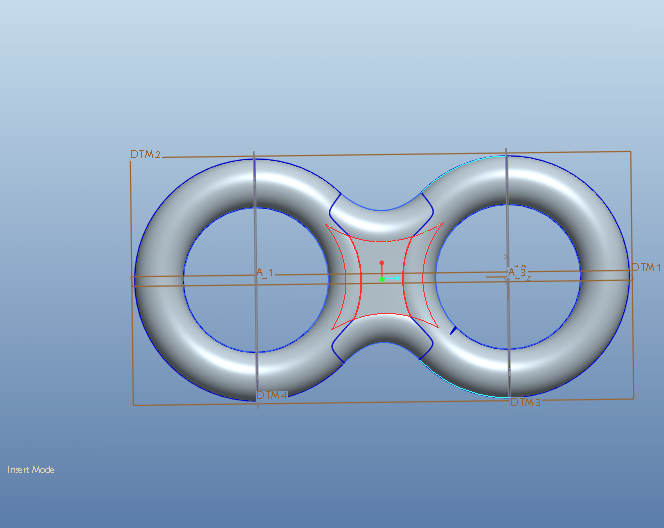
2014-06-11_232536.png

It should be something like this.

ring.png

Here is the prt file

Best answer by MauroStefanovic

Here attached the best i can. Tangency and normal costraints everywhere.

Interested in how to get curvature continuity everywhere.

4 replies

17-Peridot
June 11, 2014

Oh, now that's a dangerous challenge

gkrishna1-VisitorAuthor
1-Visitor
June 11, 2014

Problem is there has to be tangent surface connecting those 2 rings without that little collapse.

1-Visitor
June 11, 2014

Here attached the best i can. Tangency and normal costraints everywhere.

Interested in how to get curvature continuity everywhere.

1-Visitor
June 11, 2014

Cattura.PNG

Here a screenshot

17-Peridot
June 11, 2014

ptc-4684141 wrote:

...

ring.png

...

It appears that the center is not flat. Like it somehow has to merge with an oval(ish) X and Y section.

Patriot_1776
22-Sapphire II
June 11, 2014

Why surface it, it appears you can achieve this with solids.

Edit: I just did it with a solid and a rnd containing 3 sets of full rounds. 2 features. I'm assuming it's toroidial on the ends?

17-Peridot
June 12, 2014

Here you go Frank... (Creo 2.0)

fat_middle.PNG

This is really a challenge without the advanced surface extension.

Indeed, 2 features will make the basic part. This one has a center "bulged".

Warp can do this too but not as controlled.

gkrishna1-VisitorAuthor
1-Visitor
June 12, 2014

Your method is sweet too,didn't thought of this way when i started,all i was doing was going through the imported feature.