Question
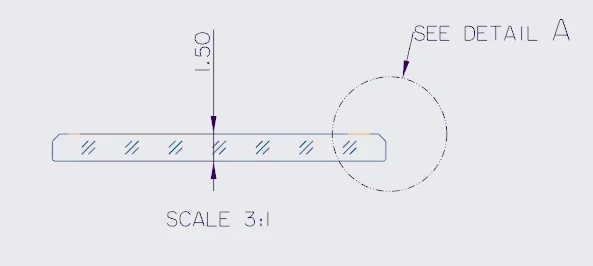
How to remove the attached notes
Hi everyone, I am trying to remove the attach notes from drawing view, anyone knows how to do that.
I tired using ProDtlnoteErase with that it will erase the note until next regeneration.
Please refer the picture (I want to remove the SCALE 3:1 note) and the code.
void glass_drawing_anote::RemoveNotes(void* app_data,
const std::string& target_view,
const std::string& target_note)
{
ProDrawing drawing = (ProDrawing)app_data;
ProError err;
ProDtlnote* p_notes = NULL;
int n_notes = 0;
// Collect all notes
err = ProDrawingDtlnotesCollect(drawing, NULL, PRO_VALUE_UNUSED, &p_notes);
if (err != PRO_TK_NO_ERROR || p_notes == NULL)
return;
ProArraySizeGet((ProArray)p_notes, &n_notes);
for (int i = 0; i < n_notes; i++)
{
ProDtlnotedata note_data = NULL;
if (ProDtlnoteDataGet(&p_notes[i], NULL,
PRODISPMODE_NUMERIC, ¬e_data) != PRO_TK_NO_ERROR || note_data == NULL)
continue;
// Get attachment info
ProDtlattach attach;
if (ProDtlnotedataAttachmentGet(note_data, &attach) != PRO_TK_NO_ERROR)
{
ProDtlnotedataFree(note_data);
continue;
}
ProDtlattachType type;
ProView note_view = NULL;
ProVector location;
ProSelection attach_point;
ProDtlattachGet(attach, &type, ¬e_view, location, &attach_point);
ProDtlattachFree(attach);
if (note_view == NULL)
{
ProDtlnotedataFree(note_data);
continue;
}
// Get view name
ProName view_name;
if (ProDrawingViewNameGet(drawing, note_view, view_name) != PRO_TK_NO_ERROR)
{
ProDtlnotedataFree(note_data);
continue;
}
char view_name_str[PRO_NAME_SIZE];
ProWstringToString(view_name_str, view_name);
// Get note text
std::string note_text = "";
ProDtlnoteline* p_lines = NULL;
if (ProDtlnotedataLinesCollect(note_data, &p_lines) == PRO_TK_NO_ERROR)
{
ProDtlnotetext* p_texts = NULL;
if (ProDtlnotelineTextsCollect(p_lines[0], &p_texts) == PRO_TK_NO_ERROR)
{
ProLine string;
ProDtlnotetextStringGet(p_texts[0], string);
char text_str[PRO_LINE_SIZE];
ProWstringToString(text_str, string);
note_text = std::string(text_str);
ProArrayFree((ProArray*)&p_texts);
}
ProArrayFree((ProArray*)&p_lines);
}
// Match both view and note text
if (std::string(view_name_str) == target_view &&
note_text.find(target_note) != std::string::npos)
{
err = ProDtlnoteErase(&p_notes[i]);
err = ProDtlnotedataDisplayedSet(note_data, PRO_B_FALSE);
if (err == PRO_TK_NO_ERROR)
{
logger::log_info("Removed note in view [" + target_view +
"] with text: " + note_text);
}
else
{
logger::log_info("Failed to remove note in view [" + target_view +
"] with text: " + note_text);
}
}
ProDtlnotedataFree(note_data);
}
ProArrayFree((ProArray*)&p_notes);
int num_sheet;
ProDrawingCurrentSheetGet(drawing, &num_sheet);
ProDwgSheetRegenerate(drawing, num_sheet); // when I regenerate the notes come back, ProDtlNoteRemove is not working for these type of notes.
}