

1-Visitor
May 10, 2016
Solved

How to Use Sweep Blend with what I'm trying to do?

  • May 10, 2016
  • 5 replies
  • 8445 views

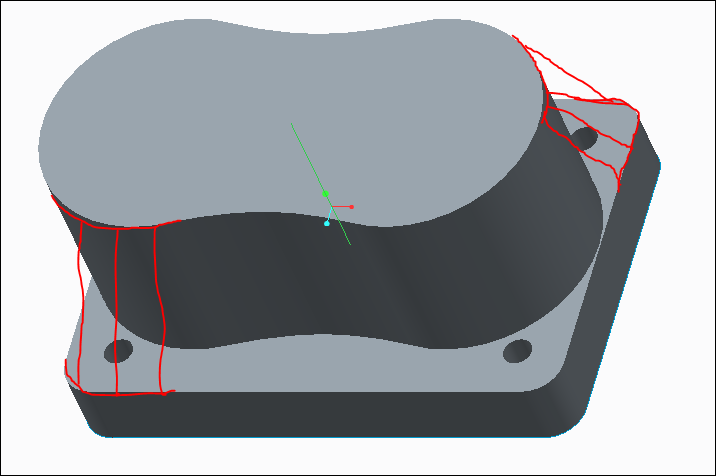
I've been trying to find a way to get the top rectangular edge to blend with the edge of the peanut shape,such that it appears trapezoidal. I'm creating a straight line that vertically intersects the middle of the peanut shape's top plane and the center of the rectangle's top plane. Then I use the project feature in the sketcher to to retrace the rectangle for the first sketch, then for the second sketch i do the same for the peanut shape. However, it won't generate the sweep and I can't figure out how.

Anyone?

This thread is inactive and closed by the PTC Community Management Team. If you would like to provide a reply and re-open this thread, please notify the moderator and reference the thread. You may also use "Start a topic" button to ask a new question. Please be sure to include what version of the PTC product you are using so another community member knowledgeable about your version may be able to assist.
Best answer by manjunathrv

Casey,

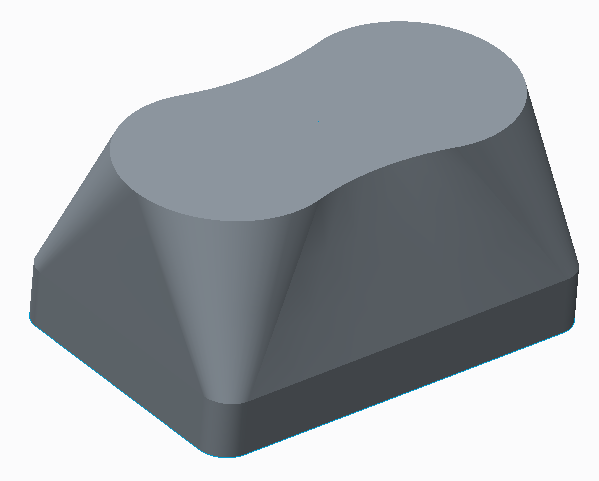
Is this what you are expecting?

5 replies

17-Peridot
May 11, 2016

Casey,

Is this what you are expecting?

cmccarty1-VisitorAuthor
1-Visitor
May 11, 2016

Yes, that's it!  How did you do??

17-Peridot
May 11, 2016

I used swept blend- used your centre curve as main trajectory and the sketched 2 sections using your curves. In the second sketch you need to divide the curve to used as blend vertex.

I will send you the model soon.

1-Visitor
May 11, 2016

Hi, you could try an old school feature called Blend Section to Surface. You will have to search for it, as it is not readily available in the standard Creo toolbars.  See the attached model, it might yield satisfactory results.

John

cmccarty1-VisitorAuthor
1-Visitor
May 11, 2016

I can't seem to find that feature for Creo 2.0. I tried the blend to tangents and can't get that to work either. Also, your file doesn't seem to open.

1-Visitor
May 12, 2016

I attach a similar model in Creo 2 so you can see the feature I describe.

John

21-Topaz II
May 11, 2016

Here's another solution using a Variable Section Sweep.  I created another trajectory (on the bottom) to control the section normal.  It's a simple oval.  The section is a straight line between the two edges.

It produces a slightly different shape:

Capture.JPG

cmccarty1-VisitorAuthor
1-Visitor
May 12, 2016

That looks great, too. Would you be able to share how you did in more detail?

21-Topaz II
May 12, 2016

It's easiest for you to understand if you look at the model, but I'll give it a shot.

For a sweep, Creo needs to know how to position and orient the sketch as it travels along the trajectories.  You need to define the sketch plane normal and the rotation along the trajectory.

For the geometry you have, using either of the two trajectories as the normal  trajectory (sketch plane stays normal to it all along the sweep) creates problems with overlapping geometry,   By creating a third trajectory (a simple oval with the centers aligned with the centers of the peanut shape, see below) that only defines the normal of the sweep, I eliminated the overlapping geometry.

The section is then a straight line between the rectangular trajectory and the peanut trajectory.

Capture.JPG

Capture.JPG

Capture.JPG

12-Amethyst
May 13, 2016

Hi Casey,

Another way is to use Boundary Blend surfaces.

e.g.

Transition.JPG

This allows a lot of control at the expense of a small amount of complexity.

Regards. Brent Drysdale

7-Bedrock
May 13, 2016

e.g.