

Dale_Rosema
23-Emerald III
23-Emerald III
October 27, 2020
Solved

Pattern: Countersink vs Counterbore/Countersink

  • October 27, 2020
  • 3 replies
  • 6334 views

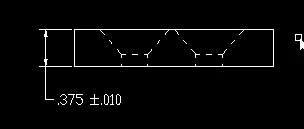
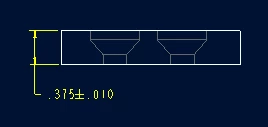
Recently changed a part modeled with a countersink to a countersink with a counter bore. It is a simple part with this feature patterned once. By doing this, though, the pattern is lost. Why would this happen if all of the changes are make within the "Hole" feature for the first hole?
 

Dale_Rosema_0-1603804057957.png


Dale_Rosema_1-1603804072949.png


Best answer by Patriot_1776

I've seen that before.  It seems like if you make any changes to the actual geometry (not just a size change) it creates a completely different feature.  I believe it changes the FID, and everything else.  Bummer!

3 replies

16-Pearl
October 27, 2020

How did you create the feature? Can you attach the part file or show the model tree?

Dale_Rosema
23-Emerald III
23-Emerald III
October 27, 2020

Here is how it was done.

I clicked on the counterbore icon.

I updated the circled values in the chart.

I accepted the change.

The pattern failed.


Dale_Rosema_0-1603810623570.png


16-Pearl
October 27, 2020

I'm wondering if you forgot to change one of these values. I'm guessing they are the same number. If they are, the pattern will fail. The ID of the Cbore needs to be smaller than the OD.


Tdaugherty_0-1603811248175.png


Patriot_1776
22-Sapphire II
October 27, 2020

I've seen that before.  It seems like if you make any changes to the actual geometry (not just a size change) it creates a completely different feature.  I believe it changes the FID, and everything else.  Bummer!

12-Amethyst
October 27, 2020

Try creating a sketch before you create your hole, in the sketch create Datum Points (the ones toward the left of the ribbon not the ones toward the right), set them where you want your holes.


Create your hole, referenced to one of the sketched points.


Pattern the hole, set pattern type to Point (see the pull down) type setting From sketch and select the sketch you made of the points in the model tree.


Tested & works in Creo 6.0.5.1


I'm finding the sketched point approach a more robust way to pattern in those cases where it can be used.


Dale_Rosema
23-Emerald III
23-Emerald III
October 27, 2020

This sounds like a great thing if I was making a complex part. This is simply a anti-marring pad on a fixture and I just want the heads of the flat head much below the surface. I just came across this when modifying the hole from large Csinks to the Cbore/Csinks by the advice of a machinist. Then the pattern failed (on about 6 different parts) and the parts on at least as many risers.

Patriot_1776
22-Sapphire II
October 28, 2020

It sounds like simply making a revolved cut would be more robust for you.  This way, you can change the sketcher section entities, and the only references that COULD fail are any surfaces or edges that disappeared.


I'm not a huge fan of the "hole" command, and this is just one of the reasons.  I may stop using it altogether.


Best of luck!
