
1-Visitor
April 18, 2012
Solved

pdf output incorrect

  • April 18, 2012
  • 2 replies
  • 24636 views

Hello,

We are using Creo Elements/Pro, Release: 5.0, Date Code: M110 and we have a sporadic problem with pdf output of drawings. Several of us in our group have come across some drawings that output the pdf with diagonal lines across the whole sheet. They are not there on the drawing, but export to pdf. The problem is very random and we are unable to find anything common to the drawings it happens to.

Our workaround has been to print to an Adobe pdf printer and then open with Adobe Acrobat Pro and run an OCR to convert the text so we have searchable text in the pdf. Kind of a pain to have to do that.

Anybody else having issues with this? Have you found any solutions?

Her is a partial screenshot of the incorrect output.

Thanks,

Wayne
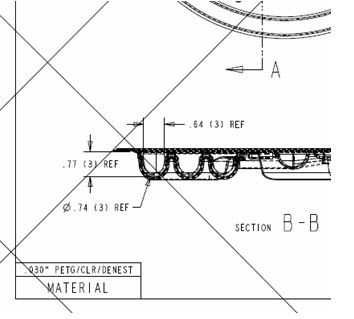
pdf_output.jpg


This thread is inactive and closed by the PTC Community Management Team. If you would like to provide a reply and re-open this thread, please notify the moderator and reference the thread. You may also use "Start a topic" button to ask a new question. Please be sure to include what version of the PTC product you are using so another community member knowledgeable about your version may be able to assist.
Best answer by Bari

Hello,

Try setting config.pro option intf_pdf_use_adaptive_linestyle to no

regards,

António Baridó

2 replies

1-Visitor
July 6, 2012

I am using creo parametric release 1.0 and have come across the same problem. Problem is also random and the drawings do not seem to have any similarities. Any help would be appreciated.

13-Aquamarine
July 6, 2012

Hi Wayne & Stephen...

I have some thoughts but I'm not sure if any of them will offer any help.

First- if you have a simple drawing that exhibits this behavior, if you could zip the drawing, format, and model and upload it for us to work with, that would be a huge help. I understand with proprietary data that may be a tall order- but maybe you could swap out your "real" model for a dummy block just so we have something to work with.

Here's some ideas:

  • Check the PDF Resolution in the properties window. I've experienced occasional odd behavior on PDF's wset to 600 DPI resolution. Changing back to 300 DPI usually fixes the issues.
  • Try a 3rd party freeware PDF printer like CutePDF. This PDF printer installs just like an Adobe PDF printer. See if you're having the same bad results using the freeware. If so, maybe we're seeing a problem within Creo/ProE. If not, I'd assume we're seeing a problem with PDF or the ProE-To-PDF conversion.
  • Do you get the same bad output no matter what method you use to print to PDF? There are at least 5 methods I can think of to create a PDF:
    • Print Directly to PDF using the embedded PDF printing icons in Creo/ProE
    • Export to PDF (Wildfire 5, Creo1 & 2) from the Publish tab.
    • Print to a custom plot file created just for PDFs (using the .pcf plot file)
    • Print to the MS Printer Manager and then select Adobe PDF as the printer
    • Print to a PostScript file then open the .ps file in Adobe Pro (which can convert the .ps to a PDF)
  • Try setting the Quality (found in the Model tab) in the Printer Configuration settings box to 0. Typically this is set to "3 (Complex Overlap Check)" Setting this option to "0" is an old trick to speed up the print/plot process. Sometimes it has the added benefit of removing weird artifacts from the final print.

Sorry I don't have more to offer. Maybe we'll get lucky and we can either isolate the artifacts to a specific print method or to a specific print setting.

Good luck!

-Brian

1-Visitor
July 9, 2012

I went to create a dummy model and drawing so I took the offending model and did a save copy so I could edit the geometry but before I did for the heck of I exported the drawing as with new name as a pdf and the lines were no longer there. I then did another save copy and named it the original file name and exported as pdf again and the lines were gone.

Not really sure why it worked but doing a save a copy as a different name then doing a save copy back to the original name seemed to fix the problem.

13-Aquamarine
July 9, 2012

That's completely odd! But I'm glad it worked. We've had a few strange PDF artifacts but never ones like you saw on the previous drawing. Hopefully it was a one-time issue that never crops up again.

Take care..

-Brian