
11-Garnet
March 3, 2022
Solved

Creo Illustrate - Workflow for Updating SBOM?

  • March 3, 2022
  • 2 replies
  • 6118 views

May anyone please provide a recommended workflow for updating SBOM?
Currently we import PVZ files into Creo Illustrate to produce operation steps and associated graphics and annotations.

This works very well until we receive a new updated PVZ.

When the new updated PVZ is imported, many of the links break requiring graphics and annotations to be rebuild.

For example, importing an updated PVZ where a sub-assembly has a new revision results in broken links and requires all graphics and annotations for each operation to be rebuild.
Best answer by agarland

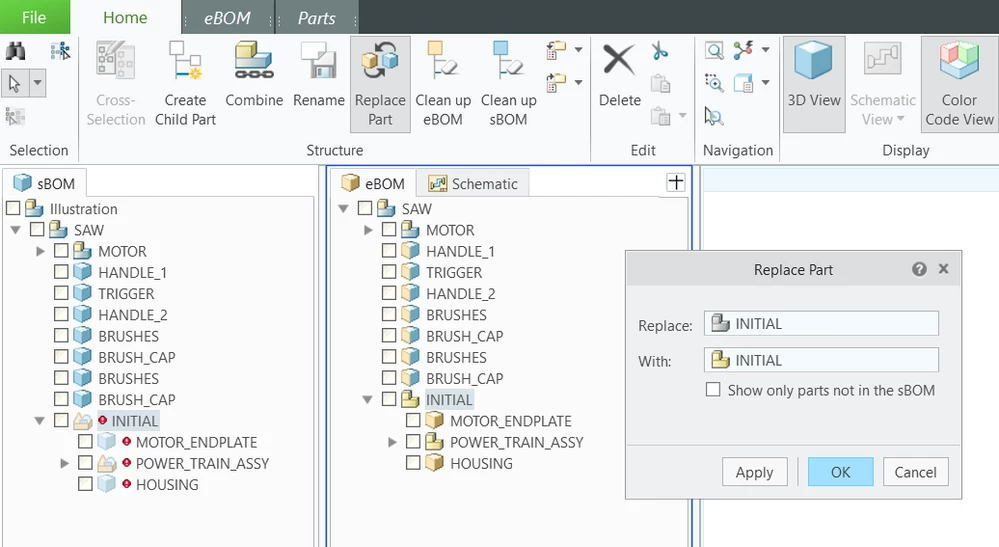
I would recommend using the 'Replace Part' option in structure edit mode.

Replace Part.png

Select the parent node with the missing link in the sBOM, then click on Replace Part in the ribbon.

Then simply select the replacement part in the eBOM and hit Apply.

This should replace the parent and child nodes, depending on what exactly has changed of course.


Hope this helps.

2 replies

16-Pearl
March 4, 2022

Hi,


Could you give a little more detail on your workflow, ie; are you using the 'Link' option when importing the source data?

Are you working in a Windchill environment?

Also is it only the children of an updated .asm part that are marked as missing link and is that asm the top node?

This may help us understand what is happening a little better.


Thanks

MaxR11-GarnetAuthor
11-Garnet
March 4, 2022

Thanks for looking into this, Agarland!


> are you using the 'Link' option when importing the source data?

   Yes. We are using the Link option when importing. We are not really concerned whether this is a manual or auto update of the links. What we are concerned about is the graphics for operations break if this link is broken.


> Are you working in a Windchill environment?

  Nahh... that would be too easy.


> is it only the children of an updated .asm part that are marked as missing link and is that asm the top node?

  It is NOT the top assembly. We bring in a top assembly that has a revised sub-assembly. All links to components in the revised sub-assembly break.

agarland16-PearlAnswer
16-Pearl
March 7, 2022

I would recommend using the 'Replace Part' option in structure edit mode.

Replace Part.png

Select the parent node with the missing link in the sBOM, then click on Replace Part in the ribbon.

Then simply select the replacement part in the eBOM and hit Apply.

This should replace the parent and child nodes, depending on what exactly has changed of course.


Hope this helps.

March 4, 2022

Contains a list of <pair> tags, each <pair> defines a part replacement.
Each <pair> includes exactly one <oldsbom> tag followed by exactly one <newebom> tag.
<oldsbom>
Contains an sbomidpath attribute that defines the idpath to the sBOM instance to replace its eBOM part.
Example:
<oldsbom sbomidpath="/3/0/10"/>
<newebom>

MaxR11-GarnetAuthor
11-Garnet
March 4, 2022

hi @unknown , I don't understand.

March 7, 2022

@MaxR wrote:

hi @unknown , I don't understand.


I will tell you in details check your PC.


Dunkin Runs on You