
11-Garnet
October 25, 2022
Solved

Creo View Rep not showing date in correct format

  • October 25, 2022
  • 2 replies
  • 2958 views

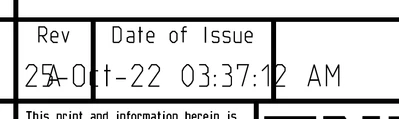
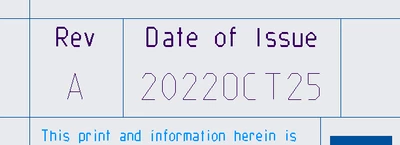
We recently updated our drawing formats to show a date of issue, as well as the date of the revision. The problem I'm now running into is when the updated representation is created for Creo View, the date in the title block is showing the *entire* date, but the view in Creo shows the correct format. I've tried republishing several times, but keep getting the same result.


This is what I'm seeing when a new representation is created in Windchill.
longdate.png


This is what is shown in Creo, and what we're hoping to see in Creo View.
correctdate.png

Best answer by Shaun_Hughes

So apparently it was just a glitch in the visualizer when a part is Under Review. After the promotion process completed, and the system updated with a proper representation with a "Production" watermark per policy, the date updated properly.


Thanks for the help!

2 replies

23-Emerald III
October 25, 2022

Where are you pulling the dates from and what formatting are you applying to dates?

If pulling from Windchill, how are you reformatting the date?

There is a config.pro setting for date format. Is it the same on your workstation and the publishing machine?


11-Garnet
October 25, 2022

The dates are pulling from the model, and the formatting is supposed to be pulling from Creo. As part of our updates, I've had users modify their config.pro to properly format things, using 


date_type_parameter_format %yyyy%MMM%dd
todays_date_note_format %yyyy%MMM%dd


The "todays_date" is formatted properly, and appears to be working just fine. I thought I had updated the publishing machine configs as well after it was brought to my attention

11-Garnet
October 25, 2022

I've also updated the config.pro in both the Creo install and Creo View folders on the publishing server. Doesn't change anything.

Shaun_Hughes11-GarnetAuthorAnswer
11-Garnet
October 27, 2022

So apparently it was just a glitch in the visualizer when a part is Under Review. After the promotion process completed, and the system updated with a proper representation with a "Production" watermark per policy, the date updated properly.


Thanks for the help!