

Solved
How to change the sequence or step speed(fps) in Creo Illustrate for publishing in Vuforia Studio?
Dear PTC community,
Please, advise how I can change the fps speed for the already-done sequence. My current sequence is too slow and I want it to play 2xfaster.
I see that there is an option to play it faster within the Creo Illustrate:
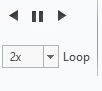
I know that I can manually shrink the length of each step or if necessary shrink each effect duration: it takes too long for 10 sequences.(20 steps each).
But I don't know how to set 2x speed for fps for publishing pvz and c3di Vuforia Studio. Please advise any solution,