
14-Alexandrite
September 26, 2023
Solved

how to show item number in creo view?

  • September 26, 2023
  • 1 reply
  • 1824 views

Hello, Would anyone know how to show the part number in the creo view,


My creo view only show filename and vision number (I open the view from windchill web page).
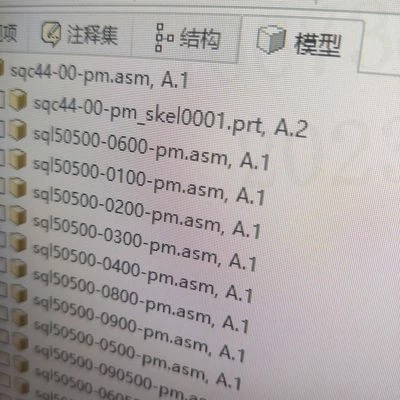
16957341909473738221119494832566.jpg

Most time I need the item number to check the ERP information,

But now, I need back to Windchill web page check item number first.

Is there any option for me can select show the inforamtion?


Best answer by vdegaonkar

You can configure attribute columns in Creo View referring which will display attributes associated with attribute of each component. Ideally you part number shall be part of attribute in for each component which you can also view in Attribute panel in Creo View.


Refer To Configure Attribute Columns in the Structure Tree Display (ptc.com) for more details

1 reply

15-Moonstone
September 27, 2023

You can configure attribute columns in Creo View referring which will display attributes associated with attribute of each component. Ideally you part number shall be part of attribute in for each component which you can also view in Attribute panel in Creo View.


Refer To Configure Attribute Columns in the Structure Tree Display (ptc.com) for more details

Sulibo14-AlexandriteAuthor
14-Alexandrite
September 28, 2023

@vdegaonkar  Thanks very much, That is what i was looking for!😀