
4-Participant
March 16, 2022
Solved

Stacked Callouts Auto-Convert to Single Line

  • March 16, 2022
  • 1 reply
  • 2680 views

Any stacked callouts I create in Illustrate are converted to a single line when I export to IDR, CGM, and SVG. Also seems like the font weight is reduced and line weight is even slightly lower. Anyone else run into this or are there export options somewhere I can edit?


Stacked callouts in Illustrate are created in the callout properties dialog using carriage returns after each line. SVG rendering is consistent between Edge, Firefox, Chrome, IsoDraw, and Adobe Illustrator.
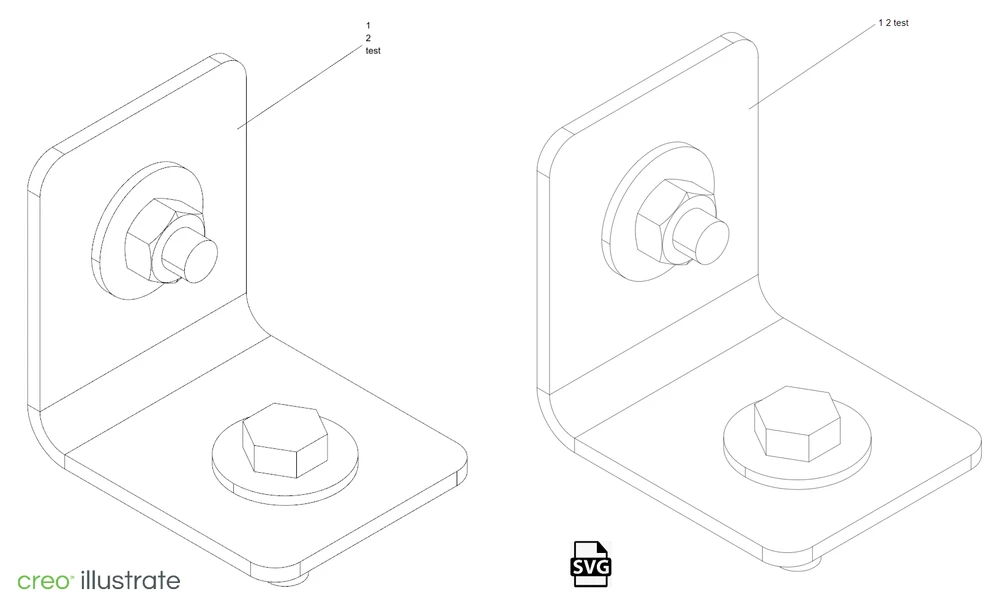
 

image.png

Best answer by agarland

I'm afraid that does look like a bug, please contact tech support and ask them to log a bug for both issues.

"Open a Support Case":  https://support.ptc.com/apps/case_logger_viewer/cs/auth/ssl/log 


Depending on whether you need hotspots or item list entries or not (& I'm guessing you do) one workaround is to use a note with leader.

That does export cleanly.

1 reply

24-Ruby III
March 16, 2022

 Hi,


What version of Creo Illustrate are you using?

JKnoll4-ParticipantAuthor
4-Participant
March 16, 2022

Hi,

I'm using Illustrate 8.0.0.0

16-Pearl
March 16, 2022

Can you give some more detail on how you are creating the callout?

I have not heard of this issue before and am unable to reproduce it.