1-Visitor
June 3, 2022
Solved

Visibility control of callouts and notes in Creo Illustrate 7.0?

  • June 3, 2022
  • 1 reply
  • 2749 views

Is there a way to control visibility of callouts and notes in Creo Illustrate 7.0?

Best answer by agarland

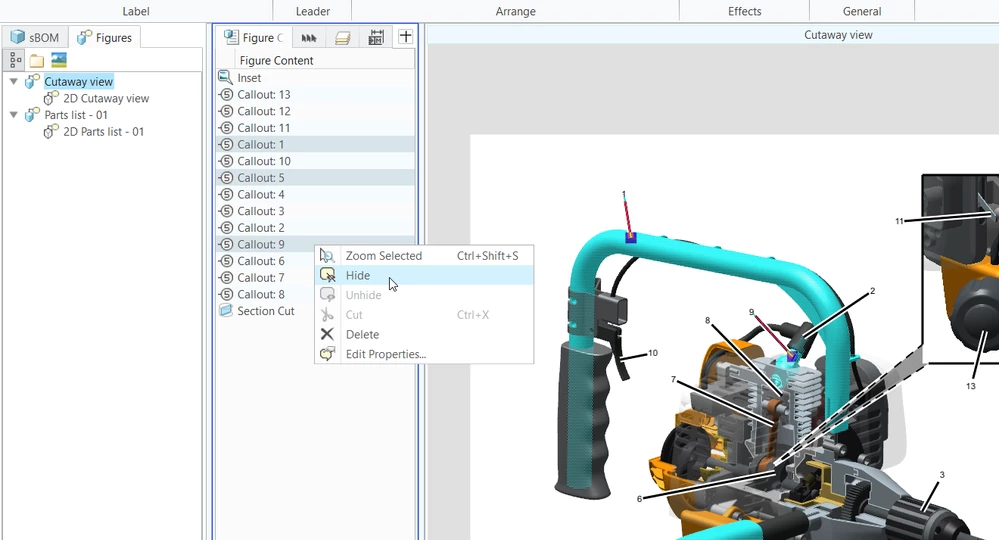
All figure content including callouts and notes are listed in the figure content tab of the upper data panel.

Right clicking on any item will give you a menu with options to show/hide/delete etc.
Hide callouts.png

1 reply

agarland16-PearlAnswer
16-Pearl
June 6, 2022

All figure content including callouts and notes are listed in the figure content tab of the upper data panel.

Right clicking on any item will give you a menu with options to show/hide/delete etc.

Hide callouts.png

1-Visitor
June 6, 2022
Thank you for your help. I was not clear on my question. How do you change the visibility through the animation timeline for callouts and notes?
I want to identify the objects at certain times in an animation and not all of the time. I presume It can't be done, because Record Content button is greyed out.
Thank you.
16-Pearl
June 6, 2022

Yes, hiding a callout or unhiding while record content is active will add a visibility track to the timeline.

If the record content button is disabled, this is unrelated to the callouts.

Is it an animation or a sequence you are creating?

If it's a sequence, Record Content is disabled for the initial step which is really a thumbnail showing the state of the content at the start of the sequence.

I generally use that initial step/thumbnail to hide all annotations I don't want to see at the start, then unhide them in the relevant step.