1-Visitor
April 16, 2019
Solved

Crankshaft analysis with varying loads

  • April 16, 2019
  • 4 replies
  • 14822 views

I'm trying to set up a design study where I rotate a crankshaft and the load vectors and magnitudes vary based on the rotation angle.  I was told I could create a user parameter, which is the angle, and then link the load values and/or directions to the angle parameter using relations. So when the angle value changes, the loads change accordingly.


Can someone show me how I would write a relation like that?

or

Does someone have another way to do this?


Currently the crankshaft is an assembly file where the load vector is defined with a coordinate system.  So when the assembly angle (crankshaft angle) is changed the csys changes to apply the bearing load at the correct vector.
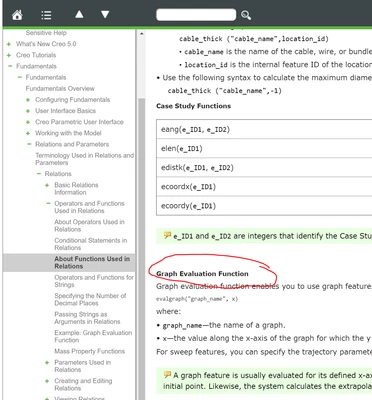
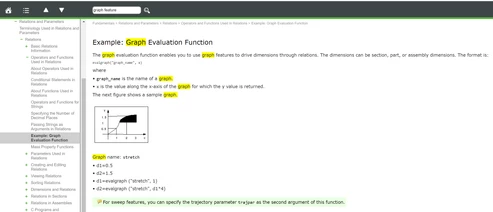
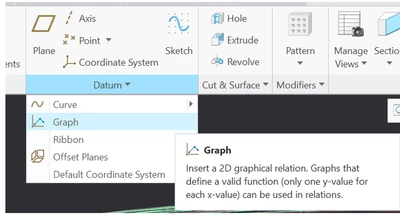
Best answer by SweetPeasHub

USe_Graph_eval.PNGExample.PNG


Graph datum.PNG


4 replies

12-Amethyst
April 16, 2019

First create the parameter to hold the load value. (Tools Parameters - + )

Create User ParameterCreate User Parameter

Then show the angle dimension before entering Tools - relations so you can pick the dimension.

Then Tools-relations.  the angle dimension I have is d4696 but yours will be a different ID.  My example uses a cosine function.  Replace that with the function you need.


Define relation for load varianceDefine relation for load variance

Regenerate the model

Verify Parameter is now driven by a relation and locked.  Tools - parameters


Verify parameter is driven by relationVerify parameter is driven by relation


Now use the parameter by just entering its name in the load magnitude box.


Assign the Load with the parameter.Assign the Load with the parameter.


The design study would then as it varies the angle dimension, automatically update the load magnitude due to the relation and the parameter connection.

17-Peridot
April 16, 2019

Oops. that reply was me incorrectly using my other log-in.

RCorley1-VisitorAuthor
1-Visitor
April 16, 2019

Thank you.  I think that's a good start.  But what if my function is more complicated than sin/cos?  Can I input a table?  This is my input torque curve, for example.


2019-04-16 15_03_22-Clipboard.png


16-Pearl
April 16, 2019

Is your study a Simulate analysis or an MDO analysis? There are different approaches based on what tool you're using and what you ultimately would like to understand.

RCorley1-VisitorAuthor
1-Visitor
April 16, 2019

It's a simulate analysis.  I've created measures in the crankpin fillets.  I'm trying to map the max principal stress through a full rotation.  Troubleshooting fatigue failures.

17-Peridot
April 16, 2019

No problem.  I'm glad to help.  The hard part is knowing what words to search by, so that is why I didn't just say - "look in the help".  Also, note you can drive relations by a c program.  That is in help too.  I have never done that, but I would love to come up with a reason to try it. 🙂

17-Peridot
April 17, 2019

Hi, could you post the assembly and/or some pics?

6-Contributor
March 16, 2026

Why wouldn't you just simulate the whole engine in CREO MDO? 


Build the motion assembly and then drive the pistons with the combustion force?


Output the MDO files into CREO Simulate