

1-Visitor
August 2, 2013
Question

Constraint Bugbear

  • August 2, 2013
  • 3 replies
  • 4734 views

hi guys,

can anyone tell me if there is a way to get around this issue im having because its driving me nuts,
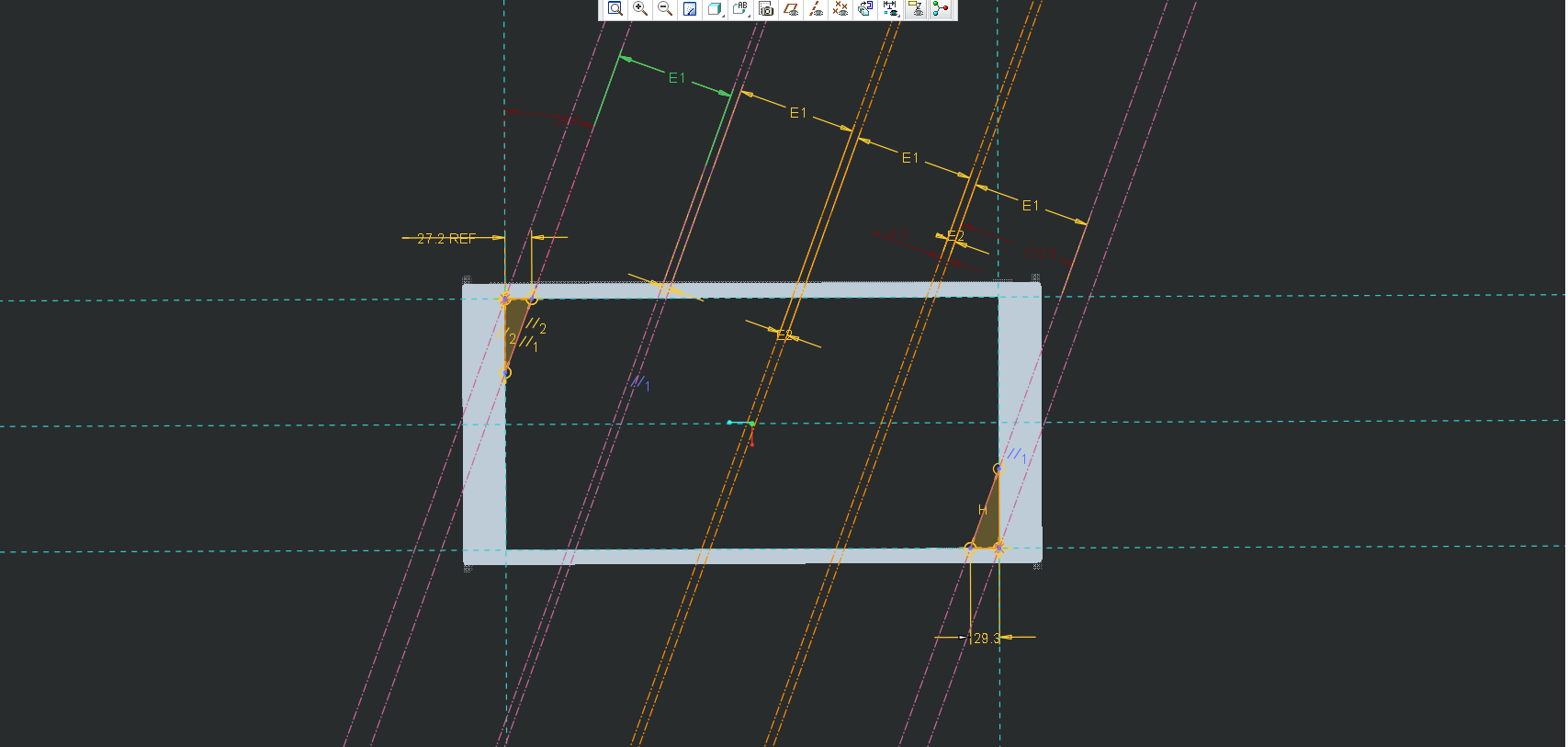
EQL_CONSTRAINT.png

ok so it should be simple. I’ve got a spacing of 120 with a 8mm gap between them, (these are constant)

there are 2 triangles in the bottom and top, all i want to do is make an equals constraint that states that 29.3 and 27.2 are in actual act the same number, I don’t even care what that number is,

Yes I know I can:

* draw line perpendicular to the inclined line from one corner

*draw a parallel line from the adjacent corner,

*sketch a reference line find the centre point,

*draw a perpendicular line and then

*set up a symmetrical constraint

Blah Blah Blah,

Or i could go into relations

*make some trig calcs

*set up a relation that equals half of the hypotenuse and

*define a centre line

*and offset the bars from there.

But that all takes way longer than something that should be so simple, and as we all know time is money.

so anyone got an idea?

    3 replies

    1-Visitor
    August 2, 2013

    ok i tried something elce as well and it faild at math horribly

    i went in to relations and said

    d1 = (d1+rd2)/2

    where d1 = the 29mm dim

    and rd2 = the ref dim

    relations ok'd it, and when i regened it the numberes cycled through some variables( which i have never seen before) and in the end it stoped with 2 un equil numbers, probbily got stuck in an infinite loop and stoped it

    so ill probbibly ad a ref dim that is

    total lg

    and then go

    d1 = (t_length-((e1*4)+(e2*3)))/2, still this is taking way too long for something so simple

    1-Visitor
    August 2, 2013


    well+that+worked.jpg

    yup that worked........ still anyone with a better system please tell me

    17-Peridot
    August 2, 2013

    I tend to use a lot of constructions circles with equal diameter and tangent constraints. In your case, I can see 3 different size circles each dimensioned to manage the desired result.

    13-Aquamarine
    August 2, 2013

    It looks like your dimensions 29.3 and 27.2 are actually each dimensioning the length of a line entity... can't you just set an equal length constraint on those two lines?

    Or am I missing something else?

    23-Emerald IV
    August 2, 2013

    Your sketch is over constrained. By constraining the outer construction lines to the corners of the rectangle, you can't control both the 8, the 120, and the 29.3. Something has to give.

    1.) Temporarily delete the corner constraint.

    2.) Dimension the distance between each outer set of construction lines.

    3.) Set these two dimensions equal to each other.

    4.) Delete the remaining outer dimension. The two outer sets should still be equal to each other, but no dimension.

    5.) Re-constrain the corner back to the line.

    1.PNG

    2.PNG

    3.PNG

    4.PNG

    17-Peridot
    August 2, 2013

    This is where you would use the equal diameter construction circles. Center the vertex of the rectangle and tangent to the outside line. This way, you didn't dimension it, but whatever the radius, they are equal.

    Otherwise yes, it would be over constrained because the equal dimensions are after all, still dimensions.

    Can you make reference dimensions equal?

    23-Emerald IV
    August 2, 2013

    The equal diameters are really no different than equal dimensions. The issue in this case is that he can't create the two dimensions (in order to later set them both equal) because doing so will overconstrain the sketch. By temporarily freeing up some other part of the sketch (like the corner constraint), the dimensions can be created and set equal, then the extra dimension deleted and the corner reconstrained. And no, you can't set reference dimensions equal to each other.