

1-Visitor
October 30, 2013
Solved

Creating a wool-like fabric in creo 2.0

  • October 30, 2013
  • 2 replies
  • 6119 views

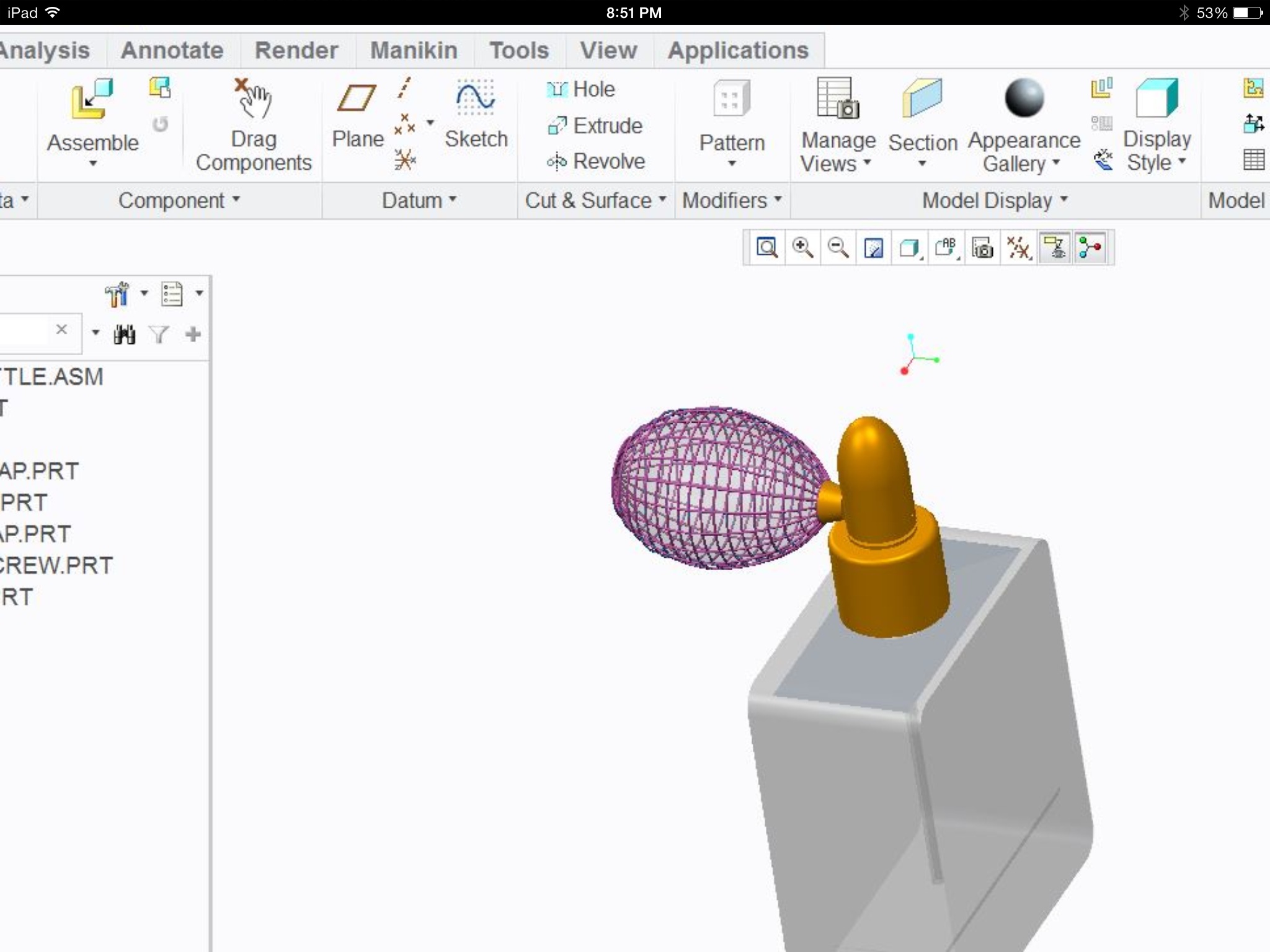
Hi im still very new to pro e and am having troubles creating a wool like atomizer (thats used for perfume bottles) for my final project that may or may not be due tomorrow I have the overall shape of it but its completely solid. i hopefully uploaded a picture of what im trying to create. Can anyone help me?
    Best answer by anwodu

    image.jpg

    yes thats pretty much exactly what i did with great difficulty

    1. sweep: draw outline of 1 vertical stitch.

    2. pattern: about axis ( could only take about15 without crashing)

    3. sweep: (manually) horizontal stitches guestimating the values

    heres my finish product: it would be better if i had more than 1 day to learn/finish it

    2 replies

    17-Peridot
    October 30, 2013

    Oh my... that can be a challenge if you mean to try to weave the fabric in true 3D.

    For the most part, people tend to make textures that closely resemble these objects for renderings. Otherwise it is simply a rubber bulb with covering.

    you can make your own textures for the appearance manager. You can even make the image have 3D texture in the rendering module by specifying a "BUMP" file.

    You are not going to master this overnight.

    If you do insist on a 3D feature to mimic the weave of the wool... also look into pattering a feature by mapping it onto a surface. It will be interesting to see what you come up with.

    anwodu1-VisitorAuthor
    1-Visitor
    October 30, 2013

    I was just thinking of doing a pattern of a sweep i made thats is the shape of the atomizer but i cant select the center axis/datum plane for some reason. I actually noticed other discussions about this issue as well.

    17-Peridot
    October 30, 2013

    You might need to make sure the references you used for the sweep can be patterened. Sometimes the pattern requires you to group all the related features and -then- pattern the group.

    The most popular patterning feature for "textures" is the FILL option. Very powerful and reasonably forgiving. You can map features normal to the surface which is what makes it powerful.

    And yes, Patterns have a few bugs. I know of one that won't be fixed until M090 although it worked in M020.

    Good luck... would really like to see what you end up with.

    anwodu1-VisitorAuthorAnswer
    1-Visitor
    November 1, 2013

    image.jpg

    yes thats pretty much exactly what i did with great difficulty

    1. sweep: draw outline of 1 vertical stitch.

    2. pattern: about axis ( could only take about15 without crashing)

    3. sweep: (manually) horizontal stitches guestimating the values

    heres my finish product: it would be better if i had more than 1 day to learn/finish it

    17-Peridot
    November 1, 2013

    Very nice!