1-Visitor
March 31, 2016
Question

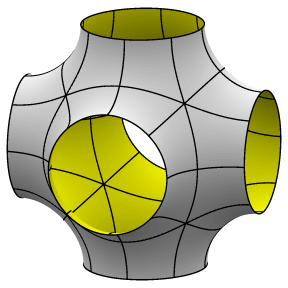
Does anybody know how to create this model ?

  • March 31, 2016
  • 10 replies
  • 8185 views

I want to create the attached model. Pls help !!

....

Mani. p surface.gif
    10 replies

    12-Amethyst
    March 31, 2016

    My quick stab at it.

    I used extrusions, rounds, then shelled.

    I'm sure there are many other ways to tackle this, here is one.

    Ron

    1-Visitor
    March 31, 2016

    I'm going to assume you want it to be nice smooth transitions.....so, a day in ISDX or 5 minutes in T-Slpines for Rhino - a very cheap CAD program where third parties make very useful plugins - and export a STEP file to Creo.

    Put t-Splines as a search into youtube and see what comes up.

    I wish Creo could do it easily, I was hoping T-Splines would make a Creo plugin at some point in the last 5 years, but guess either Creo won't let them or its not financially viable as most Creo users don't care much about the surface quality.

    Cheers

    Stephen

    23-Emerald III
    March 31, 2016

    I used curves and the style feature to create a surface model.

    1-Visitor
    March 31, 2016

    I would say yours is the best so far -assuming that the requirement was for circular apertures.....the middle of the surfaces are not that great though when you analise with reflections, but probably good enough for the part Mani needs. I think that is just what happens with N sided surfaces in Style / ISDXsurface_relections.JPG

    23-Emerald III
    March 31, 2016

    I was surprised how good it came out on the first try.

    14-Alexandrite
    March 31, 2016

    If the surface quality is important, you can use the freestyle tool. However, you can find problems to set the exact diameter due the lack of control.

    17-Peridot
    March 31, 2016

    I was thinking in this direction as well.  The nice thing about Creo 3 is that you can merge the freeform to existing geometry.

    This means you can manage the diameter and even the location of the join from the origin.

    I have also come to trust skeletons (simple curve geometry) to guide the freeform scaling.

    Keeping things symmetrical is the biggest hurdle.  The scale feature is most useful.

    17-Peridot
    March 31, 2016

    Mani, do you have the export file (step or iges) of the original? that you can attach?  Use the advanced editor.

    1-Visitor
    April 1, 2016

    No I don't have the original model. I have only pic. . !!

    21-Topaz II
    March 31, 2016

    I used the N-Sided patch tool which worked quite well, actually.  I was surprised, I've not had a lt of luck with it.

    Capture.JPG

    I assumed that the part was symmetric but that the outlets weren't all the same diameter nor the same offset.  Outlets on each axis can be changed independently and the offsets can as well.  Part is pretty flexible, but the shape gets a little odd at extremes.

    Creo 3 part attached.

    17-Peridot
    March 31, 2016

    I've never had much luck with that feature either.  Your's is a really nice solution.

    1-Visitor
    April 1, 2016

    Thanks everyone !!! It help's me a lot.

    21-Topaz II
    April 4, 2016

    I started down this path too, but I couldn't get Creo to make all the individual boundary blends and make them tangent.  Were you able to do so?

    17-Peridot
    April 4, 2016

    Doug; under the tabs in the dialog, there is a place you can set the state of the edges.  You get free, normal, tangent and curvature.

    You can also click on the white bubble with the black dots in the graphics window.  In the dialog, you can set of change the feature you want Normal, tangency, or curvature from.

    And you can also assign you own connecting points.  Boundary blend is simply full of little Easter eggs.

    21-Topaz II
    April 4, 2016

    I'm familiar with the controls, what I meant was that when I set them to be either tangent to the adjacent surface or normal to the plane the curve was sketched on, Creo refused to build them  Some of them refused to build at all because it said the corners were not joined, even though the curves were defined as aligned to one another.  Thinking about it again, I believe I was using normal to the sketch plane and that wasn't necessarily true, since I wasn't building a fully symmetric part.

    Unfortunately, I didn't save that version with the additional curves.  Maybe I'll go back to the one I built with the N-sided patch and try again if I have time.

    1-Visitor
    April 6, 2016

    style.jpg

    Style feature works as well.

    Three sketches, one style feature then mirrors.


    17-Peridot
    April 7, 2016

    @ Steve

    Now that I've played with this method, how did you determine the diagonal section parameters.

    That 3 way union radial distance isn't defined unless you start with a sphere.

    21-Topaz II
    April 7, 2016

    I'm not sure how Steven did it, but you can find my model with all the curves a couple of posts above:

    Re: Does anybody know how to create this model ?

    17-Peridot
    April 7, 2016

    The N-Sided surface is very nice when defining the periphery as one surface.

    That section through the diagonal can be defined in many different ways but in general, it becomes a very critical junction - IF - you're going to try to define it.

    I am not sure if Steve did define this and if so, using what type of feature.

    Technically, I would try to specify the spherical radius for the 8 "points" of intersection.  However, it is very easy to define a really crummy surface regardless of tangency or continuity.
