1-Visitor
December 14, 2021
Solved

15 units rounding rule.

  • December 14, 2021
  • 2 replies
  • 8204 views

Can i somehow round my answers with 15 units rounding rule with mathcad prime 7?

What functions i have to use to do that if its able to do?

Best answer by Werner_E

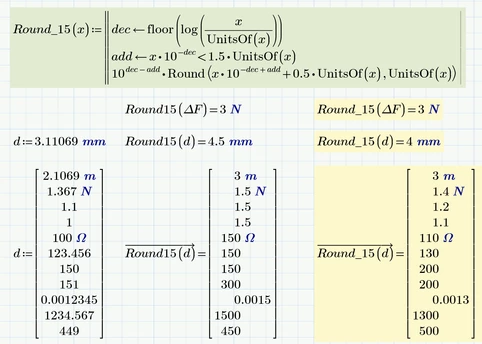
So here is a quick hack, a new function "Round_15" which seems to to what you are asking for.

Werner_E_1-1639529573616.png


I could not use "Ceil" (see "Round_15_(..) in the attached sheet) because this function would not round 1,0 up to 2. So I had to use the old method of adding 0.5 and using the normal "Round" function.

The function has no error checking, so don't feed it with arguments <=0 😉
i have the feeling that this function can be written much more compact and elegant, but...


Prime 6 sheet attached

2 replies

23-Emerald V
December 14, 2021

@TT_10147243 wrote:

Can i somehow round my answers with 15 units rounding rule with mathcad prime 7?

What functions i have to use to do that if its able to do?


Yes, Mathcad Prime 7 has a set of rounding and truncation functions.  They are describe in this link,


https://support.ptc.com/help/mathcad/r7.0/en/index.html#page/PTC_Mathcad_Help%2Ftruncation_and_rounding_functions.html


Examples are given in:


https://support.ptc.com/help/mathcad/r7.0/en/index.html#page/PTC_Mathcad_Help%2Fexample_truncation_and_roundoff_functions.html%23wwID0EIJZEB


If you just wish to display n places without affecting the value that Mathcad stores, then use the Display Precision dropdown menu in the Math Format tab.  The default display precision is 3 decimal places, but it can be set to 15 dp.


Stuart

1-Visitor
December 14, 2021

Thanks for those but i didnt found answer to my task. I have to get mathcad round my error estimate with 15 digit rule.

Like if i have Î”F=2.1069 when its rounded its 3. 15 doesnt fit to 2, 15 fits in 21 then one number back and round upwards to 3

And if Î”F=1.4678 its 1.5.   15 doesnt fit to 1, doesnt fit to 14, fits in 146 one number back and round upwards to 1.5

I know how to do it on paper but how i can get mathcad to do it :DD

25-Diamond I
December 14, 2021

Would this do the job?

Werner_E_0-1639518793642.png

Or are you rather looking for a custom function like

Werner_E_1-1639519443814.png

What should 1 be "rounded" to?

Werner_E_2-1639519607026.png


23-Emerald IV
December 15, 2021

Searching on internet for the '15 unit rule' brings me:

https://www.jyu.fi/science/en/physics/studies/student-laboratory/rules-for-presenting-the-measured-value-and-the-uncertainty

(I have a hard time understanding that English, some sentences don't appear correct) and

http://en.opasnet.org/w/Fifteen-unit_rule_for_rounding_numerical_results

From what I read in both sources, you can only apply the rule to a number WITH a given measure of accuracy/uncertainty. If not, it would be really foolish to round 2.1064 to 3. E.g. if the uncertainty in it would be 0.00004.


Success!
Luc

25-Diamond I
December 15, 2021

@LucMeekes wrote:

Searching on internet for the '15 unit rule' brings me:

https://www.jyu.fi/science/en/physics/studies/student-laboratory/rules-for-presenting-the-measured-value-and-the-uncertainty

(I have a hard time understanding that English, some sentences don't appear correct) and

http://en.opasnet.org/w/Fifteen-unit_rule_for_rounding_numerical_results

From what I read in both sources, you can only apply the rule to a number WITH a given measure of accuracy/uncertainty. If not, it would be really foolish to round 2.1064 to 3. E.g. if the uncertainty in it would be 0.00004.


Success!
Luc


As I understand it, it is just the uncertainty which is rounded that way, not the main, average value.

Its interesting that this kind of rounding seems to only appear in Finnish sources. I had not heard of it until now (which actually does not mean anything, of course).